
If you run a travel agency, you already know the biggest challenges:
- Leads are coming in, but no fast follow-up
- Missed booking opportunities
- Too many manual processes
- Difficulty keeping track of clients and trips
👉 And the truth is, most of these problems come from not having the right system in place.
That’s where GoHighLevel for Travel Agencies comes in.
Instead of juggling multiple tools for:
- emails
- bookings
- follow-ups
- and customer management
GoHighLevel gives you one platform to manage everything.
From capturing travel inquiries to sending automated follow-ups and confirming bookings, it helps you run your agency more efficiently – and close more deals.
⚡ TL;DR
- GoHighLevel helps travel agencies manage leads, automate follow-ups, and increase bookings
- You can capture inquiries, nurture prospects, and convert them into paying travelers automatically
- Built-in tools include CRM, funnels, email/SMS automation, and booking systems
- It’s best suited for agencies that want to scale and reduce manual work
👉 Bottom line: If you want to stop losing leads and start automating your booking process, GoHighLevel is a powerful solution.
Why Travel Agencies Need GoHighLevel
Running a travel agency isn’t just about booking trips – it’s about managing leads, following up quickly, and delivering a smooth customer experience.
The problem is, most agencies rely on scattered tools and manual processes, which leads to:
- Slow response times to inquiries
- Lost leads that never get followed up
- Disorganized client and trip details
- Missed opportunities for repeat bookings
👉 That’s exactly where GoHighLevel makes a difference.
🚀 You Capture and Respond to Leads Instantly
Travel inquiries are time-sensitive.
If someone asks about a vacation package and doesn’t hear back quickly, they’ll move on.
With GoHighLevel, you can:
- Capture leads through forms and landing pages
- Send instant SMS or email responses
- Automatically assign leads to your pipeline
👉 You stop losing potential bookings due to slow follow-ups.
⚡ You Automate Follow-Ups and Nurturing
Most travel bookings don’t happen instantly.
People compare options, ask questions, and take time to decide.
GoHighLevel helps you:
- Send automated follow-up messages
- Nurture leads with travel offers and updates
- Remind prospects about unfinished bookings
👉 This keeps your agency top of mind until they’re ready to book.
📊 You Organize Clients and Trips in One Place
Instead of tracking clients manually, you can:
- Store all traveler information in one CRM
- Track trip status (inquiry → quote → booked → completed)
- Manage repeat customers easily
👉 This gives you better control over your entire booking process.
📅 You Simplify Travel Consultations and Bookings
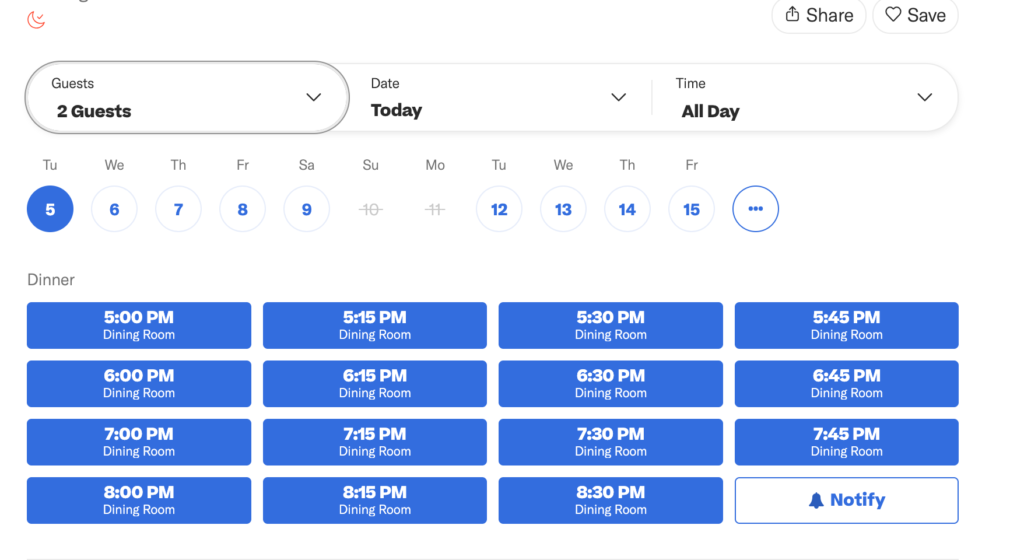
Many clients want to speak before booking.
With GoHighLevel, you can:
- Let clients book consultations online
- Send automated reminders
- Reduce no-shows
👉 This makes your booking process smoother and more professional.
💰 You Increase Bookings and Revenue
When your system is organized and automated:
- You respond faster
- You follow up consistently
- You convert more leads
👉 The result is simple: more bookings and higher revenue.
🔁 You Build Long-Term Customer Relationships
Travel is a repeat business.
With GoHighLevel, you can:
- Stay in touch with past clients
- Send seasonal offers and travel deals
- Encourage repeat bookings
👉 This helps you turn one-time customers into loyal travelers.
🧠 The Bottom Line
If your travel agency depends on leads, follow-ups, and customer relationships, then GoHighLevel gives you the system to manage everything efficiently.
👉 Instead of working harder, you build a system that works for you.
Setting Up GoHighLevel for Your Travel Agency
Getting started with GoHighLevel is straightforward – but setting it up the right way is what helps you capture more leads and automate bookings effectively.
Follow these steps to build a solid foundation for your travel agency.
Step 1: GoHighLevel Account Creation
In order to start your journey with GoHighLevel, head over to gohighlevel.com/30-day-trial, and you will be redirected to the page below.
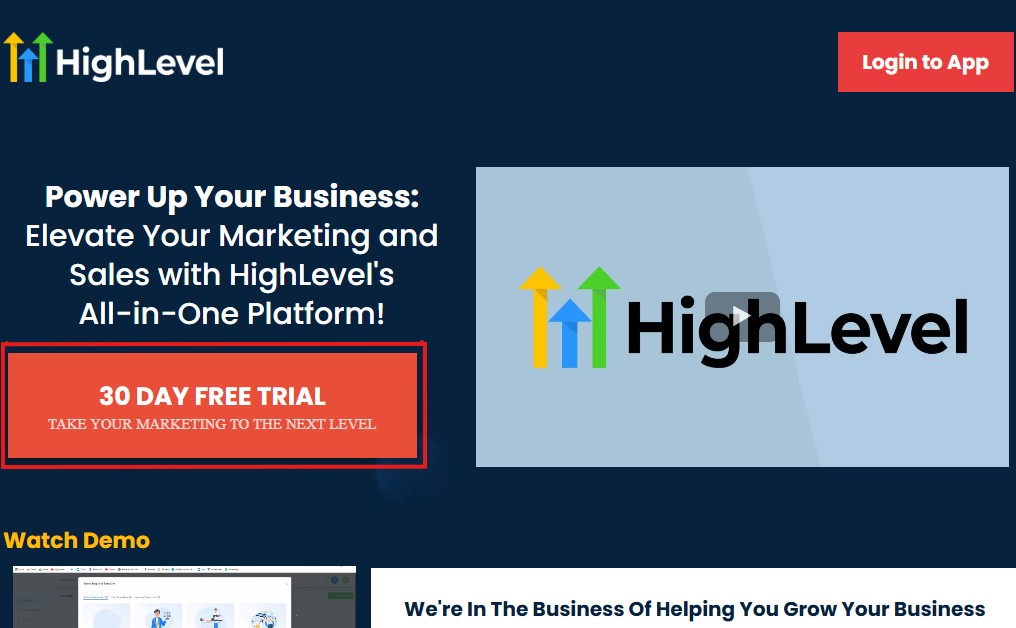
The next thing you want to do is click “30 DAY FREE TRIAL” at the left corner of your screen, and the page below will pop up.
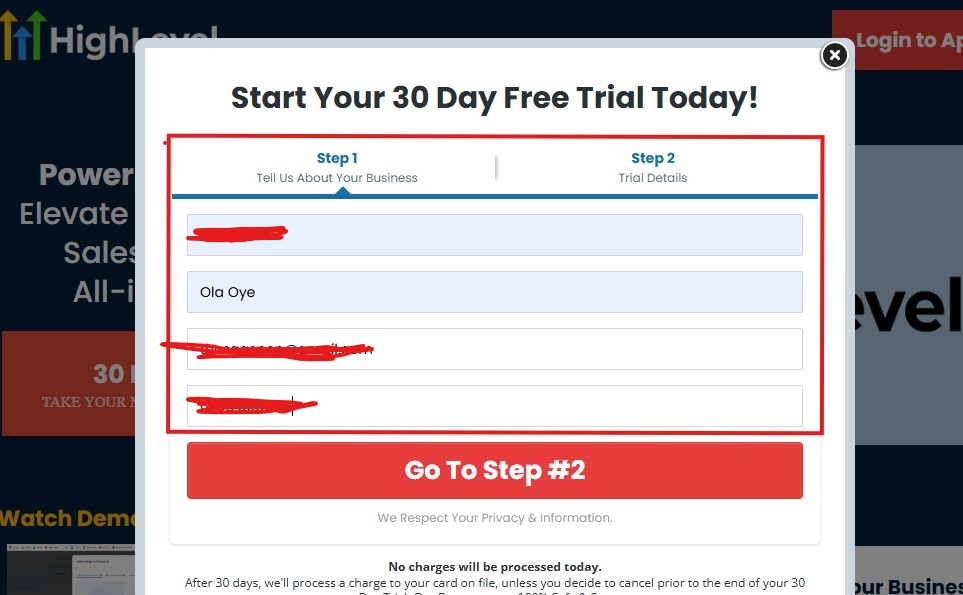
As you can see above, you need to supply your:
- Business name
- Your name
- Email address
- Phone number
Supply everything accordingly and click on “Go To Step #2” and the page below will pop up.
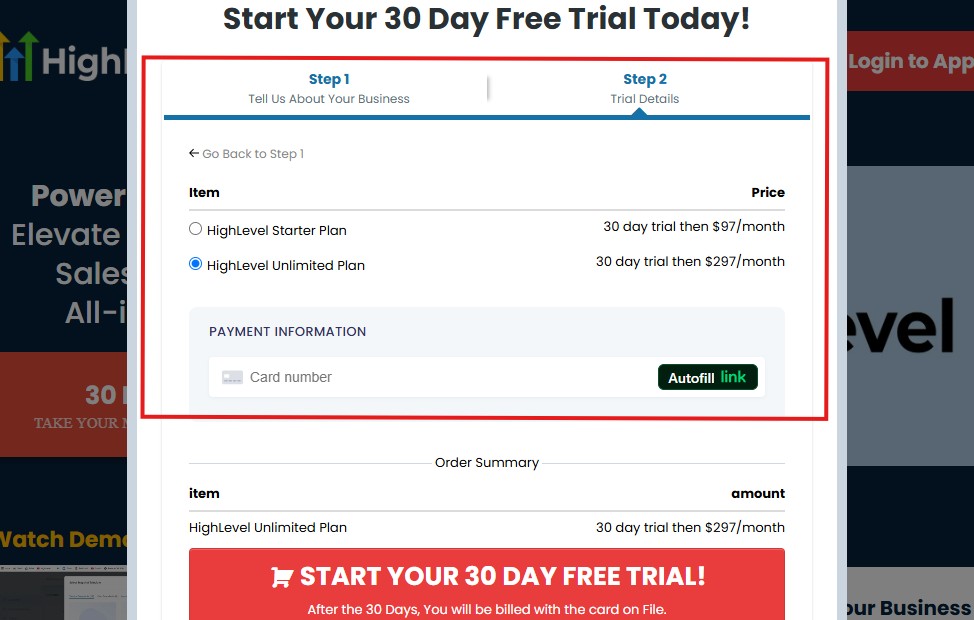
As you can see above, you need to:
- Select a plan
- Enter your credit card details
You can select the “Unlimited Plan that goes for $297/month“. You can upgrade or downgrade later.
Then click on “START YOUR 30 DAY FREE TRIAL” and you will have the page below next!
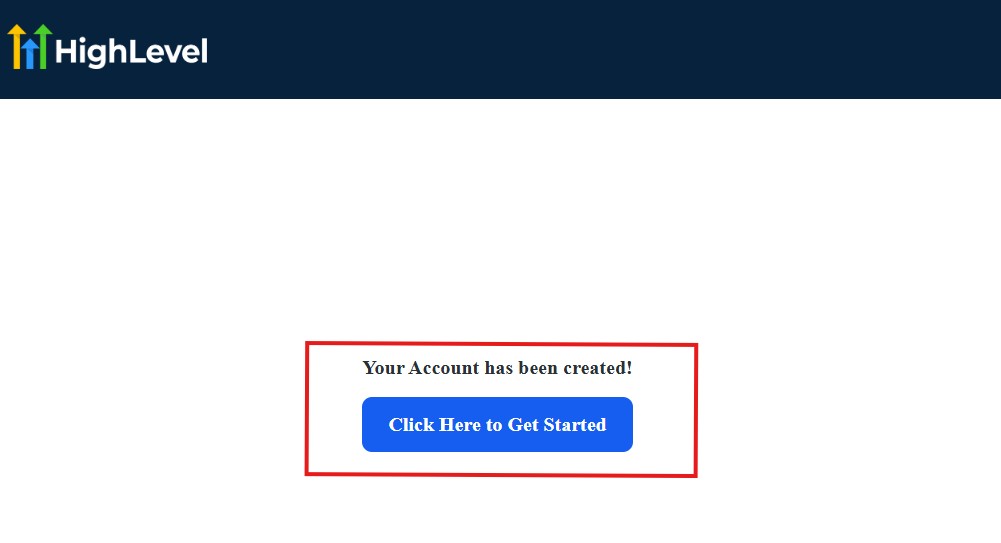
Then, click on “Click Here to Get Started“
And then, you need to start answering the onboarding questions.
Step 2: GoHighLevel Onboarding Questions
The onboarding questions help GoHighLevel understand why you have signed up for GHL and help personalize your experience accordingly.
After you have clicked on “Click Here to Get Started.” above, you will see the page below.
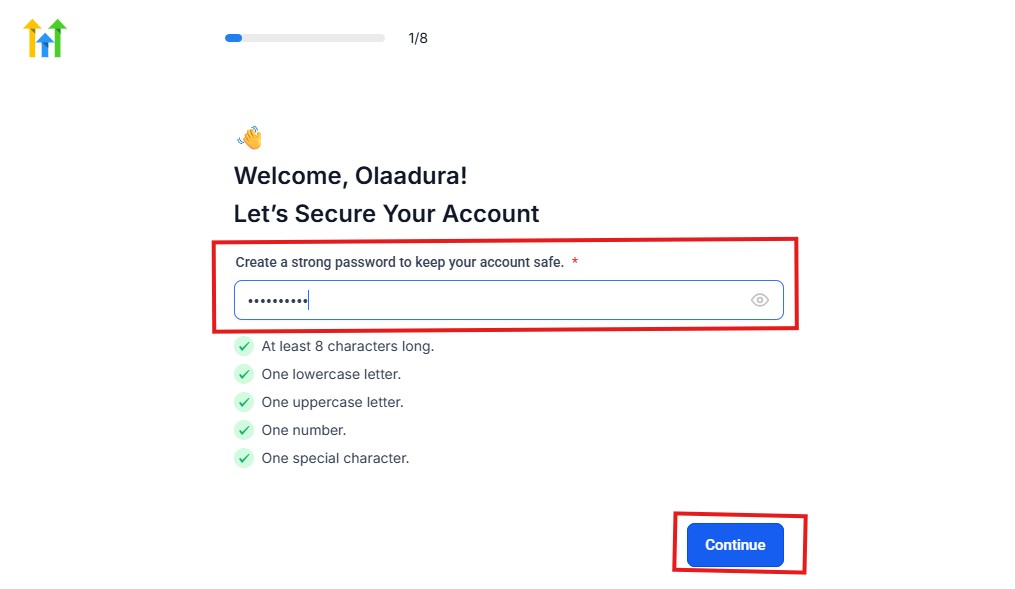
As you can see above, you need to choose a password and it must match these characters:
- At least 8 characters long
- One lowercase letter
- One uppercase letter
- One number
- One special character
If your password matches everything above, then everything should be green and hit the continue blue button.
Next, you have the page below.
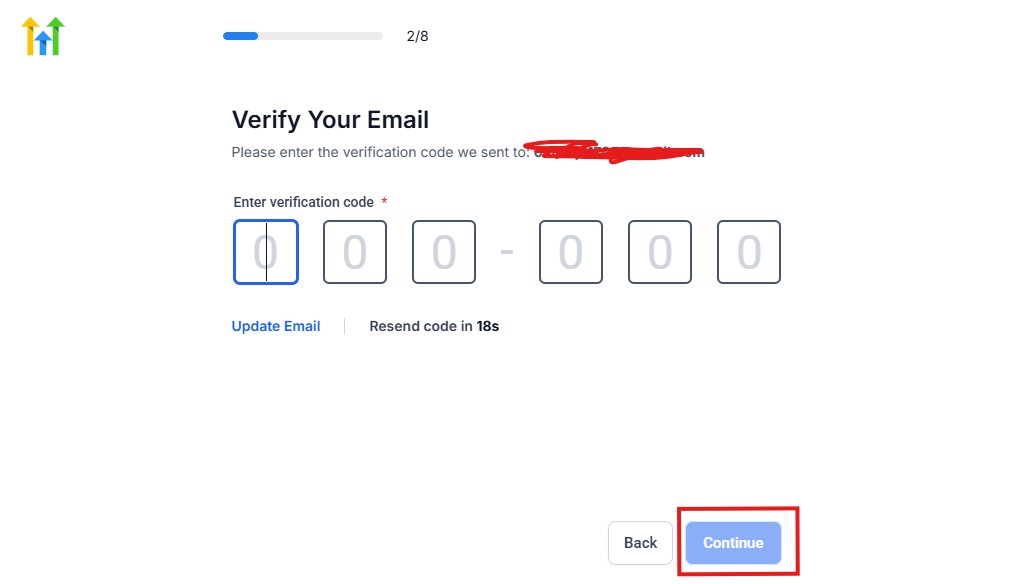
From the image above, you need to confirm your email address and do the same thing with your phone number, too.
The next page will ask you for your billing address.
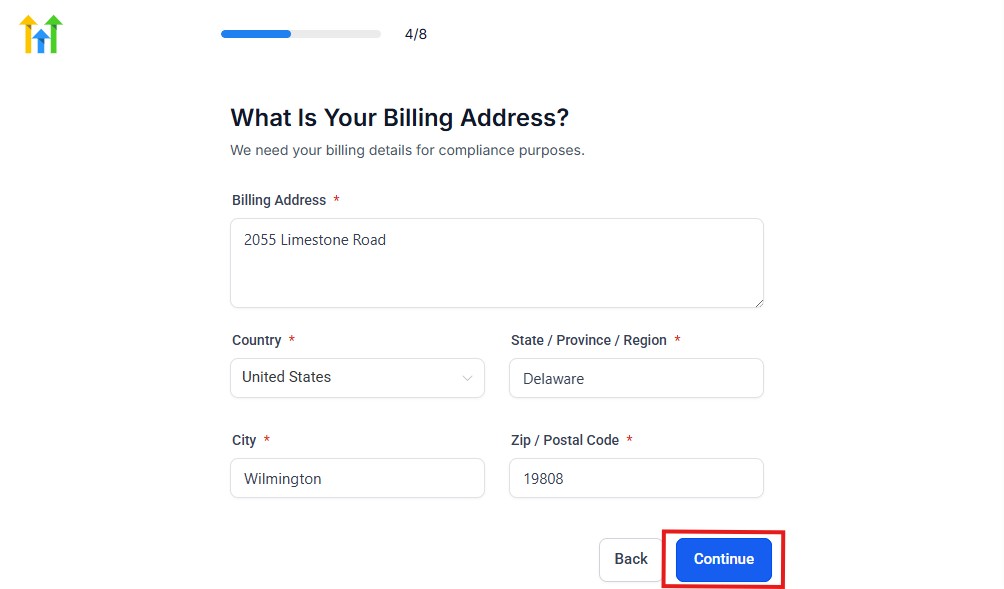
Supply everything accordingly and click on the continue blue button, and you will have the page below.
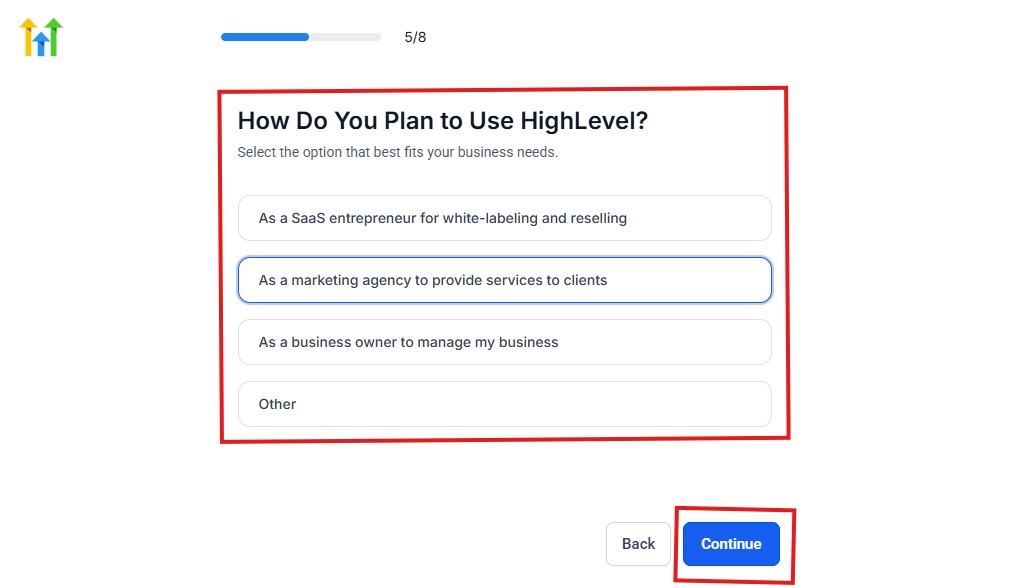
As you can see above, you need to select how you plan to use GoHighLevel.
Select what best matches why you signed up and click on continue.
The next page will ask you if you plan to resell GoHighLevel.
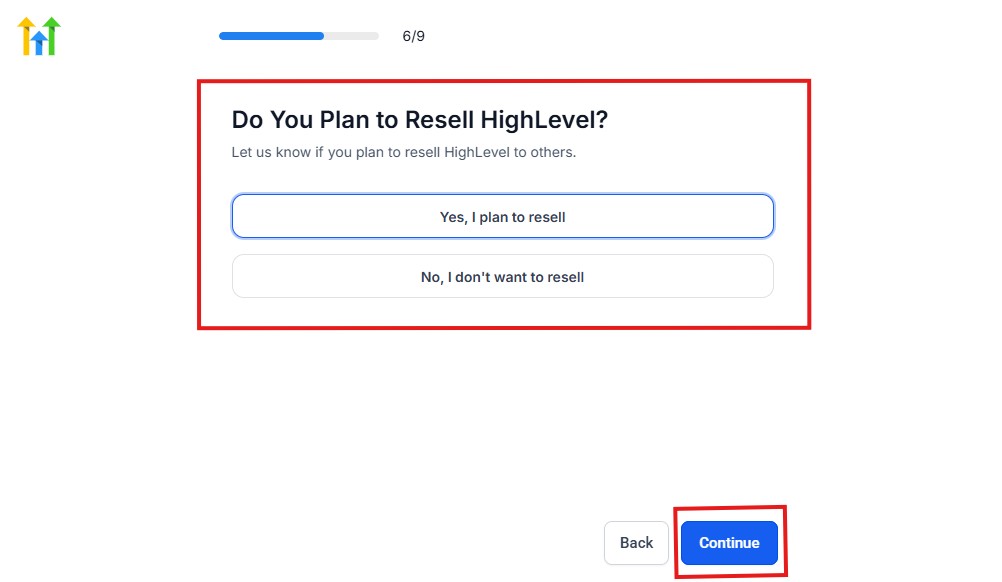
Select Yes if you plan to resell Go High Level and No if you don't have interest.
Click continue, and you will have the page below.
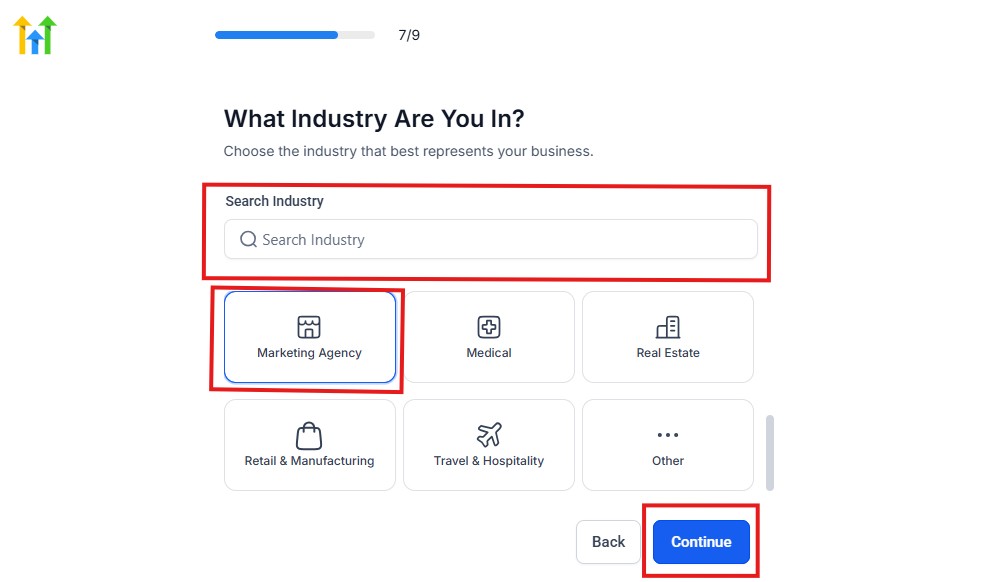
If you take a closer look at the image above, you need to select the industry that you operate.
You can also use the search button if you can't find it right away. Once you see it, click on it and click on the continue button.
And you will have the page below.
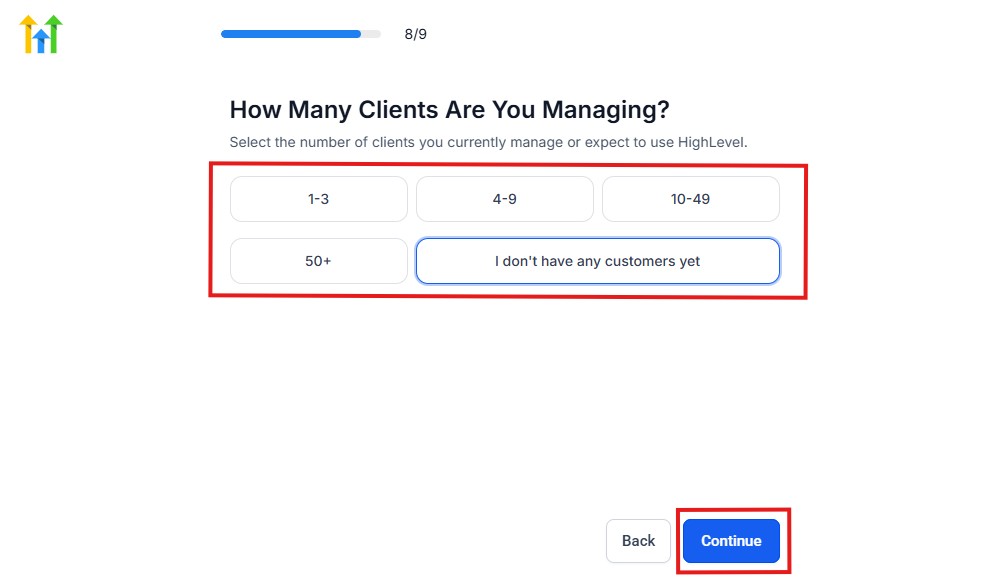
You need to indicate the number of customers that you currently have. Select “I don't have any customers yet” if you currently don't have any.
Hit the continue button, and you will have the page below.
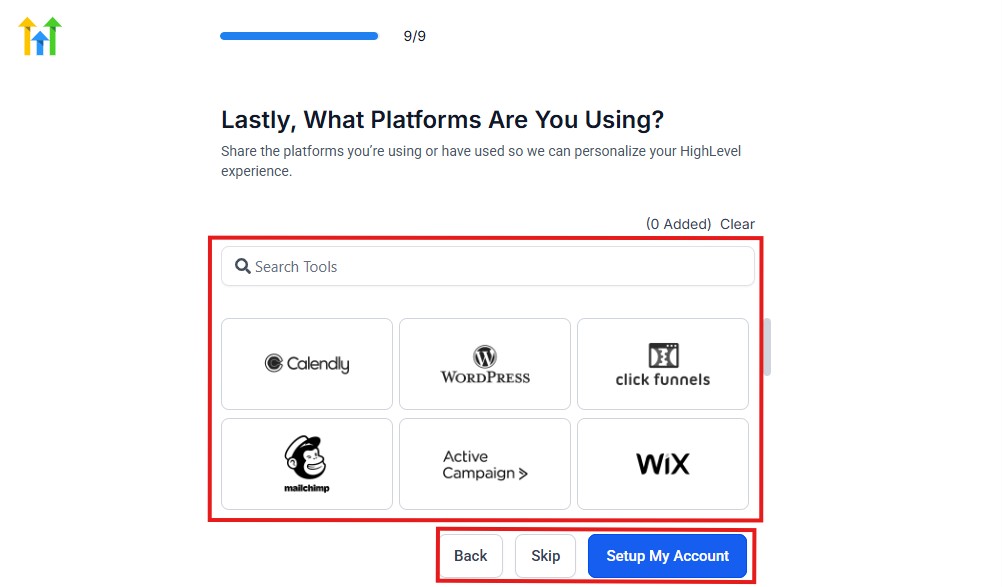
If you currently use any other software, this is where you connect it to GoHighLevel, and you can also skip it if you don't have any.
Then, you have the page below, which is an onboarding call.
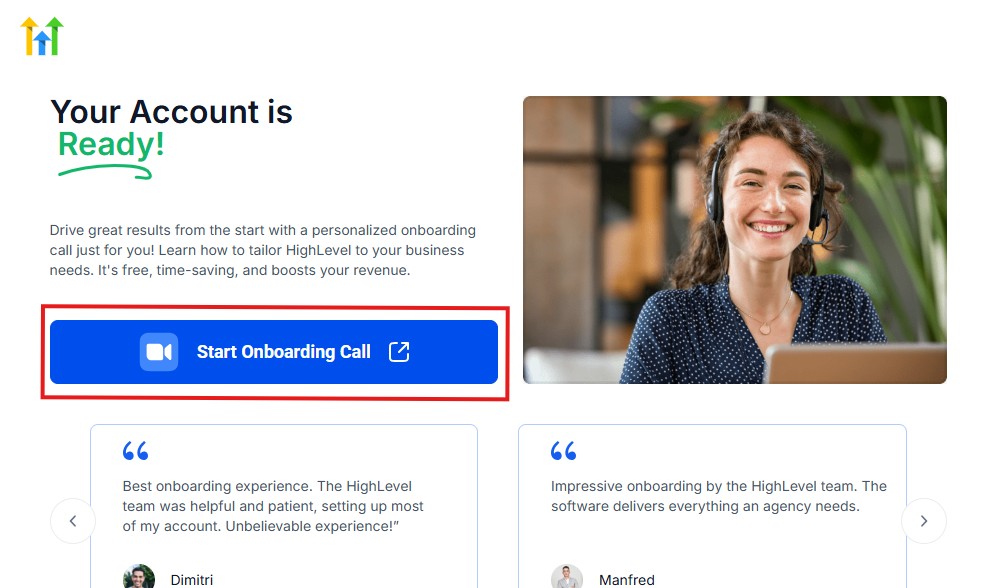
The GoHighLevel onboarding call is a 1-hour call that will connect you with a GoHighLevel expert and discuss how you can get started right away and have your account set up as well.
If you are not interested in the call, just stroll down and click “Not now, take me to my account.“
Now, you have your dashboard.
🧭 Step 3: Set Up Your Business Profile
Start with the basics:
- Add your agency name, logo, and contact details
- Connect your domain (for funnels and landing pages)
- Set up your email and phone system
👉 This ensures your branding and communication are ready for clients.
📊 Step 4: Create Your Travel Sales Pipeline
Your pipeline helps you track every inquiry from start to finish.
Create stages like:
- New Inquiry
- Contacted
- Quote Sent
- Booking Confirmed
- Trip Completed
👉 This gives you a clear view of where every client is in the booking process.
👥 Step 5: Import or Capture Your Leads
Now bring in your potential clients:
- Import existing contacts (past travelers, inquiries)
- Create forms to capture new leads
- Add leads manually when needed
👉 Every lead goes directly into your CRM for tracking and follow-up.
⚡ Step 6: Set Up Automation Workflows
This is where GoHighLevel becomes powerful.
Create simple automations like:
- New inquiry → Instant SMS/email reply
- No response → Follow-up after 24–48 hours
- Booking confirmed → Send confirmation + itinerary
👉 This ensures no lead is left unattended.
🌐 Step 7: Build Your Travel Landing Pages
Use GoHighLevel to create pages that attract and convert leads:
- Destination-specific pages (e.g., Dubai, Maldives, Europe)
- Holiday and seasonal offers
- Lead capture forms
👉 These pages help you turn visitors into inquiries.
📅 Step 8: Set Up Booking Calendars
Make it easy for clients to connect with you:
- Create consultation booking slots
- Allow clients to schedule calls online
- Enable automated reminders
👉 This reduces back-and-forth communication and saves time.
💬 Step 9: Connect Communication Channels
Centralize all conversations:
- SMS
- Calls
👉 You can respond to clients from one dashboard without missing anything.
🚀 Step 10: Test and Optimize
Before going live:
- Test your forms and funnels
- Check automation workflows
- Confirm messages are being sent correctly
👉 Small adjustments here can improve your results significantly.
🧠 Pro Tip
Don’t try to set up everything at once.
Start with:
- Pipeline
- Lead capture
- Basic automation
Then expand as your agency grows.
⚡ The Result
Once properly set up, GoHighLevel becomes a system that:
- Captures leads automatically
- Follows up instantly
- Helps you close more bookings
👉 All while reducing manual work.
Managing Leads, Travelers & Bookings With the CRM
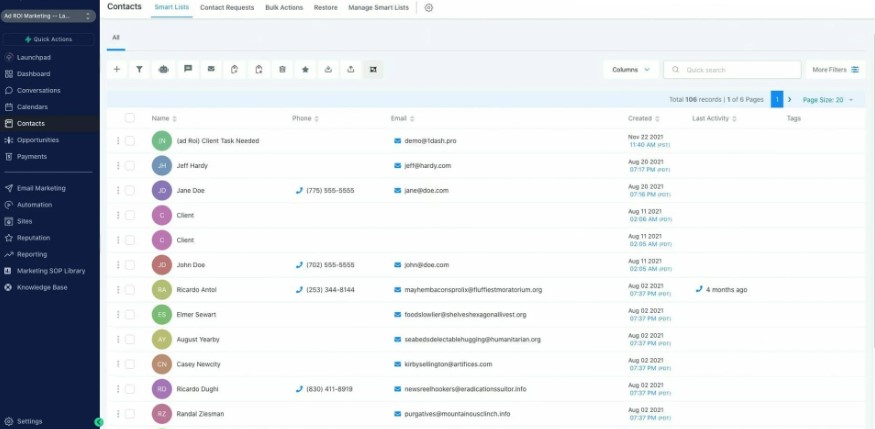
One of the biggest advantages of using GoHighLevel for your travel agency is having all your leads, clients, and bookings organized in one place.
Instead of juggling spreadsheets, emails, and messages, you manage everything from a single dashboard.
📥 Capture and Organize Every Inquiry
Every travel inquiry – whether from your website, ads, or social media – can go straight into your CRM.
You can:
- Automatically capture leads from forms and landing pages
- Tag leads based on destination or travel type (e.g., honeymoon, family trip)
- Store all contact details and preferences
👉 This ensures no inquiry gets lost or forgotten.
📊 Track Every Lead Through Your Booking Pipeline
With your pipeline set up, you can clearly see where each lead is:
- New Inquiry
- Contacted
- Quote Sent
- Booking Confirmed
- Trip Completed
👉 You always know:
- Who needs follow-up
- Who is ready to book
- Which deals are close to closing
👥 Manage Travelers and Trip Details
Inside the CRM, you can keep everything organized for each client:
- Travel preferences (destination, budget, dates)
- Booking history
- Communication history (emails, SMS, calls)
- Notes and special requests
👉 This helps you deliver a more personalized experience.
🔁 Handle Repeat Customers Easily
Travel is a repeat business.
With GoHighLevel, you can:
- Track past trips
- Identify returning clients
- Reach out with new travel offers
👉 This turns one-time bookings into long-term relationships.
💬 Centralize All Client Communication
Instead of switching between apps, all conversations are stored in one place:
- Email messages
- SMS conversations
- Call logs
👉 You can quickly see:
- What was discussed
- What the client wants
- What the next step should be
💰 Manage Bookings and Deal Progress
As leads move through your pipeline, you can:
- Track deal value (trip cost)
- Monitor booking progress
- Identify high-value opportunities
👉 This gives you better control over your revenue and sales process.
🧠 Real Example (How It Works)
Let’s say a client inquires about a Dubai trip:
- They fill out your form → Lead enters CRM
- You send a quote → Move to “Quote Sent”
- They confirm → Move to “Booking Confirmed”
- Trip is completed → Move to “Completed”
👉 Everything is tracked step-by-step without confusion.
⚡ The Result
With GoHighLevel, you:
- Never lose track of leads
- Stay organized at every stage
- Improve follow-ups and conversions
- Deliver a better client experience
👉 All of which leads to more bookings and higher customer satisfaction.
Automating Booking & Follow-Ups for Travel Agencies – GoHighLevel for Travel Agencies
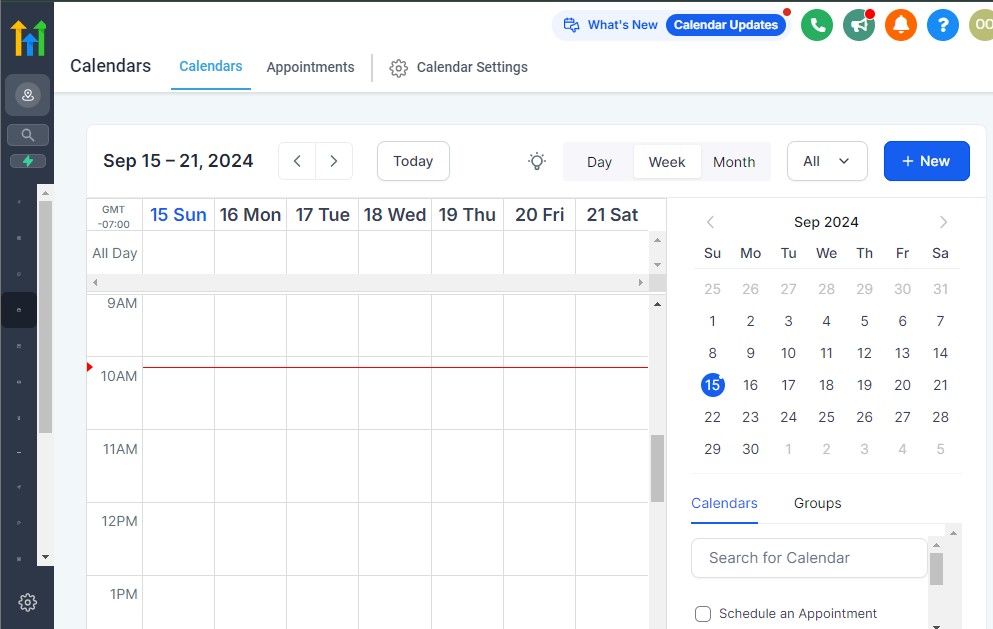
Once your travel website and booking funnel are set up, the next step is to efficiently manage client inquiries and bookings.
With GoHighLevel’s automation tools, you can streamline responses, schedule appointments, and process trip confirmations without manual effort.
This section will cover:
✅ Automating responses to client inquiries
✅ Setting up appointment booking for travel consultations
✅ Managing trip reservations and confirmations
✅ Using CRM to track leads and follow up
Step 1: Automating Inquiry Responses
Most travelers expect quick responses when they inquire about a trip.
Instead of manually replying to every message, you can set up automation in GoHighLevel to handle inquiries instantly.
How to Set Up Automated Responses for Inquiries
- Go to “Automations” in GoHighLevel.
- Click “Create Workflow” and select “Start from Scratch”.
- Add a Trigger → Choose “Form Submitted” or “Website Chat” (whichever applies to your inquiry form).
- Add an Action → Select “Send SMS” or “Send Email” to confirm the inquiry.
- Customize the Message:
Example SMS: Hi [First Name], thanks for your inquiry about our Bali getaway! One of our travel experts will reach out shortly. Meanwhile, check out our latest deals here: [link].
Example Email: Subject: Your Dream Trip is One Step Away!
Hi [First Name], thanks for reaching out! We’ve received your request and will contact you soon. If you’d like, you can schedule a quick call with our travel advisor here: [Booking Link].
Click Save & Activate.
📌 Example: If a customer submits a form for a Maldives honeymoon package, they will instantly receive an email or SMS confirming their inquiry, keeping them engaged while you process their request.
Step 2: Setting Up Appointment Booking for Consultations
Many travelers prefer one-on-one consultations before booking a trip. With GoHighLevel’s Calendar feature, you can allow potential clients to schedule travel consultations at their convenience.
How to Set Up Appointment Booking
Go to “Calendars” in GoHighLevel.
Click “Create New Calendar” and set the available time slots.
Customize settings:
- Duration: 15, 30, or 60-minute consultation calls.
- Availability: Sync with your working hours.
- Booking Confirmation: Enable email & SMS reminders.
Copy the calendar booking link and embed it on your website & emails.
Set up automated reminders to reduce no-shows.
📌 Example: A travel agency offering luxury cruises can have a “Schedule a Free Travel Consultation” button on the website, allowing potential clients to book a call instantly.
Step 3: Managing Trip Reservations & Confirmations
After a client books a trip, GoHighLevel helps you streamline confirmations, send invoices, and keep customers informed.
How to Automate Booking Confirmations
Go to “Automations” > Click “Create Workflow”.
Add a Trigger: Select “Payment Received” or “Form Submitted” (for bookings).
Add an Action: Choose “Send Email” to confirm the reservation.
Customize the Confirmation Email:
- Subject: “Your Trip to [Destination] is Confirmed!”
- Include: Travel dates, itinerary, payment receipt, and next steps.
- Add a PDF itinerary attachment (uploaded in GoHighLevel’s media storage).
📌 Example: If a client books a 7-day Japan tour, they should instantly receive a detailed confirmation email with the trip itinerary and payment details.
Step 4: Using CRM to Track Leads & Follow Up
To maximize bookings, you need to keep track of potential clients and follow up on leads that haven’t converted yet.
GoHighLevel’s CRM (Customer Relationship Management) system allows you to:
✅ Segment leads based on interest (e.g., Honeymoon, Family Trips, Adventure Travel).
✅ Set follow-up reminders to check in with potential clients.
✅ Automate abandoned inquiries by sending reminders if they haven’t booked.
How to Follow Up with Leads
Go to “Opportunities” in GoHighLevel.
Create lead stages:
- New Inquiry → Consultation Scheduled → Proposal Sent → Paid & Booked.
Automate follow-ups:
- If a lead doesn’t book within 3 days, send an email: Hi [Name], just checking in to see if you need help finalizing your trip to [Destination]. Let’s chat – here’s a link to schedule a call: [Booking Link].
- If a lead abandons a booking, send a reminder: Still thinking about your trip to [Destination]? Lock in your spot today before prices increase!
📌 Example: If a couple inquires about a Caribbean cruise but hasn’t booked yet, GoHighLevel can automatically send a follow-up email reminding them about the early bird discount.
What You’ve Accomplished So Far:
✅ Set up automated inquiry responses to keep leads engaged
✅ Enabled appointment booking for one-on-one consultations
✅ Automated trip reservations and confirmations
✅ Leveraged CRM to track leads and follow up efficiently
GoHighLevel for Travel Agency – Payment Processing & Travel Package Sales
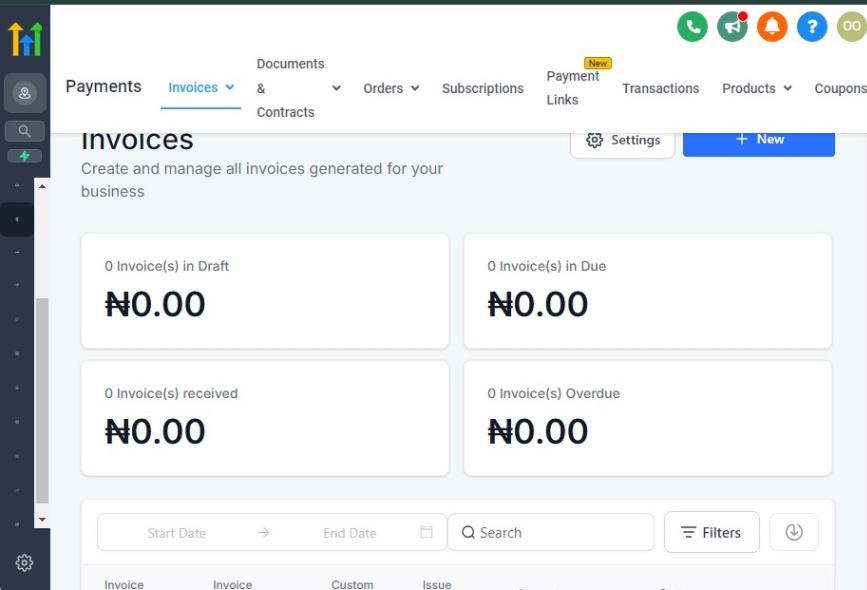
Seamless payment processing is essential for any travel agency.
With GoHighLevel, you can set up secure payment gateways, create customized travel packages, and automate sales processes to maximize efficiency and customer satisfaction.
Setting Up Payment Processing in GoHighLevel
GoHighLevel allows you to integrate Stripe and PayPal for secure payment processing.
Here’s how to set it up:
- Go to “Payments” in your GoHighLevel dashboard.
- Connect Stripe or PayPal. Navigate to settings and link your preferred payment provider.
- Set up checkout pages. Use the funnel builder to create professional checkout pages for travel bookings.
- Enable multiple payment options. Offer one-time payments, subscriptions, or installment plans to attract more customers.
- Automate payment confirmations. Set up automated email/SMS receipts and booking confirmations after payment.
🔹 Example: If you sell vacation packages, you can create a dedicated checkout page where customers select a package, pay securely, and receive an instant confirmation via email or SMS.
Selling Travel Packages & Upselling Services
With GoHighLevel, you can create custom travel packages and increase revenue through upselling.
Steps to Create & Sell Travel Packages:
- Build a dedicated sales funnel. Use GoHighLevel’s funnel builder to showcase your travel packages with high-quality images and details.
- Offer package variations. Let clients choose from different destinations, accommodations, and experiences on the booking page.
- Enable upsells & cross-sells. Offer add-ons like travel insurance, VIP tours, or airport transfers during checkout.
- Use automation for abandoned carts. Send automated reminders to customers who didn’t complete their booking.
🔹 Example: If a customer books a 7-day Caribbean cruise, GoHighLevel can automatically offer an upgrade to a premium suite or an exclusive excursion package before checkout.
Automating Invoices & Payment Follow-Ups
Handling payments manually can be time-consuming. GoHighLevel helps automate this process:
✅ Automated invoices & receipts: Instantly generate invoices and send receipts via email.
✅ Payment reminders: Send automated SMS/email reminders for pending or upcoming payments.
✅ Subscription & installment tracking: Manage recurring payments for membership-based travel clubs or long-term packages.
🔹 Example: If a customer books a multi-city European tour with a deposit, GoHighLevel can automate balance due reminders before the departure date.
Key Benefits of Using GoHighLevel for Payments & Sales:
✔ Frictionless booking experience – Customers can book and pay seamlessly through optimized checkout pages.
✔ Increased revenue opportunities – Upsell luxury upgrades, guided tours, and VIP experiences automatically.
✔ Less manual work – Automate invoices, receipts, and follow-ups for a smooth payment process.
Enhancing Customer Experience with Automation
Delivering an exceptional customer experience is key to retaining clients and generating referrals.
GoHighLevel allows you to automate personalized communications, send travel reminders, collect feedback, and nurture long-term relationships – all without manual effort.
This section will cover:
✅ Automating pre-travel reminders and trip updates
✅ Personalized travel itineraries and onboarding emails
✅ Post-trip follow-ups and review requests
✅ Retaining clients with loyalty programs and re-engagement campaigns
Step 1: Automating Pre-Travel Reminders & Trip Updates
Travelers expect clear and timely communication before their trip.
With GoHighLevel, you can automatically send pre-travel reminders, important travel documents, and last-minute updates via email or SMS.
How to Set Up Pre-Travel Reminders
- Go to Automations → Click “Create Workflow”.
- Set the Trigger: Select “Booking Confirmed” or “Trip Date Approaching” (e.g., 7 days before departure).
- Add an Action: Choose “Send Email” or “Send SMS” with important details.
- Customize the Reminder Message:
Example SMS (7 days before departure): Hi [First Name], your dream vacation to Bali is just a week away! Check your email for important travel tips & final details. Safe travels! 🌍✈️
Example Email (3 days before departure): Subject: Your [Destination] Trip: Final Travel Checklist
Hi [First Name],
Your adventure begins soon!Here’s your final checklist:
✅ Passport & Visa Ready?
✅ Flight & Hotel Confirmations Attached
✅ Local Currency & Emergency Contact Info
Have any last-minute questions? Reply to this email, and we’re happy to help!
Click Save & Activate.
📌 Example: A traveler heading to Greece will receive an SMS reminder 7 days before departure and a detailed email 3 days before departure with all essential information.
Step 2: Personalized Travel Itineraries & Onboarding Emails
Each traveler should feel like their trip was curated just for them.
Use GoHighLevel to automate itinerary delivery and send personalized onboarding emails based on the type of trip booked.
How to Deliver Automated Itineraries
Upload itinerary PDFs to GoHighLevel’s media storage.
Set up a workflow trigger:
- Trigger: “Payment Received” or “Trip Confirmed”
- Action: “Send Email” with attached itinerary
Customize the itinerary email:
- Subject: Your [Destination] Itinerary is Ready!
- Body: Include details about the trip, what to expect, local travel tips, and emergency contacts.
Click Save & Activate.
📌 Example: A family booking a Disney vacation will instantly receive a personalized itinerary email with a PDF itinerary, hotel details, and park entry guidelines.
Step 3: Automating Post-Trip Follow-Ups & Review Requests
Once a trip ends, don’t let the relationship end too. GoHighLevel allows you to automate post-trip emails, collect testimonials, and encourage referrals.
How to Set Up Post-Trip Follow-Ups
Trigger: “Trip End Date” (1 day after return).
Action: Send an email thanking them for choosing your agency.
Include a Google Review Request & Survey:
Subject: Tell Us About Your [Destination] Experience!
Body: Hi [First Name], welcome back from [Destination]! We hope you had an unforgettable experience.
🌟 We’d love your feedback! Please leave us a review: [Google Review Link]
✈️ Thinking of your next adventure? Here’s 10% off your next trip! Use code WELCOME10.
Click Save & Activate.
📌 Example: A couple who booked a romantic Paris getaway will automatically receive an email the day after their return, asking for a review and offering a discount for future trips.
Step 4: Retaining Clients with Loyalty & Re-Engagement Campaigns
Your best customers are repeat travelers. Use GoHighLevel to run automated loyalty programs and re-engagement campaigns to keep them booking with you.
How to Set Up a Loyalty Program & Re-Engagement Sequence
Trigger: “Customer has booked 2+ trips”
Action: Send an exclusive VIP loyalty offer:
- Subject: You’re Now a VIP Traveler – Enjoy Exclusive Perks!
- Body: Because you’ve booked multiple trips with us, you’re now part of our VIP Traveler Club! Get:
✅ Priority Booking on High-Demand Trips
✅ Exclusive Discounts on Future Travel
✅ Personalized Trip Planning Services
Your next vacation is just a click away! Check out our latest offers: [Link]
📌 Example: A traveler who has booked two trips with your agency will automatically receive a VIP offer with perks, encouraging them to book again.
What You’ve Accomplished So Far:
✅ Set up pre-travel reminders to ensure clients are well-prepared
✅ Automated itinerary delivery for a seamless experience
✅ Created post-trip follow-ups to collect reviews & referrals
✅ Built a loyalty program to encourage repeat bookings
Marketing & Lead Generation for Travel Agencies – GoHighLevel for Travel Agencies
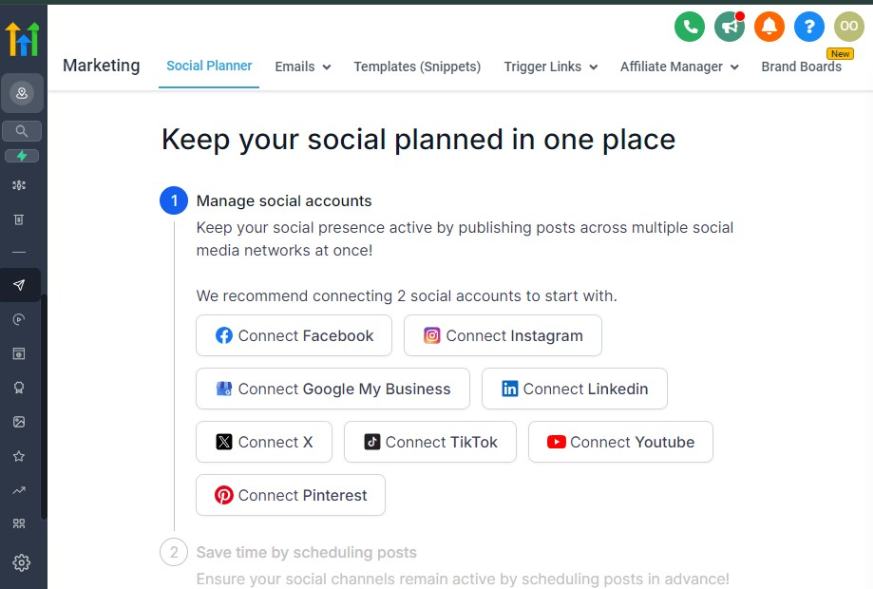
Marketing is the backbone of any successful travel agency.
With GoHighLevel, you can capture leads, nurture prospects, and convert them into paying customers using automation, email marketing, and ad campaigns.
1. Capturing Travel Leads with High-Converting Funnels
A well-designed sales funnel helps attract potential travelers and guide them toward booking.
With GoHighLevel’s Funnel Builder, you can:
✅ Create a lead magnet funnel – Offer a free travel guide, itinerary, or discount in exchange for an email.
✅ Set up trip inquiry forms – Collect details from potential travelers interested in specific destinations.
✅ Optimize booking pages – Design seamless landing pages with clear pricing, testimonials, and CTA buttons.
🔹 Example: If you specialize in luxury vacations, you can create a “VIP Travel Consultation” funnel, where leads provide their budget and interests in exchange for a free consultation.
2. Running Paid Ads for Maximum Reach
GoHighLevel integrates with Facebook, Instagram, and Google Ads, allowing you to set up highly targeted campaigns.
Steps to Set Up Ads in GoHighLevel:
- Go to the “Marketing” section and connect your Facebook and Google Ads accounts.
- Create an ad campaign promoting a travel package, free consultation, or lead magnet.
- Use audience targeting – Reach travelers based on demographics, location, and travel interests.
- Retarget website visitors – Show ads to users who visited your site but didn’t book a trip.
- Monitor ad performance – Adjust campaigns using GoHighLevel’s analytics dashboard.
🔹 Example: Run a Facebook ad campaign offering a $100 discount on summer vacations for users who sign up within 48 hours.
3. Email & SMS Marketing for Lead Nurturing
Most travelers don’t book instantly – they need follow-ups and reminders.
With GoHighLevel’s automation, you can send targeted emails and SMS to keep them engaged.
✅ Email sequences – Send trip inspiration, discounts, and client testimonials to warm up leads.
✅ Automated SMS reminders – Notify leads about limited-time deals or upcoming promotions.
✅ Abandoned cart recovery – If someone starts booking but doesn’t complete the payment, send a follow-up email with a special offer.
🔹 Example: A lead who downloads your “Top 10 Honeymoon Destinations” guide automatically enters a 5-email sequence that showcases romantic travel packages and testimonials from happy couples.
4. Leveraging Social Media & Influencer Marketing
Social media is a goldmine for travel agencies. Use GoHighLevel to schedule and automate social media posts that drive engagement and bookings.
✔ Instagram & Facebook posting – Share travel deals, destination highlights, and client testimonials.
✔ TikTok & Reels marketing – Post short-form travel videos showcasing exciting destinations.
✔ Influencer partnerships – Collaborate with travel influencers to boost brand awareness.
🔹 Example: Partner with a travel blogger to promote your Bali adventure tour, and use GoHighLevel’s funnel to track leads from the influencer’s unique referral link.
5. Automating Referral & Loyalty Programs
Encourage past customers to refer friends and return for future trips using GoHighLevel’s automation tools.
✅ Referral discounts – Reward customers who refer new travelers with discounts on their next trip.
✅ Loyalty emails – Send exclusive offers to past clients based on their previous trips.
✅ VIP travel club – Create a membership program offering perks like priority booking and special rates.
🔹 Example: A past client who booked a Maldives honeymoon package receives an email six months later with a special anniversary trip offer.
Key Benefits of Using GoHighLevel for Travel Marketing:
✔ Automated lead generation – Capture and nurture leads without manual effort.
✔ Higher conversions – Targeted email and SMS campaigns keep potential travelers engaged.
✔ Scalable growth – Use paid ads, social media, and referral programs to expand your customer base.
Learn More:
- GoHighLevel Review: (My Experience After 4 Years)
- What is GoHighLevel? [A User Experience]
- GoHighLevel Features: Complete List
- GoHighLevel Integrations
- GoHighLevel Pricing: (Costs Breakdown)
- Is GoHighLevel a CRM?: (Find Out Here💡)
- Is GoHighLevel Legit?: (Find Out Here 💡)
- Is GoHighLevel Worth It? (Find Out Here 💡)
- 15+ GoHighLevel Benefits: (Why You Need It)
Managing Customer Reviews & Reputation
In the travel industry, your reputation can make or break your business. Travelers rely heavily on reviews and testimonials before making booking decisions.
With GoHighLevel, you can automate review requests, manage feedback, and showcase positive testimonials to build trust and credibility.
1. Automating Review Requests from Satisfied Clients
After a successful trip, getting a review should be a priority.
With GoHighLevel, you can set up automated review requests that encourage happy travelers to share their experiences.
Steps to Automate Review Requests in GoHighLevel:
- Set up a workflow – After a client returns from their trip, trigger an automated email or SMS asking for feedback.
- Provide a direct review link – Make it easy for them to leave a review on Google, TripAdvisor, or Facebook.
- Offer an incentive – A small discount on future bookings can encourage more responses.
- Follow up – If they don’t leave a review within a few days, send a friendly reminder.
🔹 Example: A client who booked a Hawaii honeymoon package receives a text message a day after their return:
“Hope you had an amazing honeymoon! We'd love to hear about your experience. Please leave us a quick review here: [Review Link]. Thank you!”
2. Handling Negative Reviews Professionally
Negative reviews are inevitable, but how you handle them determines your agency’s reputation.
With GoHighLevel, you can monitor and respond to reviews in one place to maintain a professional image.
✔ Acknowledge the issue – Respond to the client’s concerns promptly.
✔ Offer a resolution – Provide a solution, such as a discount on their next trip or an apology.
✔ Move the conversation offline – Encourage unhappy clients to reach out via phone or email for personalized support.
🔹 Example Response to a Negative Review:
“We’re sorry to hear about your experience. Customer satisfaction is our top priority, and we’d love the chance to make it right. Please contact us at [email] so we can assist you further.”
3. Showcasing Positive Reviews & Testimonials
Displaying great reviews builds trust with potential customers.
GoHighLevel allows you to:
✅ Embed reviews on your website – Showcase Google and Facebook testimonials on your homepage.
✅ Use reviews in email marketing – Feature happy client stories in newsletters.
✅ Create social proof – Post video testimonials from satisfied travelers on social media.
🔹 Example: A video testimonial from a family who booked a European vacation package can be used in email campaigns and social media ads to attract more bookings.
4. Monitoring Your Online Reputation
GoHighLevel provides a Reputation Management Dashboard where you can:
✔ Track reviews from multiple platforms in one place.
✔ Get alerts whenever a new review is posted.
✔ Analyze trends – See common feedback themes and improve your services accordingly.
🔹 Example: If multiple reviews mention that airport transfers were delayed, you can quickly address this issue with your transportation partners.
5. Encouraging Social Media Engagement
Social proof extends beyond reviews – engaging with clients on social media strengthens your brand’s reputation.
✔ Encourage user-generated content – Ask clients to tag your agency in their vacation photos.
✔ Run hashtag campaigns – Create a unique travel hashtag for your brand.
✔ Reply to comments & messages – Show that you value customer interaction.
🔹 Example: A past client posts a breathtaking sunset photo from their Maldives trip and tags your agency. You reshare their post with a caption:
“Nothing beats a Maldives sunset! 🌅 Thanks for booking with us, [Client’s Name]! #DreamTripsBy[YourAgency]”
Key Benefits of GoHighLevel for Reputation Management:
✔ Automates review collection – Ensures you get consistent positive feedback.
✔ Protects your brand image – Helps manage negative reviews professionally.
✔ Strengthens credibility – Showcases testimonials to build trust with new customers.
GoHighLevel for Travel Agency – Scaling Your Travel Business with GoHighLevel
As your travel agency grows, manual processes can become overwhelming.
GoHighLevel helps you automate lead generation, streamline marketing, track business performance, and implement scalable booking systems, so you can expand without increasing workload.
This section will cover:
✅ Automating lead generation with funnels & ads
✅ Expanding your travel offerings with upsells & cross-sells
✅ Using reporting & analytics to track performance
✅ Integrating third-party tools for better efficiency
Step 1: Automating Lead Generation with Funnels & Ads
To scale, you need a steady stream of new travelers. GoHighLevel allows you to run Facebook, Google, and Instagram ads, capture leads with funnels, and automatically follow up with prospects.
How to Set Up a Travel Lead Funnel in GoHighLevel
Go to Sites → Click “Funnels” → Create New Funnel.
Add Lead Magnet Landing Page:
- Offer a free travel guide, checklist, or exclusive travel deal in exchange for emails.
- Example: “Get a FREE Bali Travel Guide – Top 10 Must-Visit Spots!”
Set Up an Email Capture Form: Collect names, emails, and travel preferences.
Create an Automated Follow-Up Workflow:
- Trigger: “New Lead Captured”
- Action 1: Send a welcome email with a downloadable travel guide.
- Action 2: 24 hours later, send an email about your latest travel deals.
- Action 3: If the lead doesn’t book within 7 days, send a special offer.
Launch Facebook & Google Ads Driving Traffic to Your Funnel.
📌 Example: A Caribbean travel agency can run an ad offering a free “Caribbean Cruise Planning Guide”, capture leads, and automate trip offers to convert them into paying clients.
Step 2: Expanding Your Travel Offerings with Upsells & Cross-Sells
Upselling and cross-selling increase revenue without needing more clients.
GoHighLevel helps you automate personalized trip recommendations based on what clients have booked.
How to Set Up Upsells & Cross-Sells
Trigger: “Client Books a Trip”
Action: Send an email with related travel add-ons, such as:
- Upsell: Upgrade to a luxury hotel or business-class flights.
- Cross-Sell: Offer airport transfers, tours, or travel insurance.
Create an Offer Funnel:
- Landing Page: Show exclusive trip upgrades.
- Checkout Page: One-click add-ons for easy purchases.
📌 Example: A client booking a Paris vacation could automatically receive an offer to upgrade to a 5-star hotel or book a private city tour.
Step 3: Using Reporting & Analytics to Track Performance
Scaling requires tracking what’s working and optimizing your marketing and sales strategies.
GoHighLevel’s reporting tools help you analyze:
- Lead Conversion Rates: Which ads and funnels drive the most bookings?
- Revenue Insights: Track total bookings, upsells, and client retention rates.
- Marketing Performance: See which emails, SMS, and campaigns generate the most engagement.
How to Use GoHighLevel's Reports
- Go to “Reporting” → Click “Funnels & Leads” to track conversion rates.
- Check “Payments” Reports to analyze booking revenue & upsells.
- Review “Marketing Analytics” to improve email & SMS engagement.
📌 Example: If a Mexico vacation ad is generating high traffic but few bookings, use reporting tools to optimize the funnel and follow-ups.
Step 4: Integrating Third-Party Tools for Better Efficiency
GoHighLevel integrates with payment gateways, CRM tools, and booking software to automate tasks and improve customer experience.
Key Integrations for Scaling Your Travel Agency:
🔹 Stripe & PayPal – Automate payments & subscriptions.
🔹 Google My Business – Boost local SEO & collect reviews.
🔹 Zapier – Connect GoHighLevel to external tools like TripAdvisor, Expedia, or QuickBooks.
📌 Example: A travel agency that integrates Stripe for payments, Zapier for automation, and Google My Business for reviews can scale faster while improving client experience.
What You’ve Accomplished So Far:
✅ Set up automated lead generation to attract new clients
✅ Created upsells & cross-sells to increase revenue
✅ Used reports to optimize performance & track growth
✅ Integrated essential tools for smooth scaling
Frequently Asked Questions
FAQ about GoHighLevel for Travel Agencies
Can I use GoHighLevel to automate my travel agency’s booking process?
Yes! You can set up automated booking funnels, email/SMS reminders, and follow-ups to streamline the entire process from inquiry to confirmed booking.
Does GoHighLevel integrate with travel booking systems?
While GoHighLevel does not have built-in travel booking engines, you can integrate it with platforms like Zapier to connect with third-party booking tools such as Expedia, Booking.com, or TravelPerk.
How can GoHighLevel help me generate more travel leads?
You can create high-converting landing pages, set up email marketing campaigns, run paid ads, and use lead capture forms to attract and nurture potential travelers.
Is GoHighLevel suitable for small travel agencies?
Yes! Whether you are a solo travel consultant or running a growing agency, GoHighLevel provides tools to automate tasks, improve efficiency, and increase bookings without needing a big team.
How does GoHighLevel improve customer retention for travel agencies?
With features like automated follow-ups, loyalty offers, and personalized trip reminders, you can stay engaged with past clients and encourage repeat bookings.
Final Thoughts
GoHighLevel is a powerful all-in-one platform that can transform how you run your travel agency.
From automating bookings and lead generation to improving customer communication and scaling operations, it streamlines every part of your business.
If you’ve followed the steps in this guide, you now know how to:
✅ Set up GoHighLevel for your travel agency
✅ Build a professional travel website and booking funnel
✅ Manage client inquiries and automate follow-ups
✅ Enhance customer experience with automation
✅ Scale your agency with upsells, reporting, and integrations
By implementing these strategies, you can save time, increase bookings, and grow your travel business effortlessly.
What’s Next? Actionable Steps to Get Started
🔹 Sign up for GoHighLevel & set up your account – If you haven’t already, start by creating a free trial account and exploring the platform’s features.
🔹 Build your first travel funnel – Create a landing page to capture leads and automate follow-ups.
🔹 Set up email & SMS automation – Engage potential and existing clients with personalized travel offers and reminders.
🔹 Launch your marketing campaigns – Use Facebook, Google, or Instagram ads to attract travelers to your offers.
🔹 Monitor & optimize performance – Use GoHighLevel’s reporting tools to track conversions and adjust strategies for better results.
The travel industry is competitive, and the agencies that embrace automation, personalization, and digital marketing will stand out.
With GoHighLevel, you can manage your entire business from one platform, save time, and focus on delivering exceptional travel experiences to your clients.
Get GoHighLevel for Travel Agencies for 30-Day Free Here ==>
