
Running a successful chiropractic practice involves much more than providing quality care.
You also have to attract:
- new patients
- manage appointments
- follow up consistently
- maintain strong relationships
- collect reviews
- and keep your practice running smoothly every day.
The challenge?
Many chiropractors rely on multiple tools to handle these tasks. One platform for scheduling, another for email marketing, another for patient communication, and yet another for tracking leads. This often leads to inefficiencies, missed opportunities, and unnecessary expenses. 😓
That's where GoHighLevel for Chiropractors comes in.
GoHighLevel is an all-in-one business growth platform designed to help service-based businesses streamline their operations and improve client communication.
For chiropractors, it can serve as a centralized hub for managing inquiries, automating follow-ups, scheduling consultations, nurturing patient relationships, and tracking marketing performance.
Whether you're operating a solo chiropractic clinic or managing multiple practitioners, GoHighLevel provides tools that can help you save time, improve organization, and create a better experience for both your team and your patients. 🚀
In this guide, you'll learn how chiropractors can use GoHighLevel to:
- 📅 Simplify appointment scheduling and consultation requests.
- 📞 Automate patient communication and follow-ups.
- 👥 Organize patient interactions using the built-in CRM.
- 📈 Generate more inquiries through funnels and marketing campaigns.
- ⭐ Collect and manage online reviews more efficiently.
- 📊 Track important business metrics to make smarter decisions.
- 🔗 Connect GoHighLevel with other tools you already use.
If you've been wondering whether GoHighLevel is the right fit for your chiropractic practice, this guide will walk you through everything you need to know.
TL;DR:
If you're short on time, here's the quick version:
| ✅ What GoHighLevel Can Help Chiropractors Do | |
|---|---|
| 👥 Manage patient inquiries and communication | Keep conversations organized in one place |
| 📅 Schedule appointments | Allow patients to book consultations online |
| 🤖 Automate follow-ups | Send reminders, nurture campaigns, and check-ins automatically |
| 📈 Generate more leads | Use landing pages, funnels, and forms to attract new patients |
| ⭐ Improve your online reputation | Request and monitor patient reviews |
| 📊 Measure marketing performance | Track leads, appointments, and campaign results |
| 🔗 Integrate with other tools | Connect GoHighLevel with platforms that support your workflow |
The bottom line?
GoHighLevel won't replace the clinical side of your chiropractic practice, but it can significantly improve the business side of it.
By bringing your marketing, communication, scheduling, and relationship management into one platform, you can spend less time juggling software and more time focusing on growing your practice and serving your patients. 🙌
Why Chiropractors Need GoHighLevel
Running a chiropractic practice requires you to wear many hats.
Beyond patient appointments, you also need to market your services, answer inquiries, schedule consultations, send reminders, follow up with patients, and maintain a positive online reputation.
When these tasks are handled manually or spread across multiple platforms, things can quickly become overwhelming. 😓
Missed calls can lead to lost opportunities. Forgotten follow-ups may result in patients going elsewhere. Administrative tasks can consume valuable time that could be spent focusing on your practice and your patients.
This is why many chiropractors are looking for ways to simplify and automate their day-to-day operations.
The Common Challenges Chiropractors Face
No matter the size of your practice, you may encounter challenges such as:
- 📞 Missing inquiries outside business hours.
- 📅 Managing appointments through phone calls and emails.
- ⏰ Spending too much time on repetitive administrative tasks.
- 👥 Keeping track of patient interactions and communication history.
- 📣 Finding consistent ways to attract new patients.
- ⭐ Encouraging satisfied patients to leave online reviews.
- 📊 Understanding which marketing efforts are actually producing results.
These challenges don't necessarily indicate that your practice is struggling. They simply highlight areas where better systems can make a significant difference.
How GoHighLevel Helps Chiropractors
GoHighLevel brings many of these functions together into one platform.
Instead of juggling several separate tools, you can manage important aspects of your business from a single dashboard. 🚀
For example, you can use GoHighLevel to:
👥 Organize Patient Communication
The built-in CRM allows you to keep track of inquiries, consultations, and ongoing communication.
This means you can quickly see where each person is in your process without digging through emails, sticky notes, or spreadsheets.
🤖 Automate Routine Follow-Ups
Not every message needs to be sent manually.
GoHighLevel enables you to create automated workflows that can:
- Send appointment reminders.
- Follow up with new inquiries.
- Check in after consultations.
- Re-engage inactive contacts.
- Deliver helpful information at the right time.
Automation helps ensure consistency while reducing administrative workload.
📅 Simplify Appointment Booking
Many people prefer booking online rather than calling during office hours.
With GoHighLevel's scheduling tools, potential patients can request consultations based on your availability, making the process more convenient for everyone involved.
This can also reduce the number of back-and-forth scheduling conversations. 📆
📈 Support Practice Growth
Generating a steady flow of new inquiries is important for any business.
GoHighLevel includes tools such as:
- Landing pages.
- Forms.
- Surveys.
- Sales funnels.
- Email campaigns.
- SMS campaigns.
These features can help you create marketing systems designed to attract and nurture potential patients.
⭐ Strengthen Your Online Reputation
Online reviews play an important role in how people choose service providers.
GoHighLevel allows you to automate review requests, making it easier to encourage happy patients to share their experiences.
Over time, this can help strengthen your practice's credibility and visibility. 🌟
📊 Make Better Business Decisions
Without data, it's difficult to know what's working.
GoHighLevel provides reporting features that help you monitor:
- Lead sources.
- Appointment activity.
- Campaign performance.
- Conversion trends.
- Team responsiveness.
Having access to this information allows you to make more informed decisions about your marketing and operations.
Is GoHighLevel Right for Every Chiropractor?
The answer depends on your goals.
If you're looking for a platform focused solely on clinical documentation or specialized healthcare functions, GoHighLevel may not replace every system you currently use.
However, if you want a solution that helps you:
- Save time through automation,
- Improve communication,
- Organize your patient acquisition process,
- Strengthen your online presence, and
- Support business growth,
then GoHighLevel can be a valuable addition to your chiropractic practice. 👍
At the end of the day, successful chiropractic practices rely on both excellent patient experiences and efficient business systems.
GoHighLevel is designed to help you build the systems side of your practice so you can operate more efficiently and focus on what matters most.
Setting Up GoHighLevel for Your Chiropractic Practice
Getting started with GoHighLevel may seem overwhelming at first, especially if you're moving from several different tools. However, setting up your account properly from the beginning will help you create a more organized and efficient practice.
The goal isn't to use every feature immediately.
Instead, focus on building a system that supports your patient communication, appointment scheduling, marketing efforts, and practice growth. 🚀
Step 1: GoHighLevel Account Creation
To start your journey with GoHighLevel, head over to gohighlevel.com/30-day-trial, and you will be redirected to the page below.

The next thing you want to do is click “30 DAY FREE TRIAL” at the left corner of your screen, and the page below will pop up.
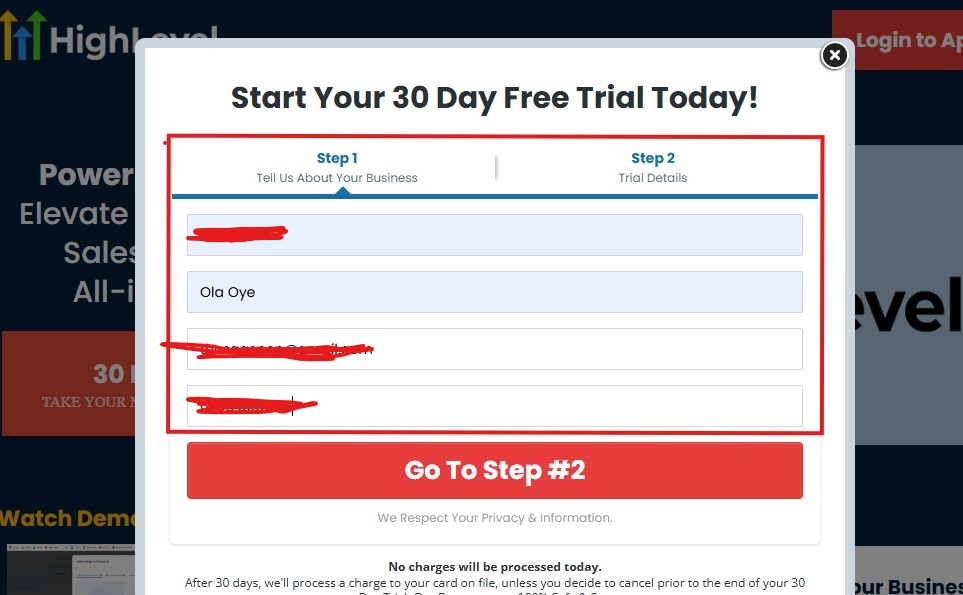
As you can see above, you need to supply your:
- Business name
- Your name
- Email address
- Phone number
Supply everything accordingly and click on “Go To Step #2” and the page below will pop up.
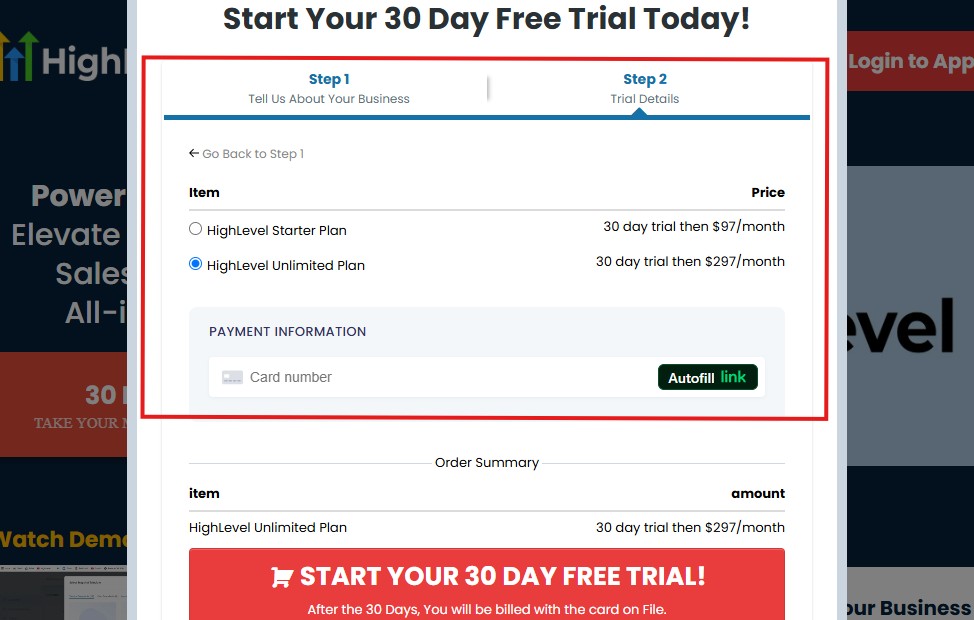
As you can see above, you need to:
- Select a plan
- Enter your credit card details
You can select the “Unlimited Plan that goes for $297/month“. You can upgrade or downgrade later.
Then click on “START YOUR 30 DAY FREE TRIAL” and you will have the page below next!
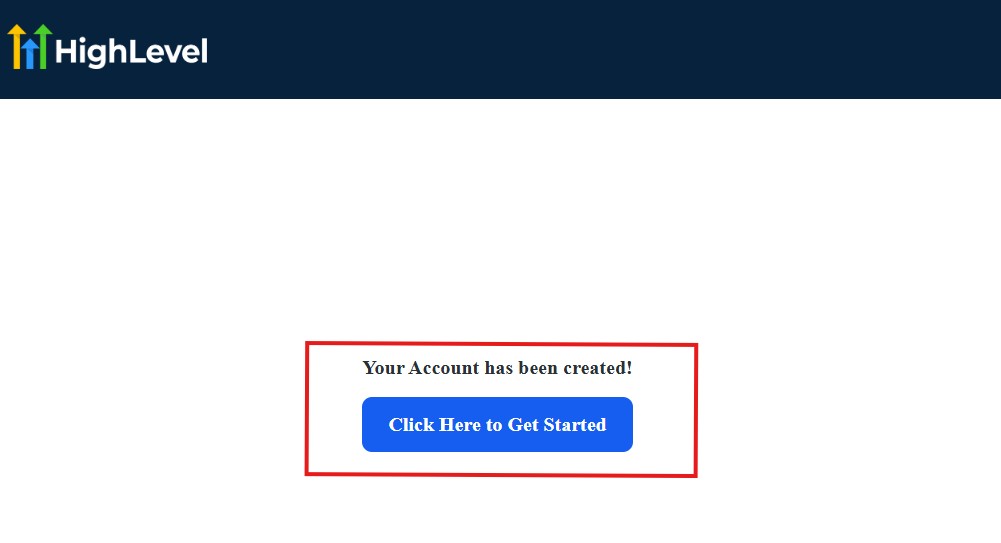
Then, click on “Click Here to Get Started“
And then, you need to start answering the onboarding questions.
Step 2: GoHighLevel Onboarding Questions
The onboarding questions help GoHighLevel understand why you have signed up for GHL and help personalize your experience accordingly.
After you have clicked on “Click Here to Get Started.” above, you will see the page below.
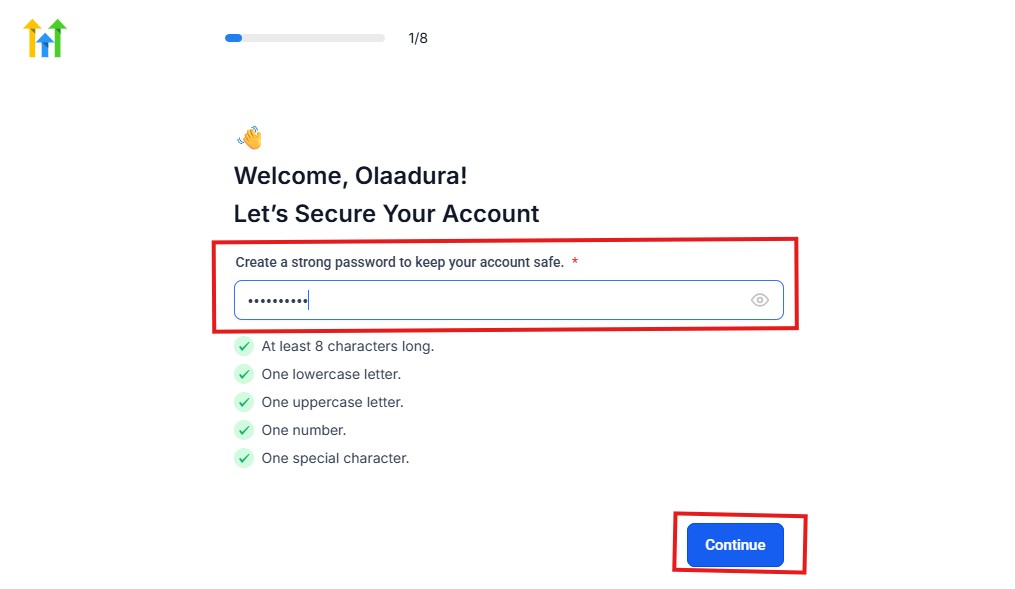
As you can see above, you need to choose a password and it must match these characters:
- At least 8 characters long
- One lowercase letter
- One uppercase letter
- One number
- One special character
If your password matches everything above, then everything should be green and hit the continue blue button.
Next, you have the page below.
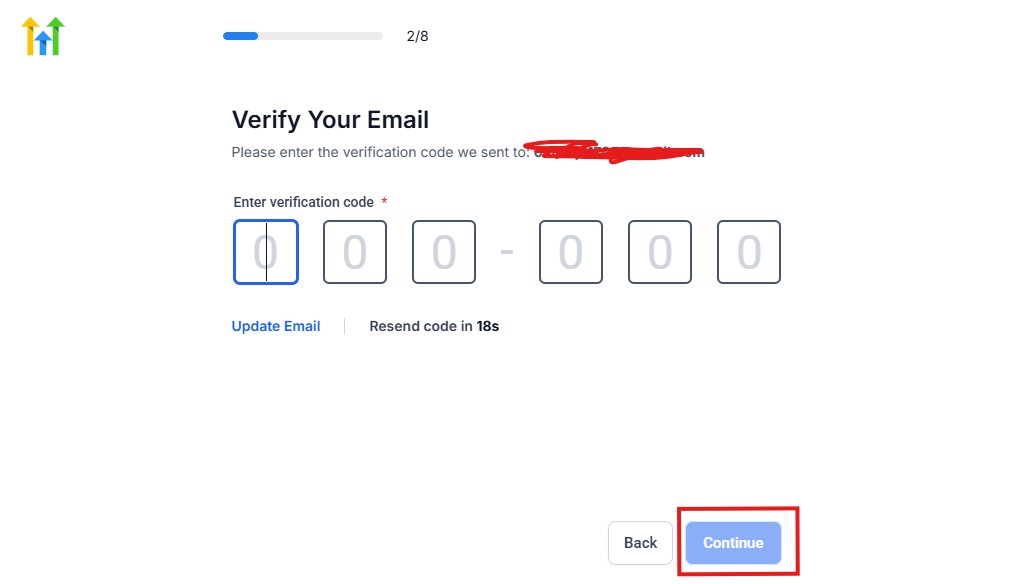
From the image above, you need to confirm your email address and do the same thing with your phone number, too.
The next page will ask you for your billing address.
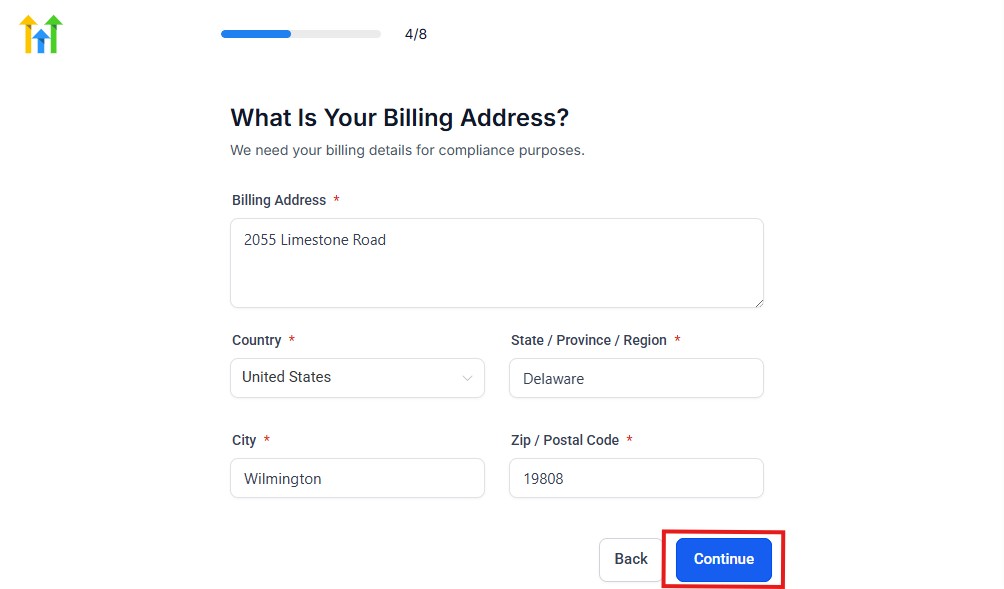
Supply everything accordingly and click on the continue blue button, and you will have the page below.
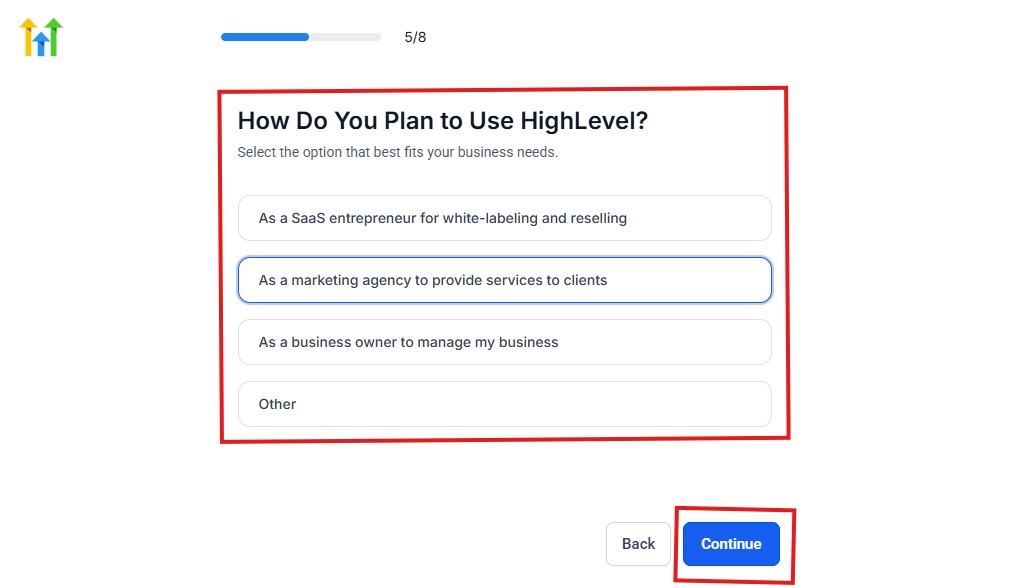
As you can see above, you need to select how you plan to use GoHighLevel.
Select what best matches why you signed up and click on continue.
The next page will ask you if you plan to resell GoHighLevel.
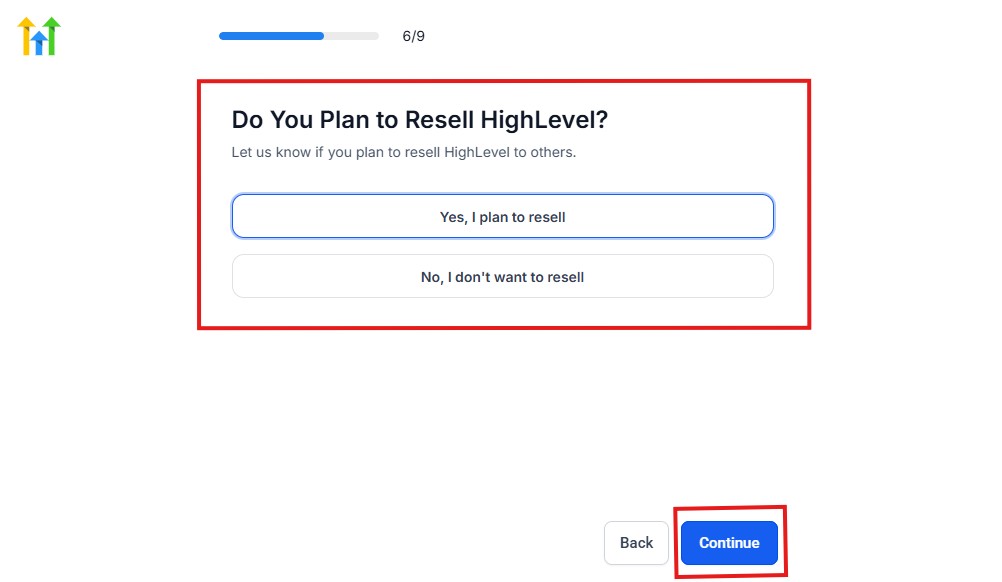
Select Yes if you plan to resell Go High Level and No if you don't have interest.
Click continue, and you will have the page below.
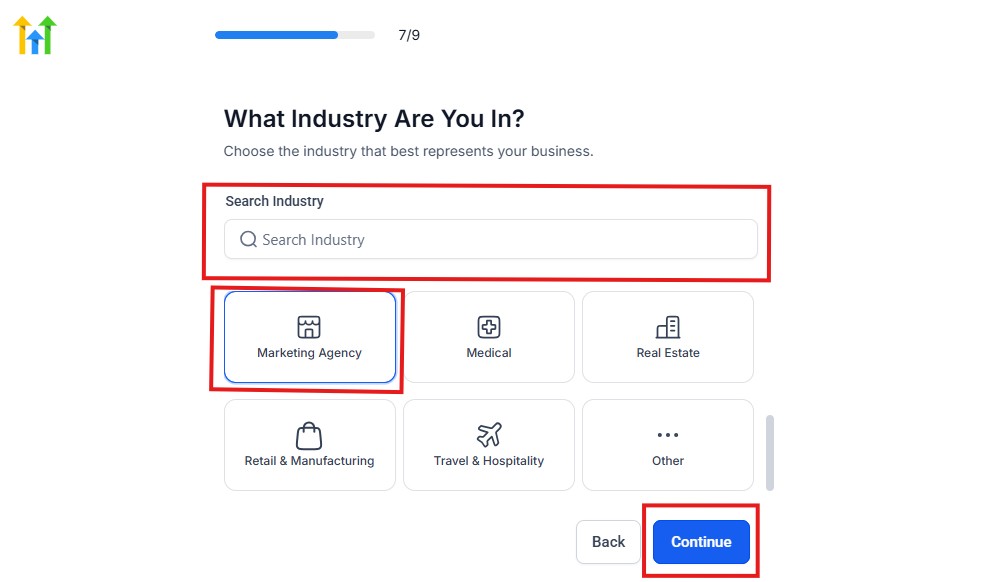
If you take a closer look at the image above, you need to select the industry that you operate.
You can also use the search button if you can't find it right away. Once you see it, click on it and click on the continue button.
And you will have the page below.
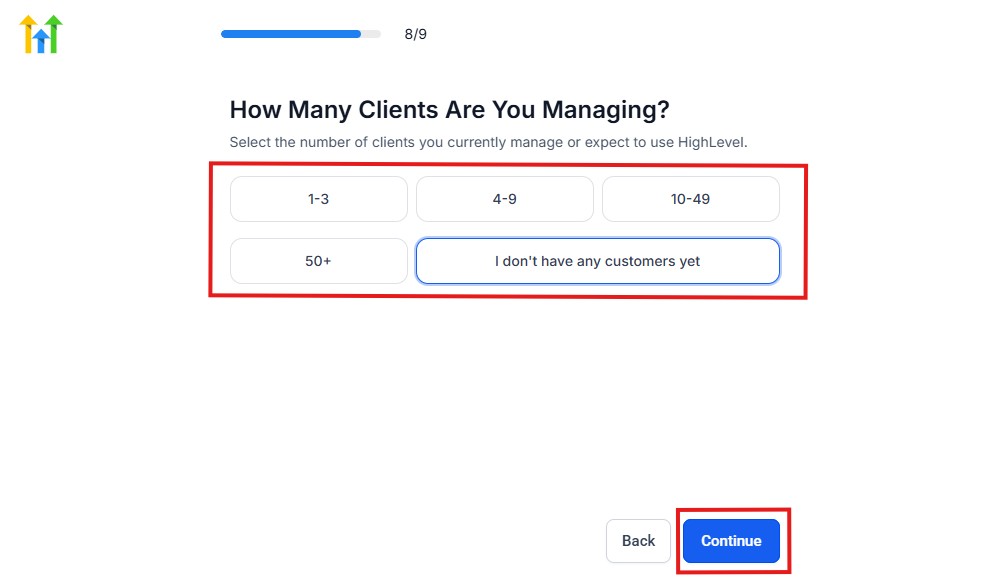
You need to indicate the number of customers that you currently have. Select “I don't have any customers yet” if you currently don't have any.
Hit the continue button, and you will have the page below.
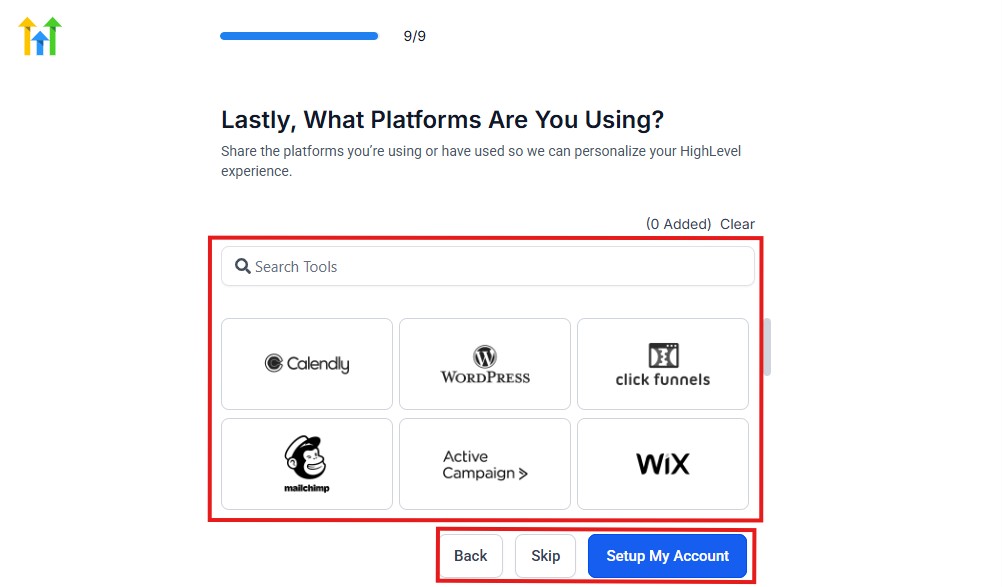
If you currently use any other software, this is where you connect it to GoHighLevel, and you can also skip it if you don't have any.
Then, you have the page below, which is an onboarding call.
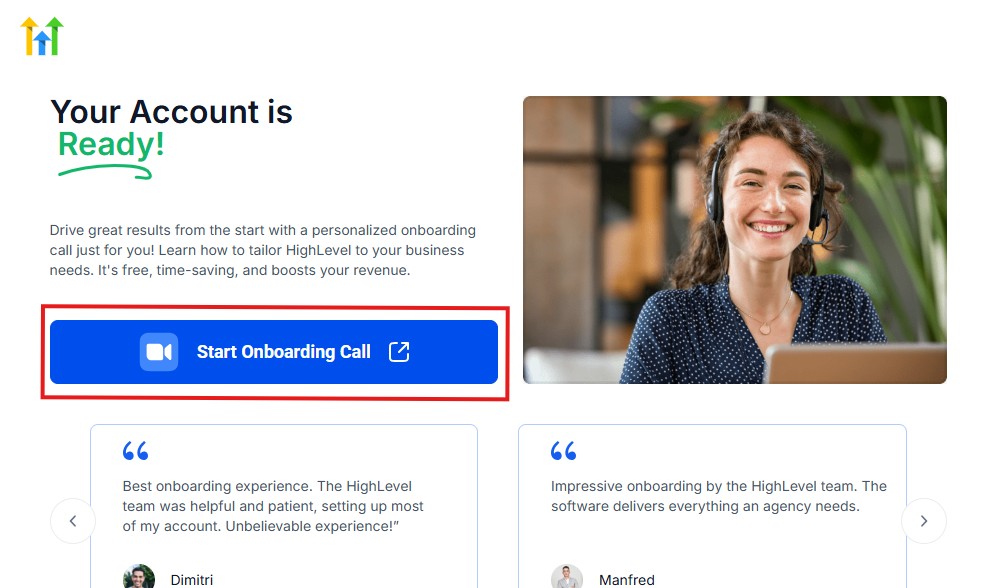
The GoHighLevel onboarding call is a 1-hour call that will connect you with a GoHighLevel expert and discuss how you can get started right away and have your account set up as well.
If you are not interested in the call, just stroll down and click “Not now, take me to my account.“
Now, you have your dashboard.
Step 3: Set Up Your Practice Information
The first thing you'll want to do is customize your account with your practice details.
This includes information such as:
- 🏢 Practice name
- 📍 Business address
- 📞 Phone number
- 📧 Business email address
- 🌐 Website URL
- 🕒 Operating hours
Having accurate information ensures consistency across your communication channels and scheduling tools.
Step 4: Customize Your CRM Pipeline
One of the most powerful features of GoHighLevel is its CRM (Customer Relationship Management) system.
Instead of treating every contact the same way, you can organize people based on where they are in your patient journey.
For example, your pipeline may look something like this:
| Stage | Purpose |
|---|---|
| 🆕 New Inquiry | Someone who has recently contacted your practice |
| 📞 Consultation Requested | A prospective patient interested in learning more |
| 📅 Consultation Scheduled | An appointment has been booked |
| 👋 New Patient Onboarding | Initial forms and information are being completed |
| 🔄 Active Patient | Ongoing communication and engagement |
| ⭐ Review Request Sent | Feedback has been requested |
| 🤝 Patient Relationship Maintained | Continued communication through newsletters and updates |
This simple structure helps you stay organized and prevents inquiries from falling through the cracks.
Step 5: Connect Your Communication Channels
To get the most from GoHighLevel, you'll want to connect the communication tools you plan to use regularly.
These may include:
- 📱 SMS messaging
- ☎️ Phone services
- 💬 Website chat widgets
- 📲 Social media messaging channels
Having conversations in one place makes it easier for your team to respond quickly and maintain consistency.
Step 6: Set Up Your Calendar
A well-configured calendar can save countless administrative hours.
When setting up your scheduling system, consider:
- 📅 Consultation availability
- 🕒 Appointment duration
- ⏳ Buffer times between appointments
- 🚫 Unavailable days and holidays
- 🔔 Automated appointment reminders
This allows prospective patients to request appointments based on your availability without constant back-and-forth communication.
Step 7: Create Essential Automations
Automation doesn't have to be complicated.
Start with a few simple workflows that can improve efficiency immediately.
Examples include:
📩 New Inquiry Follow-Up
When someone submits a form:
- Send a welcome message
- Thank them for reaching out
- Explain the next steps
🔔 Appointment Reminders
Before scheduled consultations:
- Send reminder emails
- Deliver SMS notifications
- Reduce the likelihood of missed appointments
⭐ Review Request Campaigns
After positive interactions:
- Ask patients to share their experience online
- Make the review process simple and convenient
These small automations can make a big difference over time.
Step 8: Build Your Initial Marketing Assets
You don't need dozens of campaigns to get started.
Begin with a few essential assets, such as:
- 🌐 A consultation booking page
- 📝 An inquiry form
- 📄 A simple landing page
- 📧 An email nurture sequence
- 📱 A text message follow-up workflow
Starting small allows you to learn the platform without becoming overwhelmed.
Step 9: Train Your Team
Technology works best when everyone understands how to use it.
If you have staff members assisting with administration or patient communication, provide guidance on:
- How to update contact records
- How to manage conversations
- How to use the appointment calendar
- How to monitor pipeline stages
- How to respond to new inquiries
Clear processes improve consistency and reduce confusion.
Start Simple and Expand Over Time
One mistake many businesses make is trying to implement every feature at once.
You don't have to do that.
Focus first on the systems that will provide the biggest impact, such as:
- ✅ Communication
- ✅ Scheduling
- ✅ Follow-ups
- ✅ Lead management
As your confidence grows, you can gradually introduce more advanced features and workflows.
By taking a step-by-step approach, you'll create a GoHighLevel setup that supports both your daily operations and your long-term growth goals without adding unnecessary complexity. 😊
Managing Patients & Opportunities With the CRM
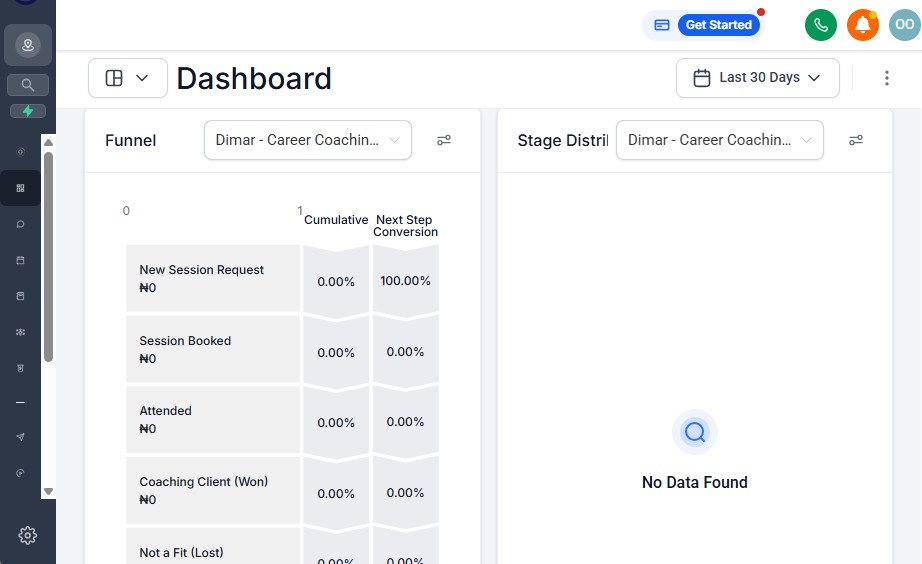
As your chiropractic practice grows, keeping track of every inquiry, consultation request, and patient interaction can become increasingly difficult.
Relying on spreadsheets, sticky notes, email threads, or memory alone often leads to missed follow-ups and lost opportunities. 😓
This is where GoHighLevel's CRM becomes extremely valuable.
The CRM gives you a central place to organize patient relationships and track potential opportunities, helping your team stay on the same page.
What Is the GoHighLevel CRM?
A Customer Relationship Management (CRM) system helps you manage and organize the people who interact with your practice.
For chiropractors, this means having better visibility into:
- 👥 New patient inquiries
- 📞 Consultation requests
- 📅 Scheduled appointments
- 📝 Patient communication history
- ⭐ Review requests
- 🔄 Ongoing engagement activities
Instead of wondering where someone is in the process, you can quickly see their status at a glance.
Create a Patient Journey Pipeline
One of the easiest ways to use the CRM is by setting up a pipeline that reflects your patient journey.
For example:
| Pipeline Stage | Purpose |
|---|---|
| 🆕 New Inquiry | Someone has contacted your practice through a form, phone call, or website |
| 📞 Consultation Requested | The individual wants additional information or has expressed interest |
| 📅 Consultation Scheduled | An appointment has been booked |
| 📝 Forms Pending | Intake information still needs to be completed |
| 🤝 Active Patient | The patient is currently engaged with your practice |
| ⭐ Review Requested | Feedback has been requested |
| 💙 Long-Term Relationship | Ongoing communication through newsletters or updates |
This structure helps ensure that no opportunity gets overlooked.
Keep All Communication in One Place
One major advantage of using GoHighLevel is the ability to view communication history from a single dashboard.
Depending on the channels you connect, you may be able to track conversations involving:
- 📧 Emails
- 📱 Text messages
- ☎️ Phone interactions
- 💬 Website chat inquiries
- 📲 Social media messages
This provides valuable context whenever someone reaches out to your practice.
Instead of asking, “Have we spoken with this person before?”, you can quickly review previous interactions.
Use Tags for Better Organization
Tags make it easier to segment and organize contacts.
Examples of useful tags may include:
- 🏷️ New Inquiry
- 🏷️ Consultation Booked
- 🏷️ Needs Follow-Up
- 🏷️ Review Request Sent
- 🏷️ Newsletter Subscriber
- 🏷️ Inactive Contact
Proper tagging helps you personalize communication and create targeted automations.
Assign Tasks to Your Team
If multiple team members help manage your practice, GoHighLevel allows you to assign responsibilities internally.
For example:
- 📋 Follow up with a recent inquiry.
- ☎️ Return a missed phone call.
- 📧 Send additional information.
- 📅 Confirm an upcoming appointment.
Task assignments improve accountability and reduce the chances of important actions being forgotten.
Identify Opportunities More Easily
Every new inquiry represents a potential opportunity for your practice.
Without a system in place, it's easy for these opportunities to slip away.
The CRM helps you identify contacts who may need additional attention, such as:
- 👀 Individuals who expressed interest but never booked.
- 📞 People who requested more information.
- ⏰ Contacts who haven't responded recently.
- 🔄 Former patients who may benefit from re-engagement campaigns.
Having this visibility enables your team to respond more proactively.
Improve the Overall Patient Experience
Patients appreciate timely communication and organized processes.
Using a CRM can help you:
- ✅ Respond more consistently.
- ✅ Reduce delays in follow-ups.
- ✅ Personalize communication.
- ✅ Maintain organized records of interactions.
- ✅ Create a smoother experience from the first inquiry onward.
Small improvements in communication often contribute to stronger relationships and increased trust. 🤝
The CRM Is More Than a Contact List
Many people think of a CRM as simply a database of names and phone numbers.
In reality, it's much more than that.
For chiropractors, GoHighLevel's CRM can serve as the operational hub for managing patient inquiries, tracking opportunities, coordinating follow-ups, and supporting long-term practice growth.
When used effectively, it helps your team work smarter – not harder – while creating a more organized experience for everyone involved. 🚀
Automating Patient Follow-Ups & Communication
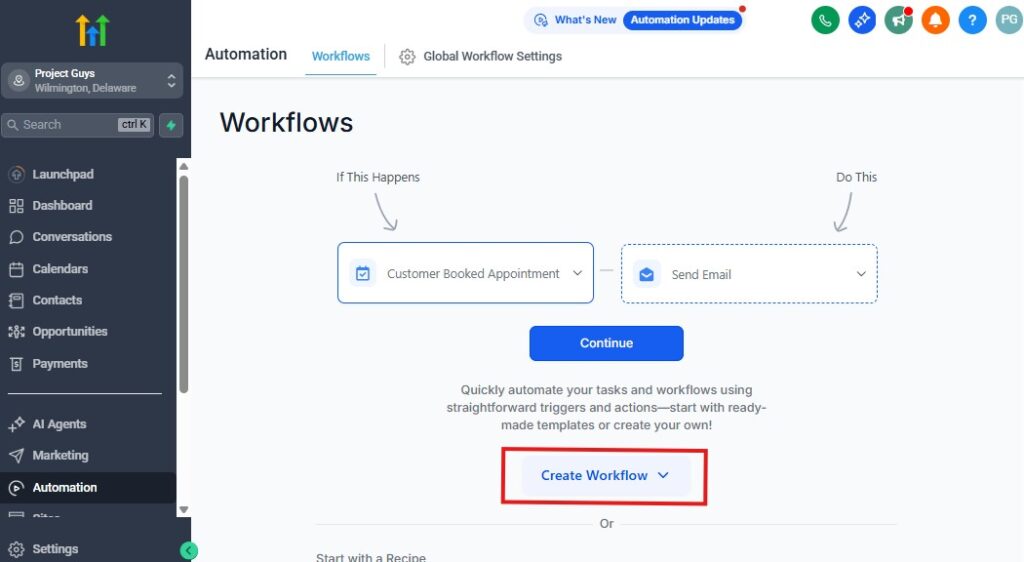
Consistent communication is one of the most important parts of running a successful chiropractic practice.
However, manually sending every email, text message, and reminder can quickly become overwhelming – especially as your patient base grows. 😓
This is where GoHighLevel's automation tools can make a significant difference.
By automating routine communication, you can save time, improve consistency, and ensure that important messages are delivered at the right moment.
The best part?
You don't have to sacrifice the personal touch. Modern automations can still feel warm, professional, and patient-focused.
Why Follow-Ups Matter
People are busy.
Sometimes they intend to book an appointment but forget. Other times, they need additional information before taking the next step.
Without a proper follow-up system, potential opportunities may simply disappear.
Consistent communication can help you:
- 📞 Stay connected with new inquiries.
- 📅 Reduce missed appointments.
- 💬 Keep patients informed.
- 🤝 Strengthen patient relationships.
- ⭐ Encourage feedback and reviews.
- ⏰ Save valuable administrative time.
Instead of relying on memory, GoHighLevel allows you to build repeatable systems that work automatically.
Automate New Inquiry Responses
When someone reaches out to your practice, responding quickly can create a positive first impression.
With GoHighLevel, you can create a workflow that automatically sends a message when a new inquiry is received.
For example:
📩 New Inquiry Workflow
Trigger: Someone submits a contact form.
Actions:
- Send a welcome email thanking them for reaching out.
- Deliver a text message confirmation.
- Provide instructions on how to schedule a consultation.
- Notify your team that a new lead has entered the system.
This helps ensure that no inquiry goes unnoticed.
Send Appointment Reminders Automatically
Missed appointments can disrupt schedules and impact productivity.
Automated reminders help keep patients informed and prepared.
A simple reminder sequence might include:
- 📧 Email reminder 48 hours before the appointment.
- 📱 SMS reminder 24 hours before the appointment.
- ⏰ Final reminder a few hours beforehand.
These reminders reduce the need for manual calls while helping patients remember their scheduled consultations.
Create Follow-Up Campaigns for Unbooked Leads
Not everyone books immediately.
Some people need more time to make a decision.
Instead of letting those contacts go cold, you can create lead nurturing campaigns.
For example:
🔄 Consultation Nurture Sequence
Day 1: Thank them for their interest.
Day 3: Share information about what to expect during an initial consultation.
Day 7: Invite them to schedule a convenient appointment.
Day 14: Send a friendly follow-up message checking in.
This keeps your practice top of mind without requiring manual outreach.
Re-Engage Inactive Contacts
Over time, you may accumulate contacts who haven't interacted with your practice in a while.
Rather than ignoring these relationships, you can use automation to reconnect.
Examples include:
- 📧 Practice newsletters.
- 🎉 Birthday greetings.
- 📢 Announcements about new services.
- 💬 Invitations to schedule another consultation.
These touchpoints help maintain engagement in a professional and respectful way.
Use Two-Way Communication
Automation doesn't have to be one-sided.
GoHighLevel allows people to respond to messages, creating opportunities for real conversations.
For example:
A patient receives an appointment reminder and replies:
“Can I reschedule for next week?”
Your team can then continue the conversation directly from the platform.
This combination of automation and human interaction creates a better overall experience.
Keep Communication Personal
One concern many business owners have is that automation might feel robotic.
Fortunately, GoHighLevel allows you to personalize messages using contact information such as:
- 👤 First name
- 📅 Appointment details
- 📍 Practice information
- 👨⚕️ Assigned team member
Simple personalization can make automated communication feel much more natural.
For example:
Instead of:
“You have an appointment scheduled.”
You can send:
“Hi Sarah, this is a friendly reminder about your appointment with our team tomorrow at 10:00 AM. We look forward to seeing you!” 😊
Start Small With Automation
You don't need dozens of complex workflows to see results.
Start with a few high-impact automations, such as:
- ✅ New inquiry responses.
- ✅ Appointment reminders.
- ✅ Consultation follow-ups.
- ✅ Review requests.
- ✅ Re-engagement campaigns.
As you become more comfortable with the platform, you can expand your automations over time.
Let Automation Support Your Team – Not Replace It
The goal of automation isn't to remove the human element from your chiropractic practice.
Instead, it's about handling repetitive administrative tasks so your team can focus on meaningful interactions.
When used thoughtfully, GoHighLevel's automation features can help you:
- 🚀 Improve efficiency.
- 💬 Communicate more consistently.
- 📅 Reduce scheduling issues.
- 🤝 Build stronger patient relationships.
- ⏰ Free up time for the work that matters most.
In a busy chiropractic practice, having reliable systems in place can make all the difference.
Appointment Scheduling & Chiropractic Consultations
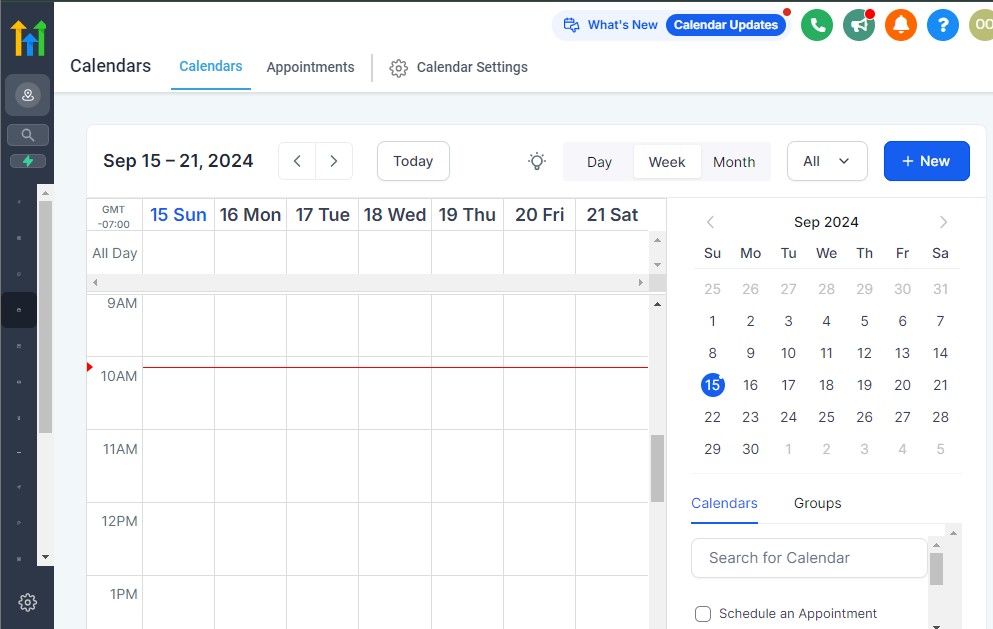
Scheduling appointments may seem like a simple task, but it can quickly become one of the biggest administrative challenges for a chiropractic practice.
Phone calls during busy hours, missed messages, double bookings, and constant back-and-forth communication can consume valuable time that could be spent serving patients. 😓
Fortunately, GoHighLevel's scheduling tools can help simplify the process.
By giving people an easy way to request consultations and book appointments based on your availability, you can improve efficiency while creating a more convenient experience for everyone involved.
Why Efficient Scheduling Matters
A smooth scheduling process benefits both your practice and your patients.
When booking appointments becomes complicated, some people may delay scheduling—or choose another provider altogether.
An organized system can help you:
- 📅 Reduce administrative workload.
- ☎️ Minimize unnecessary phone calls.
- ⏰ Decrease scheduling errors.
- 😊 Improve the patient experience.
- 📈 Increase consultation opportunities.
Making it easy for people to connect with your practice can positively impact your day-to-day operations.
Allow Patients to Book Online
Many people prefer the convenience of online scheduling.
With GoHighLevel, you can create custom booking calendars that allow prospective and existing patients to request appointments based on your available time slots.
You can embed these calendars on your:
- 🌐 Practice website
- 📄 Landing pages
- 📧 Email campaigns
- 📱 Text message campaigns
- 🔗 Social media profiles
This provides multiple opportunities for people to schedule consultations without needing to call your office.
Customize Your Appointment Settings
Every chiropractic practice operates differently.
GoHighLevel allows you to configure your scheduling system to match your workflow.
For example, you can set:
- 🕒 Appointment duration
- ⏳ Buffer times between appointments
- 📅 Available business hours
- 🚫 Days off and holidays
- 👥 Specific team member availability
- 🔔 Automated appointment confirmations
These settings help prevent scheduling conflicts and create a more organized calendar.
Different Types of Chiropractic Appointments
Depending on your practice, you may offer different appointment categories.
Examples include:
- 👋 New patient consultations
- 🔄 Follow-up visits
- 📞 Phone consultations
- 💬 Virtual consultations
- 📝 Assessment appointments
- 👥 Special event bookings
Creating separate calendars for different appointment types can help streamline the booking process.
Reduce No-Shows With Automated Reminders
One of the most valuable scheduling features in GoHighLevel is appointment automation.
Once someone books, the system can automatically send reminders leading up to the appointment.
For example:
🔔 Reminder Sequence
Immediately after booking:
- Send a confirmation email.
- Deliver a confirmation text message.
48 hours before the appointment:
- Send an email reminder.
24 hours before the appointment:
- Send an SMS reminder.
A few hours before the appointment:
- Deliver a final reminder with important details.
These reminders can help reduce missed appointments while keeping patients informed.
Simplify Rescheduling Requests
Life happens.
Sometimes patients need to change their appointments.
Instead of requiring multiple phone calls, GoHighLevel can provide options that make rescheduling more convenient.
Benefits include:
- 📅 Easier calendar management.
- 😊 Improved patient satisfaction.
- ☎️ Fewer administrative interruptions.
- ⏰ Faster response times.
Providing flexibility can contribute to a better overall experience.
Collect Information Before the Appointment
The scheduling process can also be used to gather basic information ahead of time.
For example, you might ask individuals to provide:
- 👤 Name
- 📧 Email address
- 📱 Phone number
- 📝 Reason for requesting a consultation
- 📅 Preferred appointment times
Having this information in advance helps your team prepare for the interaction.
Connect Scheduling With Your Workflows
One of GoHighLevel's strengths is the ability to connect scheduling with other automation features.
For example, when someone books an appointment, you can automatically:
- 📩 Send a welcome email.
- 📋 Assign an internal task to a team member.
- 🏷️ Update the contact's pipeline stage.
- 🔔 Trigger reminder campaigns.
- ⭐ Schedule a future review request.
This creates a seamless process from the initial booking through ongoing communication.
Create a Better Booking Experience
Today's consumers expect convenience.
If booking an appointment requires too many steps, people may lose interest before completing the process.
An efficient scheduling system helps create a positive first impression by offering:
- ✅ Easy online booking.
- ✅ Immediate confirmations.
- ✅ Helpful reminders.
- ✅ Flexible rescheduling options.
- ✅ Consistent communication.
These small improvements can have a significant impact on how people perceive your practice.
Turn Scheduling Into a Growth Opportunity
Appointment scheduling isn't just an administrative function.
It's often one of the first interactions people have with your chiropractic practice.
By using GoHighLevel to simplify consultations and appointment requests, you can improve efficiency, reduce manual work, and create a smoother experience for both your team and your patients. 🚀
The easier you make it for people to connect with your practice, the more opportunities you'll have to build lasting relationships and support the continued growth of your business.
Funnels & Lead Generation for Chiropractors
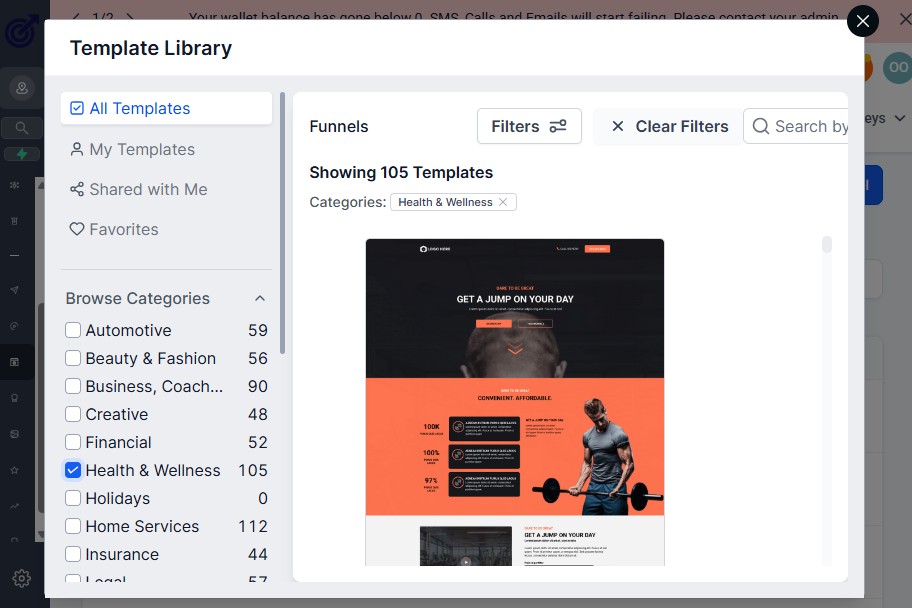
No matter how excellent your services are, people first need to discover your practice before they can become patients.
Many chiropractors rely solely on word-of-mouth referrals, which can certainly help grow a practice. However, if you want a more predictable and scalable way to attract new inquiries, having a lead generation system in place is essential. 🚀
This is where GoHighLevel's funnels and marketing tools can be incredibly valuable.
Instead of hoping that potential patients will find you, you can create intentional pathways that guide interested individuals from awareness to consultation requests.
What Is a Funnel?
A funnel is simply a step-by-step process designed to encourage someone to take a specific action.
For chiropractors, that action might be:
- 📅 Booking a consultation
- 📞 Requesting more information
- 📝 Completing an inquiry form
- 📧 Joining your email list
- 🎁 Downloading an educational resource
Rather than sending visitors to a generic website homepage, funnels focus on a single goal, making it easier for people to know what to do next.
Why Chiropractors Should Use Funnels
Traditional websites often contain a lot of information.
While that's helpful, it can sometimes overwhelm visitors.
Funnels simplify the experience by guiding people through a clear journey.
Benefits include:
- 🎯 A focused call-to-action
- 📈 Higher conversion potential
- 📊 Better tracking and reporting
- 🤖 Built-in automation opportunities
- ⏰ Less manual follow-up
Most importantly, funnels can help turn interest into action.
Types of Funnels Chiropractors Can Create
Depending on your goals, you can build different types of funnels within GoHighLevel.
📅 Consultation Booking Funnel
The purpose of this funnel is to encourage visitors to schedule a consultation.
A simple structure might look like this:
- Landing page
- Consultation request form
- Appointment scheduling page
- Confirmation page
- Automated follow-up sequence
This provides a smooth experience from the first click to the scheduled appointment.
📄 Information Request Funnel
Some people may not be ready to book immediately.
Instead, they may simply want to learn more.
This funnel could include:
- An introduction to your practice.
- Frequently asked questions.
- A contact form.
- Automated email follow-ups.
The goal is to nurture the relationship until they are ready to take the next step.
📧 Email Subscriber Funnel
Email marketing remains an effective way to stay connected with your audience.
You can invite visitors to subscribe in exchange for valuable content, such as:
- 💡 Practice updates
- 📢 Community announcements
- 📅 Event invitations
- 📚 Educational resources
Over time, these emails help keep your practice top of mind.
Build Landing Pages Without Technical Skills
One advantage of GoHighLevel is its drag-and-drop funnel builder.
You don't need coding knowledge to create pages designed to capture leads.
You can customize elements such as:
- 🖼️ Images
- 📝 Headlines
- 📋 Forms
- 📞 Call-to-action buttons
- 📹 Videos
- ⭐ Testimonials
This makes it easier to launch campaigns quickly.
Capture Leads Automatically
Every time someone completes a form, GoHighLevel can automatically move them into your CRM.
From there, you can trigger workflows that:
- 📧 Send welcome emails.
- 📱 Deliver text message responses.
- 📋 Assign internal tasks.
- 🏷️ Apply tags.
- 🔄 Add contacts to nurture campaigns.
This reduces the chances of inquiries being overlooked.
Drive Traffic to Your Funnels
A funnel works best when people actually visit it.
Chiropractors may promote their funnels through channels such as:
- 🌐 Organic website traffic
- 📱 Social media
- 📧 Email newsletters
- 💰 Paid advertising campaigns
- 🤝 Community partnerships
- 🔗 Google Business Profile links
Using multiple channels can help increase visibility and generate more inquiries.
Track What Is Working
One of the biggest advantages of digital funnels is the ability to measure performance.
GoHighLevel allows you to monitor important metrics, such as:
- 👀 Page views
- 📝 Form submissions
- 📅 Consultation bookings
- 📈 Conversion rates
- 💬 Campaign engagement
This data helps you identify what is performing well and where improvements may be needed.
Focus on Providing Value
Lead generation should never feel pushy.
Instead, the goal should be to educate, inform, and make it easy for people to connect with your practice.
When creating funnels, focus on:
- ✅ Clear messaging
- ✅ Simple navigation
- ✅ Easy booking options
- ✅ Professional design
- ✅ Helpful information
People appreciate straightforward experiences that respect their time.
Build a System That Supports Growth
Generating new inquiries doesn't have to rely entirely on chance.
With GoHighLevel, chiropractors can create structured lead generation systems that help attract potential patients, organize communication, and encourage meaningful next steps.
The combination of funnels, automation, CRM organization, and reporting gives your practice the tools needed to build a more predictable growth process. 📈
When your lead generation system is working consistently in the background, you can spend less time worrying about where your next inquiry will come from and more time focusing on delivering an excellent experience to the people you serve.
Managing Patient Intake, Documentation & Onboarding
First impressions matter.
The experience someone has from the moment they decide to work with your practice can influence how they perceive your professionalism, organization, and level of care.
Unfortunately, many chiropractic practices still rely heavily on paper forms, repeated phone calls, and manual administrative processes that can create unnecessary delays and frustration. 😓
With GoHighLevel, you can streamline many aspects of your patient intake and onboarding process, creating a smoother experience for both your team and your patients.
The goal isn't to eliminate the human touch.
Instead, it's to reduce administrative bottlenecks so your staff can spend more time building meaningful relationships.
Why Patient Onboarding Matters
A well-structured onboarding process helps set expectations from the beginning.
When patients know what to expect, they often feel more confident and prepared.
An effective onboarding system can help you:
- 😊 Create a positive first impression
- 📋 Gather important information efficiently
- ⏰ Reduce administrative workload
- 📞 Minimize repetitive follow-up calls
- 🤝 Build trust through clear communication
- 🚀 Improve overall operational efficiency
Even small improvements in the onboarding process can make a big difference.
Use Forms to Collect Information
One of the easiest ways to simplify intake is through digital forms.
Instead of asking patients to complete paperwork upon arrival, you can provide forms in advance through email or text message.
Depending on your practice needs, you might collect information such as:
- 👤 Basic contact details
- 📞 Preferred communication methods
- 📝 General intake information
- 🚨 Emergency contact information
- 📅 Scheduling preferences
- 📋 Practice-specific questionnaires
Collecting information beforehand can help appointments run more smoothly.
Automate the Intake Process
GoHighLevel allows you to automate parts of the onboarding journey.
For example:
🔄 New Patient Intake Workflow
Trigger: A consultation is scheduled.
Actions:
- 📧 Send a welcome email.
- 📝 Deliver digital intake forms.
- 📅 Confirm appointment details.
- 📱 Send reminder text messages.
- 📋 Notify team members about upcoming appointments.
This creates a consistent experience for every new patient entering your practice.
Create a Professional Welcome Experience
The onboarding process is also an opportunity to introduce people to your practice.
Your welcome communication may include:
- 👋 A brief introduction to your team.
- 📍 Directions to your office.
- 🚗 Parking instructions.
- 🕒 What to expect during the first visit.
- 📞 How to contact your office if questions arise.
Providing this information proactively can help reduce uncertainty and improve the patient experience.
Organize Documentation Efficiently
Keeping information organized is essential for maintaining efficient operations.
Within GoHighLevel, you can track:
- 📂 Form submissions
- 🏷️ Contact tags
- 📋 Pipeline progress
- 💬 Communication history
- 📅 Appointment activity
Having information stored in a centralized location makes it easier for your team to access the details they need.
Use Pipelines to Monitor Progress
Patient onboarding often involves multiple steps.
Using a CRM pipeline can help your team understand exactly where someone is in the process.
For example:
| Onboarding Stage | Purpose |
|---|---|
| 🆕 Consultation Scheduled | Appointment has been booked |
| 📋 Forms Sent | Intake documents have been delivered |
| ⏳ Forms Pending | Waiting for completion |
| ✅ Forms Completed | Information has been received |
| 🤝 Onboarding Complete | Patient is ready for ongoing engagement |
This visibility helps reduce confusion and keeps everyone aligned.
Improve Internal Team Coordination
If multiple team members participate in the intake process, automation can improve communication behind the scenes.
GoHighLevel can help you:
- 📋 Assign internal tasks.
- 🔔 Notify staff of new submissions.
- 👥 Update team members on pipeline movement.
- 📝 Track completed onboarding steps.
This minimizes the chances of important details being overlooked.
Continue Communication After Onboarding
The patient journey doesn't end after the initial intake process.
Ongoing communication remains important.
You can use GoHighLevel to send:
- 📧 Practice newsletters.
- 📱 Appointment reminders.
- ⭐ Review requests.
- 📢 Important announcements.
- 🤝 Relationship-building follow-ups.
Consistent communication helps strengthen connections over time.
Keep the Process Simple
One common mistake practices make is overcomplicating onboarding.
The objective should be to make the process as easy as possible.
Focus on creating an experience that is:
- ✅ Clear
- ✅ Convenient
- ✅ Professional
- ✅ Organized
- ✅ Patient-friendly
When people can move through the process without unnecessary obstacles, it reflects positively on your practice.
Create an Onboarding Experience That Builds Confidence
Patient intake isn't just about collecting information.
It's an opportunity to demonstrate that your chiropractic practice is organized, responsive, and committed to providing an excellent experience from day one. 🌟
By using GoHighLevel to streamline forms, automate communication, and organize onboarding workflows, you can reduce administrative stress while creating a smoother journey for everyone involved.
A well-designed onboarding process benefits your team, supports operational efficiency, and helps patients feel welcomed and informed from the very beginning.
Reputation Management & Reviews for Chiropractors
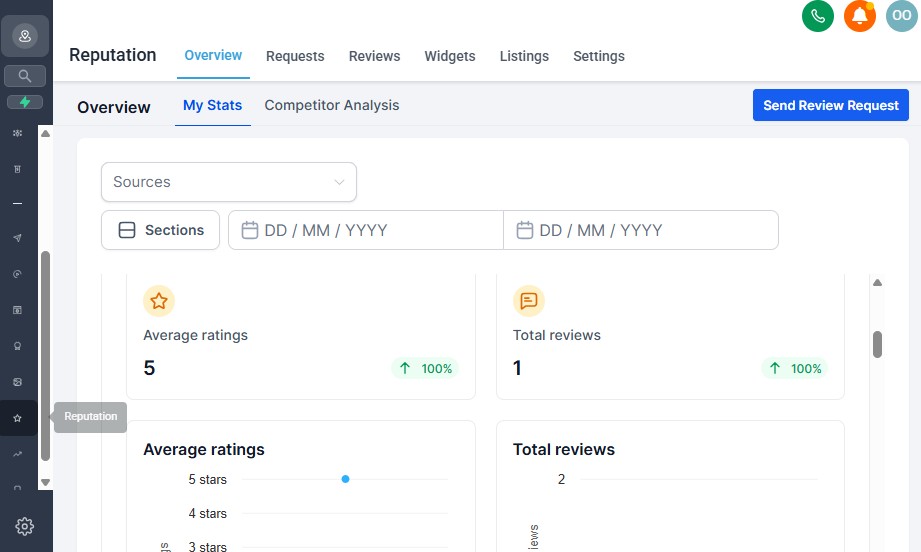
In today's digital world, your online reputation often becomes one of the first impressions potential patients have of your chiropractic practice.
Before scheduling a consultation, many people will search for reviews to learn more about other patients' experiences. ⭐
While referrals from friends and family remain valuable, online reviews have become an important part of the decision-making process.
The challenge?
Many satisfied patients never think about leaving a review unless they're asked.
This is where GoHighLevel's reputation management features can help.
By creating a simple and consistent process for requesting feedback, you can strengthen your online presence while saving valuable administrative time. 🚀
Why Reviews Matter for Chiropractors
Positive reviews can help build trust and credibility.
When prospective patients see that others have had professional and positive experiences with your practice, they may feel more confident reaching out.
A strong online reputation can help you:
- ⭐ Increase trust with potential patients
- 📍 Improve local visibility online
- 🤝 Reinforce your practice's credibility
- 📈 Generate more consultation inquiries
- 😊 Highlight positive patient experiences
Reviews don't guarantee growth, but they can certainly support your marketing efforts.
The Problem With Manual Review Requests
Many practices ask for reviews occasionally—but not consistently.
Common reasons include:
- 😓 Staff members forget to ask.
- ⏰ The office gets too busy.
- 📞 Follow-up calls take priority.
- 📝 There isn't a clear process in place.
As a result, valuable feedback opportunities are often missed.
Automate Your Review Requests
GoHighLevel allows you to automate review request campaigns following key interactions.
For example:
⭐ Review Request Workflow
Trigger: A patient completes an appointment.
Actions:
- 📧 Send a thank-you email.
- 📱 Deliver a text message requesting feedback.
- 🔗 Include a direct review link.
- ⏰ Send a gentle reminder if no response is received.
This creates a consistent process without requiring manual effort every time.
Make It Easy to Leave a Review
Convenience matters.
The easier you make the process, the more likely people are to participate.
Best practices include:
- 🔗 Providing a direct review link
- 📱 Using mobile-friendly communication
- ✍️ Keeping your request short and polite
- 😊 Expressing genuine appreciation
For example:
“Thank you for choosing our practice. If you'd be willing to share your experience, we'd truly appreciate your feedback. Your review helps others learn more about our services.”
Simple requests often perform better than lengthy messages.
Monitor Your Online Reputation
Requesting reviews is only part of the process.
It's also important to monitor your reputation over time.
Regularly reviewing feedback can help you:
- 👀 Identify trends in patient experiences.
- 💡 Discover opportunities for improvement.
- 🙌 Recognize team members for outstanding service.
- 📈 Track the growth of your online presence.
Even constructive feedback can provide valuable insights.
Respond Professionally to Reviews
Whenever appropriate, consider acknowledging reviews thoughtfully and professionally.
When responding:
- 💬 Thank individuals for their feedback.
- 😊 Maintain a respectful tone.
- 🚫 Avoid discussing personal details publicly.
- 🤝 Focus on appreciation and professionalism.
Your responses are often visible to future patients, making them an extension of your brand.
Use Reviews in Your Marketing
Positive feedback can also support your broader marketing efforts.
With permission where appropriate, testimonials may be incorporated into:
- 🌐 Website pages
- 📄 Landing pages
- 📧 Email campaigns
- 📱 Social media content
- 🎯 Advertising materials
Authentic experiences can help prospective patients feel more comfortable taking the next step.
Build a Reputation Management Habit
The most successful reputation strategies rely on consistency rather than occasional effort.
Instead of requesting reviews only when someone remembers, establish a repeatable process that operates in the background.
A sustainable approach may include:
- ✅ Automated review requests.
- ✅ Periodic reputation monitoring.
- ✅ Professional responses to feedback.
- ✅ Ongoing improvements based on patient input.
Over time, these small actions can have a meaningful impact.
Your Reputation Is One of Your Most Valuable Assets
Every interaction contributes to how people perceive your chiropractic practice.
While excellent service remains the foundation of a strong reputation, having systems in place to collect, manage, and learn from feedback can amplify those efforts. 🌟
GoHighLevel gives chiropractors the ability to turn reputation management into an organized process rather than an afterthought.
By consistently encouraging reviews and staying engaged with patient feedback, you can strengthen trust, enhance your online presence, and support the continued growth of your practice.
Learn More:
- GoHighLevel Review: (My Experience After 4 Years)
- What is GoHighLevel? [A User Experience]
- GoHighLevel Features: Complete List
- GoHighLevel Integrations
- GoHighLevel Pricing: (Costs Breakdown)
- Is GoHighLevel a CRM?: (Find Out Here💡)
- Is GoHighLevel Legit?: (Find Out Here 💡)
- Is GoHighLevel Worth It? (Find Out Here 💡)
- 15+ GoHighLevel Benefits: (Why You Need It)
Reporting & Analytics for Chiropractic Practices
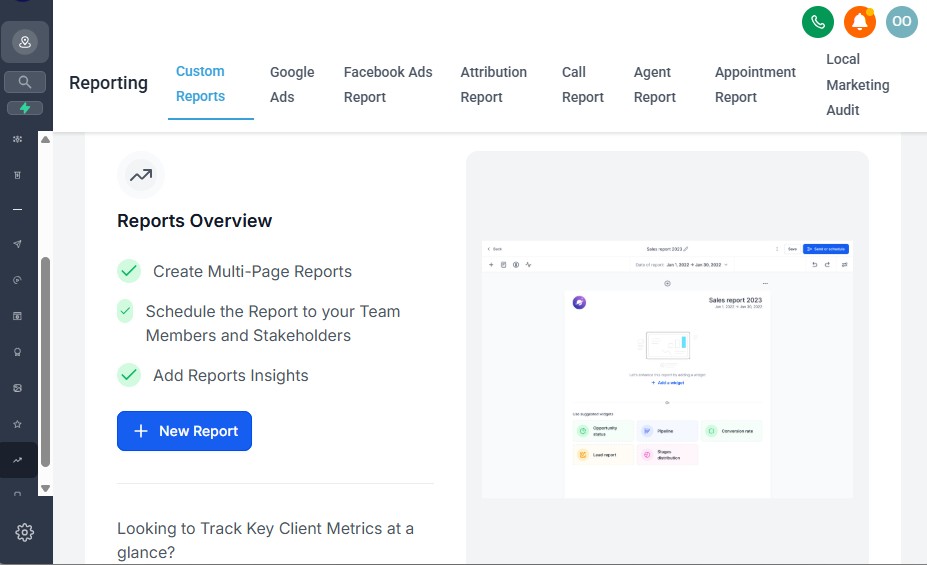
Making decisions based on assumptions can be risky for any business.
Without clear data, it becomes difficult to understand what's working, what's not working, and where improvements are needed. 📊
This is why reporting and analytics are so important.
While chiropractors often focus heavily on delivering excellent patient experiences, it's equally important to monitor the business side of the practice.
With GoHighLevel's reporting tools, you can gain valuable insights into your marketing activities, patient acquisition efforts, communication performance, and overall operational efficiency.
The goal isn't to track every possible metric.
Instead, it's to focus on the numbers that help you make smarter business decisions. 🚀
Why Reporting Matters for Chiropractors
Having access to accurate information allows you to move beyond guesswork.
Rather than asking:
- ❓ “Are our marketing efforts working?”
- ❓ “Which lead sources generate the most inquiries?”
- ❓ “Are we following up consistently?”
- ❓ “How many consultations are being scheduled?”
you can use real data to find answers.
Effective reporting can help you:
- 📈 Identify growth opportunities
- 🎯 Improve marketing performance
- 🤝 Enhance the patient experience
- ⏰ Increase operational efficiency
- 💰 Allocate resources more effectively
Track Lead Sources
Understanding where your inquiries come from can help you invest your time and budget wisely.
GoHighLevel can help you monitor lead sources such as:
- 🌐 Website inquiries
- 📱 Social media campaigns
- 📧 Email marketing efforts
- 💰 Paid advertising campaigns
- 🤝 Referral initiatives
- 📄 Landing pages and funnels
When you know what's generating results, you can focus more attention on those channels.
Monitor Consultation Activity
Scheduling consultations is often an important step in the patient acquisition journey.
Tracking consultation activity can provide useful insights, including:
- 📅 Number of consultations booked
- 🚫 Missed appointments
- 🔄 Rescheduled consultations
- ✅ Completed consultations
- 📈 Consultation trends over time
This information can help you identify patterns and make adjustments when necessary.
Evaluate Marketing Performance
If you're investing time or money into marketing, measuring performance is essential.
GoHighLevel reporting can help you assess:
- 👀 Page visits
- 📝 Form submissions
- 📧 Email engagement
- 📱 SMS response rates
- 🎯 Funnel conversion rates
- 🚀 Campaign effectiveness
Even simple reporting can reveal opportunities for improvement.
Measure Follow-Up Effectiveness
Following up consistently is important, but it's also helpful to understand whether your efforts are generating engagement.
Reporting can provide visibility into:
- 📧 Email open rates
- 💬 Response rates
- 📱 SMS engagement
- ⏱️ Speed of follow-up
- 🔄 Workflow completion rates
These insights can help refine your communication strategies.
Monitor Team Activity
If you have administrative staff or multiple practitioners, reporting can improve accountability and coordination.
Examples include tracking:
- 📋 Task completion
- ☎️ Call activity
- 📞 Response times
- 🏷️ Pipeline updates
- 📅 Appointment management activities
The objective isn't to micromanage.
Instead, it's to ensure that systems are functioning as intended.
Use Dashboards for Quick Insights
One of the advantages of GoHighLevel is having important information accessible from a centralized dashboard.
Rather than pulling reports from multiple systems, you can monitor key metrics in one place.
This may help you answer questions such as:
- 📈 Are inquiries increasing or decreasing?
- 🎯 Which campaigns are producing the strongest results?
- 📅 Are consultations being booked consistently?
- 💬 Is our communication strategy effective?
Having this visibility supports faster decision-making.
Focus on Metrics That Matter
Not every data point deserves equal attention.
To avoid becoming overwhelmed, focus on metrics that align with your goals.
For many chiropractic practices, this might include:
- ✅ New inquiries generated
- ✅ Consultations scheduled
- ✅ Consultation completion rates
- ✅ Review growth
- ✅ Marketing campaign performance
- ✅ Patient engagement trends
Tracking the right metrics often provides more value than tracking everything.
Use Data to Improve Over Time
Reporting shouldn't be viewed as a one-time activity.
Instead, it should become part of your ongoing business strategy.
Regular reviews can help you:
- 💡 Identify strengths.
- 🔍 Uncover inefficiencies.
- 📈 Optimize marketing campaigns.
- 🤝 Improve patient communication.
- 🚀 Support long-term growth.
Small adjustments based on reliable data can lead to meaningful improvements over time.
Better Decisions Start With Better Insights
Successful chiropractic practices don't rely solely on instinct.
They combine experience with information.
By using GoHighLevel's reporting and analytics tools, you can gain a clearer understanding of how your practice is performing and where opportunities exist for improvement. 📊
When you consistently monitor the metrics that matter most, you're better equipped to refine your processes, strengthen your marketing efforts, and build a more efficient and sustainable practice.
After all, you can't improve what you don't measure.
Integrating GoHighLevel With Chiropractic Tools & Platforms
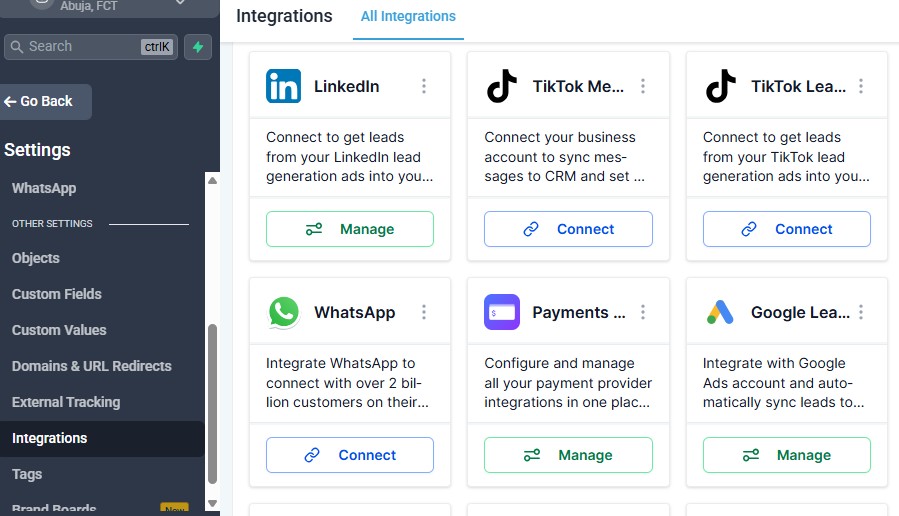
One of the biggest advantages of using GoHighLevel is that it doesn't have to operate in isolation.
Many chiropractic practices already use various software solutions for scheduling, payments, communication, accounting, and other day-to-day activities. Replacing every tool at once isn't always practical—or necessary.
The good news is that GoHighLevel offers several integration options that can help connect your systems and improve workflow efficiency. 🔗
The goal isn't to add more complexity.
Instead, it's to create a more connected business environment where information flows more smoothly between the tools you rely on.
Why Integrations Matter
When systems don't communicate with each other, your team may end up performing the same tasks repeatedly.
For example:
- Copying contact details from one platform to another.
- Sending manual notifications.
- Updating records across multiple systems.
- Tracking information in several different places.
These repetitive tasks can increase the risk of errors and consume valuable time. 😓
Integrations help reduce these inefficiencies by allowing your tools to work together more effectively.
Benefits may include:
- ⏰ Saving time
- 🤝 Improving team coordination
- 📋 Reducing manual data entry
- 🚀 Enhancing operational efficiency
- 😊 Creating smoother patient experiences
Common Integration Categories for Chiropractors
Every chiropractic practice is different, but there are several types of tools that many practices commonly use alongside GoHighLevel.
📅 Scheduling Platforms
If your practice already uses a scheduling solution, integrations can help keep your appointment workflows organized.
Potential use cases include:
- Synchronizing booking information.
- Triggering automated reminders.
- Updating contact records after appointments.
- Launching follow-up campaigns.
💳 Payment Processing Solutions
Integrating payment platforms can help streamline certain administrative tasks.
Possible applications include:
- Sending payment requests.
- Tracking completed transactions.
- Triggering confirmation communications.
- Automating onboarding workflows after payment.
This can help improve efficiency while creating a smoother experience for patients.
📧 Email and Communication Tools
GoHighLevel already offers built-in communication capabilities, but some practices may still rely on additional communication platforms.
Integrations may support activities such as:
- Contact synchronization.
- Campaign coordination.
- Workflow automation.
- Centralized communication tracking.
The objective is to maintain consistency across your communication channels.
📊 Analytics and Advertising Platforms
If you're investing in digital marketing, connecting advertising and analytics tools can provide additional insights into campaign performance.
Examples of potential benefits include:
- 📈 Tracking lead sources.
- 🎯 Monitoring campaign effectiveness.
- 🔍 Understanding conversion trends.
- 💡 Identifying growth opportunities.
Better visibility often leads to better decision-making.
💼 Accounting and Financial Software
Administrative efficiency extends beyond marketing and scheduling.
Integrating accounting systems may help simplify internal processes by supporting:
- Invoice management.
- Transaction tracking.
- Financial reporting workflows.
- Administrative coordination.
Reducing duplicate work allows your team to focus on higher-value activities.
🌐 Website and Funnel Integrations
Your website is often one of the first places prospective patients interact with your practice.
Connecting GoHighLevel with your website can help you:
- 📝 Capture inquiry form submissions.
- 👥 Automatically create CRM contacts.
- 📧 Trigger follow-up campaigns.
- 📅 Direct visitors toward consultation booking.
- 📊 Monitor lead generation performance.
This creates a more seamless experience from initial interest to ongoing communication.
Use Zapier to Expand Possibilities
One of the most flexible ways to extend GoHighLevel's functionality is through Zapier.
Zapier acts as a bridge between thousands of applications, enabling automated actions without requiring advanced technical knowledge.
Examples might include:
- ⚡ Adding new form submissions to a spreadsheet.
- ⚡ Sending internal notifications when appointments are scheduled.
- ⚡ Updating contact records across platforms.
- ⚡ Connecting specialized software with GoHighLevel workflows.
This flexibility allows practices to tailor their systems to their unique needs.
Evaluate Integrations Carefully
Just because an integration is available doesn't mean it's necessary.
Before connecting additional tools, ask questions such as:
- ❓ Will this save our team time?
- ❓ Does it eliminate repetitive work?
- ❓ Will it improve the patient experience?
- ❓ Is the integration easy to maintain?
- ❓ Does it support our long-term goals?
The best integrations solve problems rather than create new ones.
Build Your Technology Stack Gradually
You don't have to integrate everything on day one.
Start with the systems that have the greatest impact on your daily operations.
For many chiropractic practices, this may include:
- ✅ Scheduling workflows.
- ✅ Website lead capture.
- ✅ Communication automation.
- ✅ Payment-related processes.
- ✅ Marketing and reporting tools.
As your practice evolves, you can continue refining and expanding your technology ecosystem.
Create a More Connected Practice
Technology should simplify your work – not complicate it.
By integrating GoHighLevel with the tools and platforms that support your chiropractic practice, you can reduce manual tasks, improve operational efficiency, and create a more streamlined experience for both your team and your patients. 🚀
The ultimate goal is to build systems that work together behind the scenes, allowing you to spend less time managing technology and more time focusing on the growth and success of your practice.
When implemented thoughtfully, integrations can transform disconnected processes into a well-coordinated business operation.
Frequently Asked Questions
1. Is GoHighLevel a good fit for chiropractic practices?
Yes, GoHighLevel can be a valuable tool for chiropractic practices that want to improve their marketing, communication, appointment scheduling, and lead management processes.
It provides features such as CRM management, automation, online booking, funnels, and reputation management, all within a single platform. However, you should evaluate whether its capabilities align with your specific operational needs and existing systems.
2. Can GoHighLevel help chiropractors attract new patients?
GoHighLevel includes several tools that can support your lead generation efforts. For example, you can create landing pages, marketing funnels, online forms, and automated follow-up campaigns designed to engage potential patients.
While no platform can guarantee results, having organized marketing systems in place can help you generate and manage inquiries more effectively. 📈
3. Can patients book appointments through GoHighLevel?
Yes. GoHighLevel offers appointment scheduling features that allow people to request consultations based on your availability.
You can customize your booking calendars, automate confirmation messages, and send appointment reminders to create a more convenient scheduling experience for both your team and your patients. 📅
4. Can GoHighLevel automate communication with patients?
Absolutely. One of GoHighLevel's strengths is its automation capabilities.
You can create workflows that automatically send:
- 📧 Email follow-ups
- 📱 SMS reminders
- 🔔 Appointment confirmations
- ⭐ Review requests
- 🤝 Re-engagement campaigns
These automations can help improve consistency while reducing repetitive administrative tasks.
5. Does GoHighLevel replace every tool used in a chiropractic practice?
Not necessarily.
GoHighLevel is designed to serve as an all-in-one marketing and customer management platform, but some chiropractic practices may continue using specialized software for certain operational functions.
Many practices choose to integrate GoHighLevel with their existing tools to create a more connected and efficient workflow. The best approach depends on your practice's unique needs, goals, and technology stack.
Final Thoughts
Running a chiropractic practice involves balancing many responsibilities.
Beyond providing excellent care, you also need to manage appointments, communicate with patients, generate new inquiries, maintain your online reputation, and ensure that daily operations run smoothly.
Trying to handle all of these tasks manually – or across multiple disconnected platforms – can quickly become overwhelming. 😓
This is where GoHighLevel for Chiropractors has the potential to make a meaningful difference.
By combining tools for CRM management, automation, appointment scheduling, marketing funnels, review management, and reporting, GoHighLevel gives chiropractors the opportunity to streamline many aspects of the business side of their practice.
Throughout this guide, we've explored how chiropractors can use GoHighLevel to:
- 👥 Organize patient relationships using the CRM
- 🤖 Automate follow-ups and ongoing communication
- 📅 Simplify appointment scheduling and reminders
- 📈 Generate new inquiries through funnels and marketing campaigns
- 📝 Improve patient intake and onboarding processes
- ⭐ Build and maintain a stronger online reputation
- 📊 Track performance through reporting and analytics
- 🔗 Integrate important business tools and platforms
Of course, GoHighLevel isn't a one-size-fits-all solution.
Every chiropractic practice has unique goals, workflows, and technology requirements. The key is to evaluate which features align with your current needs and identify areas where automation and better systems could create the greatest impact.
If you're just getting started, don't feel pressured to implement everything at once.
Begin with a few high-impact areas, such as:
- ✅ Appointment scheduling
- ✅ Lead management
- ✅ Automated follow-ups
- ✅ Review requests
As your confidence grows, you can gradually expand your use of the platform and build more sophisticated workflows over time.
At the end of the day, technology should support your practice – not complicate it.
The right systems can help you save time, improve organization, enhance communication, and create a better experience for both your team and your patients. 🚀
If you're looking for a platform that brings together marketing, communication, and practice growth tools under one roof, GoHighLevel is certainly worth considering.
Ready to Explore GoHighLevel?
If you'd like to see how GoHighLevel works for yourself, you can start with a free trial and explore the features discussed throughout this guide.
Take the time to test the tools, build a few simple automations, and determine whether the platform fits the way your chiropractic practice operates.
After all, the best business systems are the ones that help you work smarter, stay organized, and focus more of your energy on serving the people who trust your practice. 😊
