
If you’re considering GoHighLevel, one of the first questions you’ll have is:
How much does GoHighLevel really cost – and is it worth it?
At first glance, the pricing looks simple.
But once you dig deeper, you’ll realize there’s more to understand – especially when it comes to choosing the right plan and knowing what you’ll actually pay monthly.
In this guide, you’ll get a clear, no-fluff breakdown of GoHighLevel pricing, including:
- All available plans and what they include
- The real monthly cost (including extras)
- Which plan is best for your business
- Whether GoHighLevel is worth the price
👉 By the end, you’ll know exactly which plan to choose – and avoid overpaying.
💰 GoHighLevel Pricing Overview
| Category | Item | Cost | What It Means for You |
|---|---|---|---|
| Platform Plans | Starter Plan | $97/month | Best for solo users |
| Unlimited Plan | $297/month | Best for agencies | |
| SaaS Pro Plan | $497/month | Best for SaaS reselling | |
| Email Costs | Email sending | ~$0.000135 – $0.000675 per email | ~$0.13–$0.67 per 1,000 emails |
| SMS (Text Messages) | Outbound SMS | ~$0.0079 per segment | Cost increases with longer messages |
| Inbound SMS | ~$0.0079 per message | You pay for replies too | |
| MMS (Images/Videos) | MMS messages | ~$0.02 – $0.03 per message | 2–3x more expensive than SMS |
| Phone System (LC Phone) | Local phone number | ~$1 – $2/month per number | Required for calls/SMS |
| Outbound calls | ~$0.014 – $0.018 per minute | Charged per minute | |
| Inbound calls | ~$0.0085 per minute | Charged when receiving calls | |
| SMS Compliance Fees | A2P Registration | ~$4–$15 (one-time + monthly) | Required for SMS campaigns |
| AI Features | AI usage | ~$20–$100/month (usage-based) | Depends on how much you use AI |
| Automation / Workflows | Premium actions | Variable | Charged based on usage |
| Wallet System | Pay-as-you-go billing | Based on usage | You only pay for what you use |
⚠️ What Most People Don’t Tell You
The base price ($97–$497/month) is just the platform access.
👉 Once you start using:
- Emails
- SMS
- Calls
- AI
Your actual cost increases.
In many cases:
- Expect 30%–50% extra on top of your plan, depending on usage
🧠 Simple Example (Realistic Monthly Cost)
Let’s say you’re on the $97 plan:
- Emails (10,000) → ~$7
- SMS (500 messages) → ~$4–$6
- Calls → ~$5–$15
👉 Total ≈ $110–$130/month
💡 Key Takeaway
With GoHighLevel:
- You pay a base subscription
- Plus usage-based costs (emails, SMS, calls, AI)
👉 This is actually a benefit because:
You only pay for what you use – not fixed bundles.
💸 HighLevel Monthly Cost Breakdown (Beginner vs Agency vs Advanced)
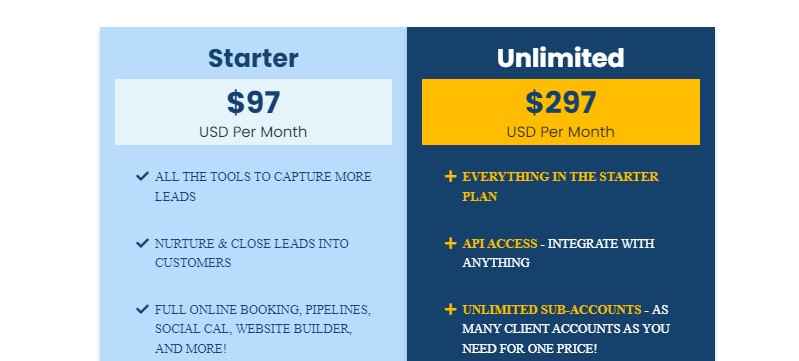
The pricing of GoHighLevel isn’t just about the base plan – you also pay for usage like emails, SMS, and calls.
To help you understand what you’ll actually spend, here are realistic monthly scenarios:
🟢 Beginner (Solo Business Owner)
Best for: Freelancers, coaches, or small service businesses just getting started
| Cost Type | Estimated Monthly Cost |
|---|---|
| Starter Plan | $97 |
| Emails (10,000) | ~$5–$10 |
| SMS (200–500 messages) | ~$2–$6 |
| Calls | ~$5–$10 |
| Total Estimated Cost | $110 – $125/month |
👉 What this means:
You can run your entire business for just over $100/month if your usage is low.
🔵 Agency (Managing Clients)
Best for: Agencies handling multiple clients and campaigns
| Cost Type | Estimated Monthly Cost |
|---|---|
| Unlimited Plan | $297 |
| Emails (50,000+) | ~$25–$50 |
| SMS (1,000–3,000 messages) | ~$10–$30 |
| Calls | ~$20–$50 |
| Total Estimated Cost | $350 – $425/month |
👉 What this means:
Even with multiple clients, your costs stay predictable—and you can charge clients far more than this.
🔴 Advanced (High-Volume / SaaS Users)
Best for: Agencies scaling or running SaaS with high usage
| Cost Type | Estimated Monthly Cost |
|---|---|
| SaaS Pro Plan | $497 |
| Emails (100,000+) | ~$50–$100 |
| SMS (5,000+ messages) | ~$40–$100 |
| Calls | ~$50–$150 |
| AI & Advanced Features | ~$20–$100 |
| Total Estimated Cost | $650 – $950+/month |
👉 What this means:
Costs increase with scale – but so does your revenue potential.
⚠️ Important Things to Remember
- Costs vary based on how much you use emails, SMS, and calls
- You are billed through a wallet system (pay-as-you-go)
- You can control your spending by limiting usage
🧠 The Real Insight
With GoHighLevel:
Your cost grows as your business grows—which is actually a good thing.
👉 Because it means:
- You’re only paying for what you use
- Your expenses scale with your results
💡 Bottom Line
- Beginner → ~$110/month
- Agency → ~$350/month
- Advanced → $650+
👉 The key is not just the cost – but what you can earn using the platform.
How to Get a Huge Discount on GoHighLevel Pricing
If you’re looking to save money on GoHighLevel, the easiest way is to choose the annual billing option instead of paying monthly.
💰 Save More With Annual Pricing
When you pay yearly, you essentially get a discount equivalent to 2 months free.
👉 In simple terms, you pay for 10 months instead of 12 months.
📊 Monthly vs Annual Pricing Comparison
| Plan | Monthly Price | Annual Price | Effective Monthly (Annual) |
|---|---|---|---|
| Agency Starter | $97 | $970 | $80.83 |
| Agency Unlimited | $297 | $2,970 | $247.50 |
| Agency SaaS Pro | $497 | $4,970 | $414.16 |
⚡ What This Means for You
For example:
- Instead of paying $297/month for the Unlimited plan
- You effectively pay $247.50/month when billed annually
👉 That’s a significant saving over time – especially if you plan to use GoHighLevel long-term.
🧠 Is Annual Billing Worth It?
👉 Choose annual billing if you:
- Plan to use GoHighLevel for several months or longer
- Want to reduce your overall software cost
- Are committed to scaling your business
👉 Stick with monthly if you:
- Want to test the platform first
- Prefer flexibility without long-term commitment
🚀 Pro Tip
Before committing to the annual plan, start with the free trial to explore the platform and make sure it fits your needs.
Is GoHighLevel Worth the Price?
At first glance, GoHighLevel might seem expensive.
But when you look deeper, the real question is not:
“How much does GoHighLevel cost?”
It’s:
“What value do you get for what you pay?”
💡 What You’re Actually Paying For
With GoHighLevel, you’re paying for two things:
1. Platform Access
- $97/month (Starter)
- $297/month (Unlimited)
- $497/month (SaaS Pro)
2. Usage-Based Costs
- Emails
- SMS
- Calls
- AI features
👉 This is a pay-as-you-go system, meaning you only pay for what you use – not fixed bundles
💰 The Real Value (This Is What Most People Miss)
Most businesses don’t realize this:
GoHighLevel replaces tools like:
- CRM software
- Funnel builders
- Email marketing platforms
- SMS tools
- Booking systems
- Automation platforms
👉 And instead of paying for all of these separately, you pay for one system.
📊 Real Cost vs Real Value
Even when you include usage costs:
- Most users pay 20 – 40% more than the base plan depending on usage
- Emails cost around $0.675 per 1,000 sends
- SMS costs about $0.0079 per segment
👉 So yes, your total cost increases – but so does your capability.
⚖️ When GoHighLevel Is Worth It
👉 It’s worth it if you:
- Use automation to follow up with leads
- Run funnels or marketing campaigns
- Manage multiple clients or pipelines
- Want to scale your business
👉 In these cases, it can:
- Save time
- Increase conversions
- Reduce tool costs
- Generate more revenue
❌ When It’s NOT Worth It
👉 It may NOT be worth it if you:
- Only need a simple CRM
- Don’t plan to use automation
- Won’t use most of the features
👉 In that case, you’re paying for power you won’t use.
🧠 The Honest Truth
GoHighLevel is not “cheap” – and it’s not meant to be.
It’s a business system, not just a tool.
If you use it properly, it can easily pay for itself.
If you don’t, it will feel expensive.
🚀 Final Verdict
👉 Yes – GoHighLevel is worth the price for the right user.
Especially if you:
- Want to simplify your tech stack
- Need automation
- Are serious about growth
👉 But if you just want something basic, there are simpler (and cheaper) options.
Learn More:
- GoHighLevel Review: (My Experience After 4 Years)
- What is GoHighLevel? [A User Experience]
- GoHighLevel Features: Complete List
- GoHighLevel Integrations
- GoHighLevel Pricing: (Costs Breakdown)
- Is GoHighLevel a CRM?: (Find Out Here💡)
- Is GoHighLevel Legit?: (Find Out Here 💡)
- Is GoHighLevel Worth It? (Find Out Here 💡)
- 15+ GoHighLevel Benefits: (Why You Need It)
How to Choose the Right GoHighLevel Pricing Plan
Choosing the right plan on GoHighLevel comes down to how you plan to use it.
Instead of overthinking it, use this simple breakdown to decide quickly.
🟢 Choose the Starter Plan ($97/month) If…
👉 You’re running your own business and don’t need to manage clients.
This plan is perfect if you:
- Are a freelancer, coach, or consultant
- Want to capture and manage your own leads
- Need funnels, automation, and a CRM in one place
- Are just getting started with GoHighLevel
👉 Best for: Solo business owners who want an all-in-one system without extra complexity.
🔵 Choose the Unlimited Plan ($297/month) If…
👉 You manage clients or plan to scale your business.
This plan is ideal if you:
- Run a marketing or service-based agency
- Handle multiple clients
- Need separate accounts for each client
- Want to deliver services like funnels, automation, and lead generation
👉 Best for: Agencies and growing businesses (most popular choice).
🔴 Choose the SaaS Pro Plan ($497/month) If…
👉 You want to build a recurring revenue business.
This plan is right if you:
- Want to resell GoHighLevel under your own brand
- Plan to create SaaS offers for clients
- Need advanced features like rebilling and white-label SaaS mode
👉 Best for: Agencies building a SaaS business model.
⚡ Quick Decision Shortcut
If you’re still unsure, use this:
- Running your own business? → Starter
- Managing clients? → Unlimited
- Want to resell as SaaS? → SaaS Pro
⚠️ Common Mistake to Avoid
Don’t choose a plan based only on price.
👉 Instead, choose based on:
- Your business model
- How many clients you manage
- Whether you plan to scale
👉 Picking the wrong plan can limit your growth or cost you more later.
🧠 Final Tip
Start simple if you’re unsure.
You can always:
- Upgrade later
- Scale as your business grows
👉 The key is to choose a plan that fits your current needs while allowing room to grow.
How to Get Started with GoHighLevel
Here's the full breakdown of how to get started with GoHighLevel right away.
Step 1: GoHighLevel Account Creation
In order to start your journey with GoHighLevel, head over to gohighlevel.com/30-day-trial, and you will be redirected to the page below.
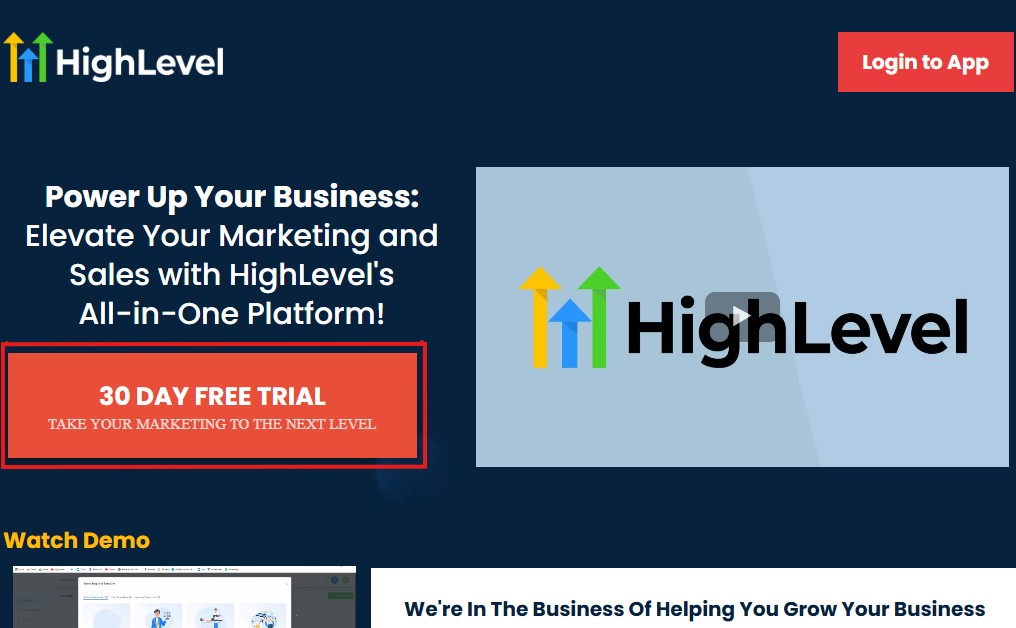
The next thing you want to do is click “30 DAY FREE TRIAL” at the left corner of your screen, and the page below will pop up.
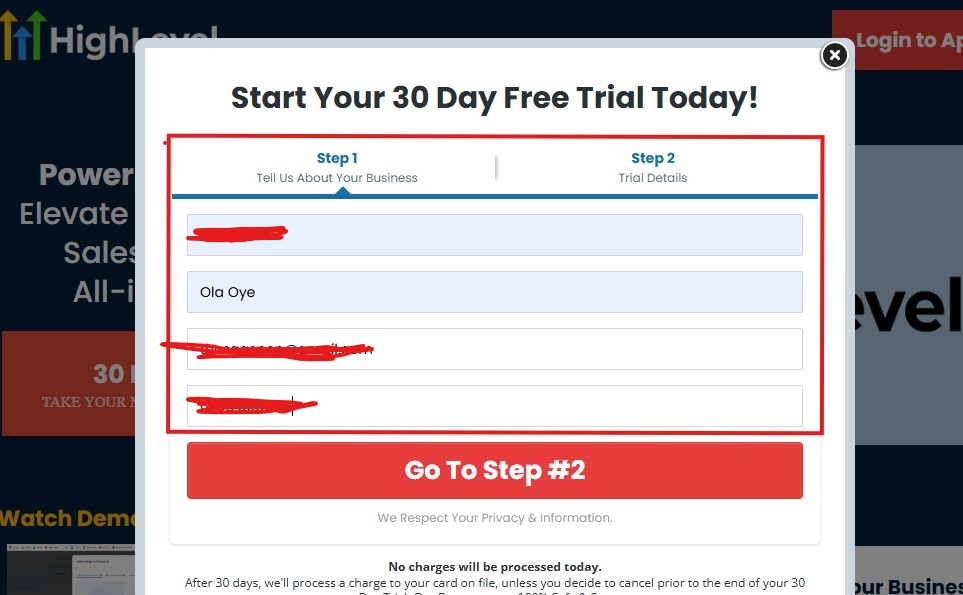
As you can see above, you need to supply your:
- Business name
- Your name
- Email address
- Phone number
Supply everything accordingly and click on “Go To Step #2” and the page below will pop up.
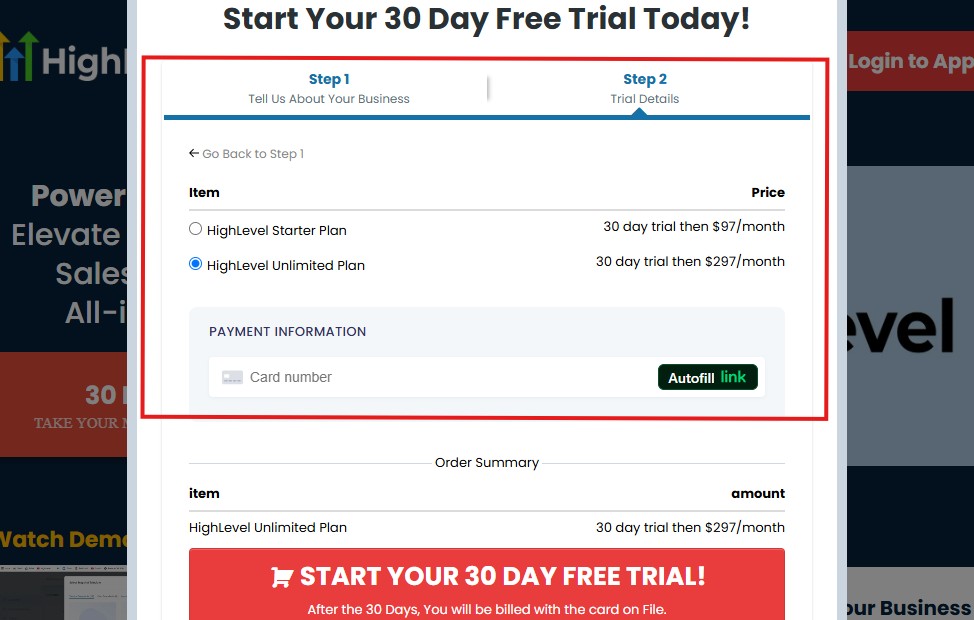
As you can see above, you need to:
- Select a plan
- Enter your credit card details
You can select the “Unlimited Plan that goes for $297/month“. You can upgrade or downgrade later.
Then click on “START YOUR 30 DAY FREE TRIAL” and you will have the page below next!
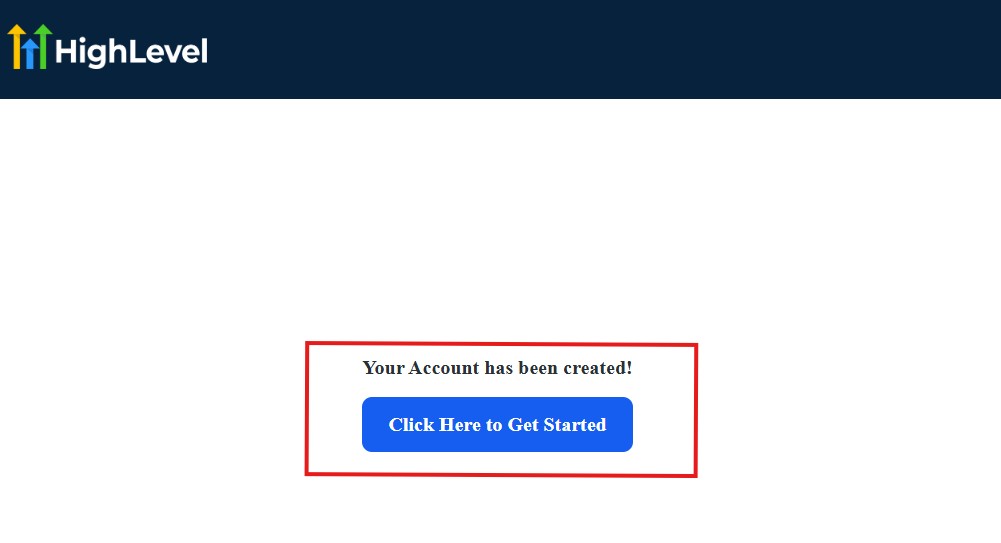
Then, click on “Click Here to Get Started“
And then, you need to start answering the onboarding questions.
Get GoHighLevel for 30-Day Free Now➡
Step 2: GoHighLevel Onboarding Questions
The onboarding questions help GoHighLevel understand why you have signed up for GHL and help personalize your experience accordingly.
After you have clicked on “Click Here to Get Started.” above, you will see the page below.
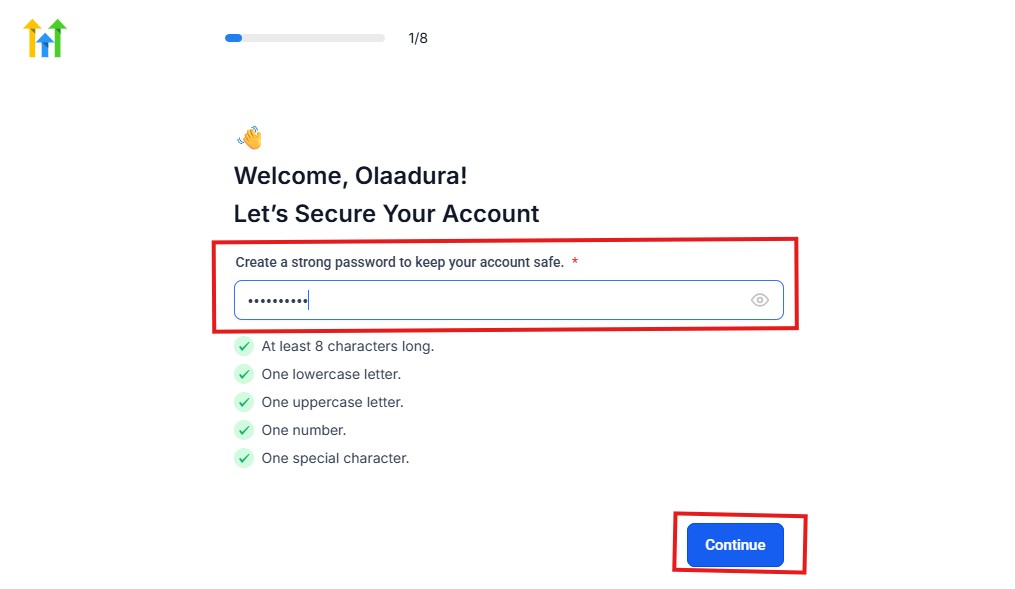
As you can see above, you need to choose a password, and it must match these characters:
- At least 8 characters long
- One lowercase letter
- One uppercase letter
- One number
- One special character
If your password matches everything above, then everything should be green and hit the continue blue button.
Next, you have the page below.
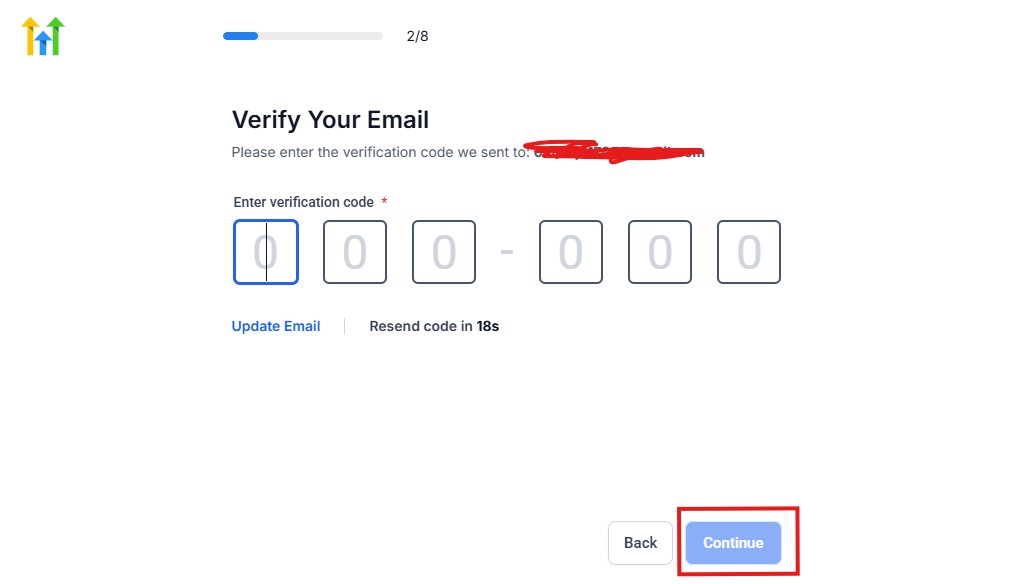
From the image above, you need to confirm your email address and do the same thing with your phone number, too.
The next page will ask you for your billing address.
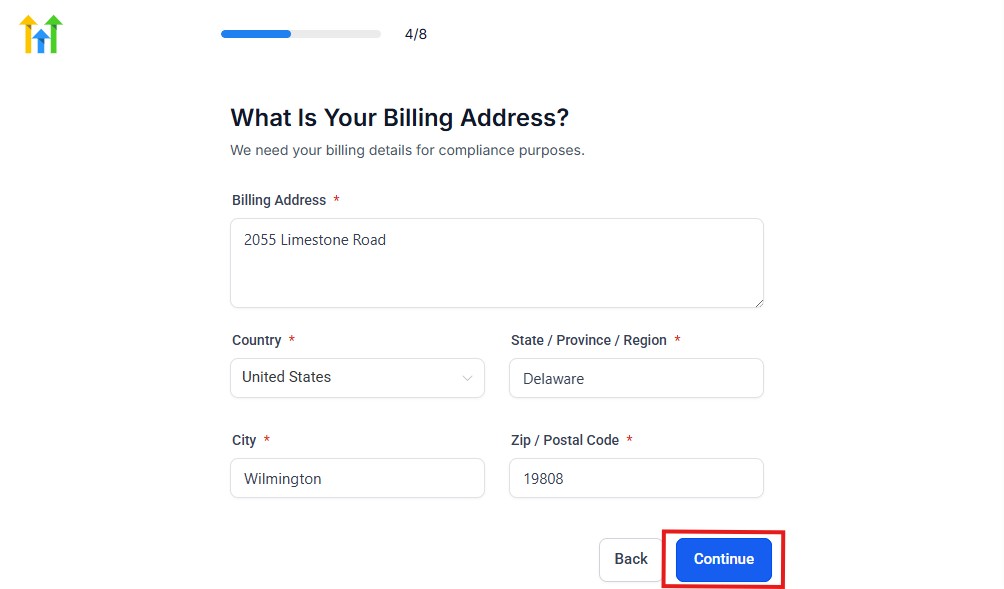
Supply everything accordingly and click on the continue blue button, and you will have the page below.
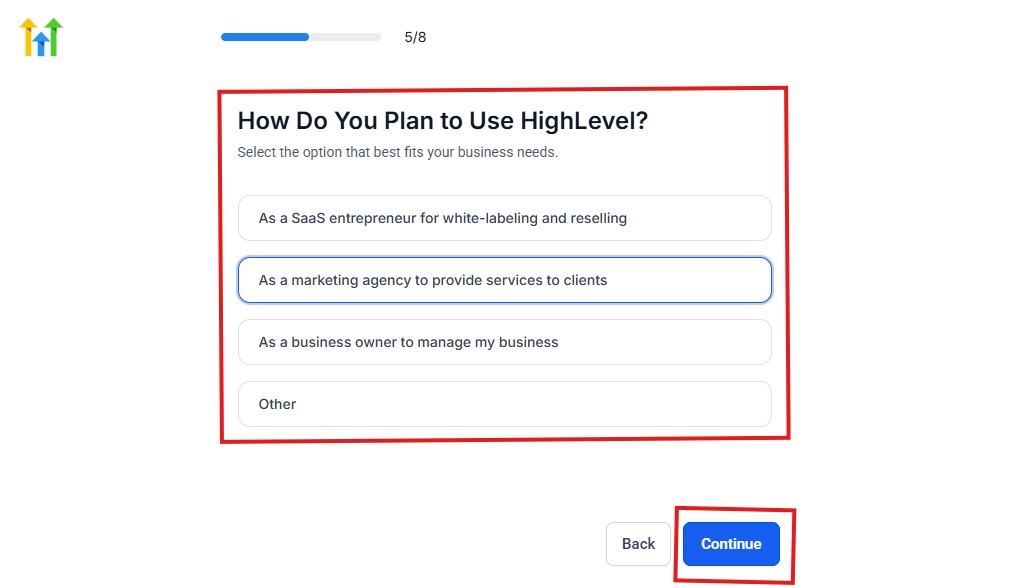
As you can see above, you need to select how you plan to use GoHighLevel.
Select what best matches why you signed up and click on continue.
The next page will ask you if you plan to resell GoHighLevel.
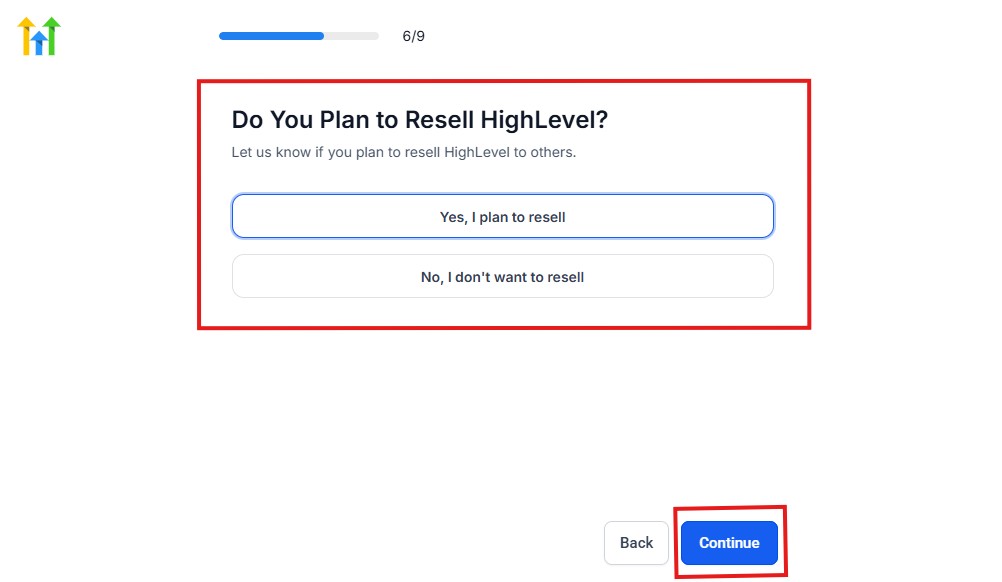
Select Yes if you plan to resell Go High Level and No if you don't have interest.
Click continue, and you will have the page below.
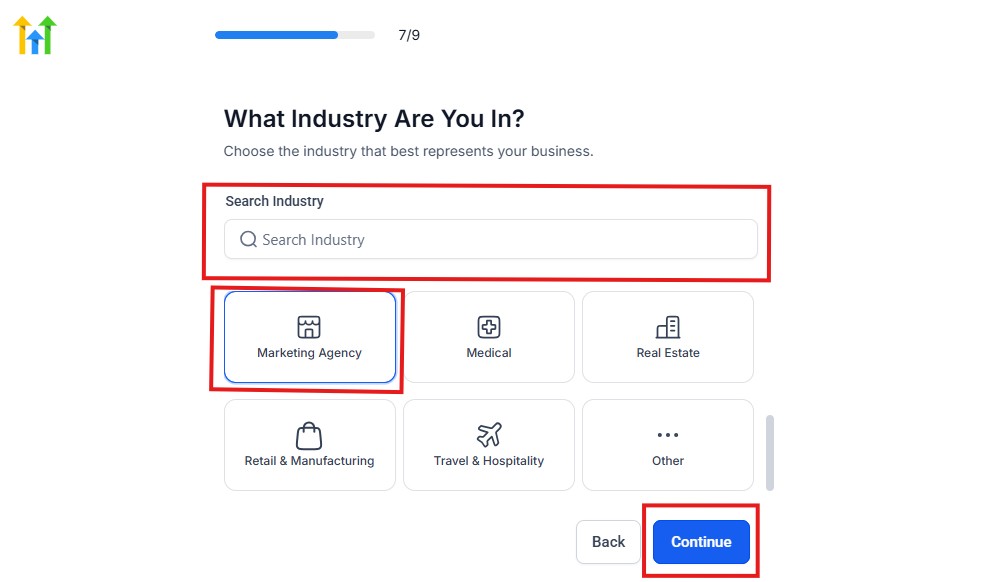
If you take a closer look at the image above, you will see that you need to select the industry in which you operate.
You can also use the search button if you can't find it right away. Once you see it, click on it and click on the continue button.
And you will have the page below.
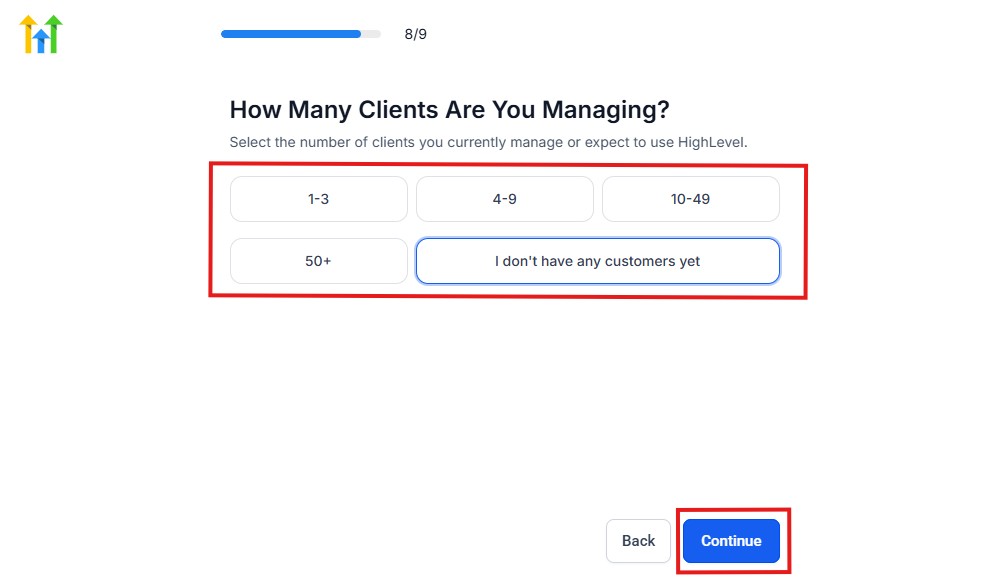
You need to indicate the number of customers that you currently have. Select “I don't have any customers yet” if you currently don't have any.
Hit the continue button, and you will have the page below.
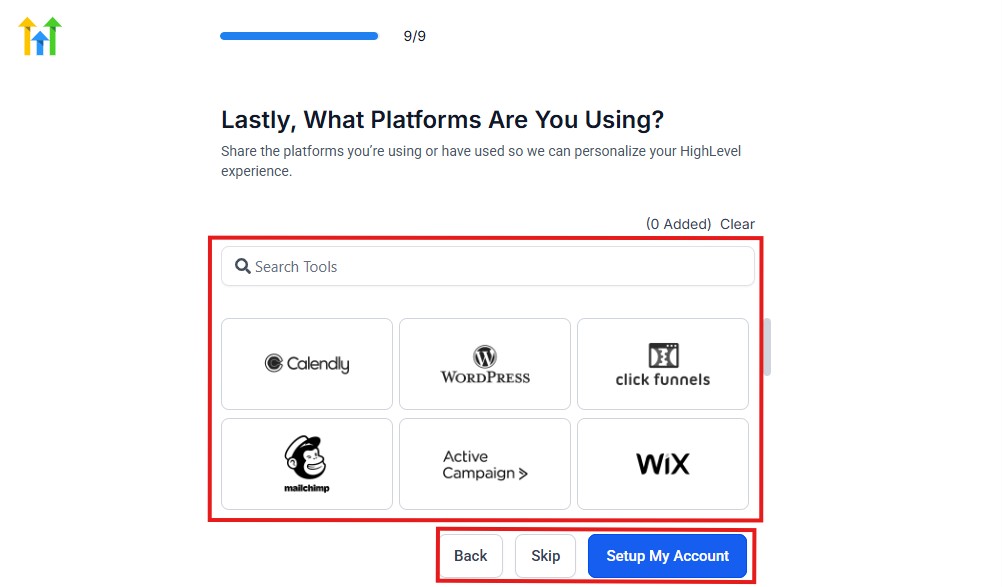
If you currently use any other software, this is where you connect it to GoHighLevel, and you can also skip it if you don't have any.
Then, you have the page below, which is an onboarding call.
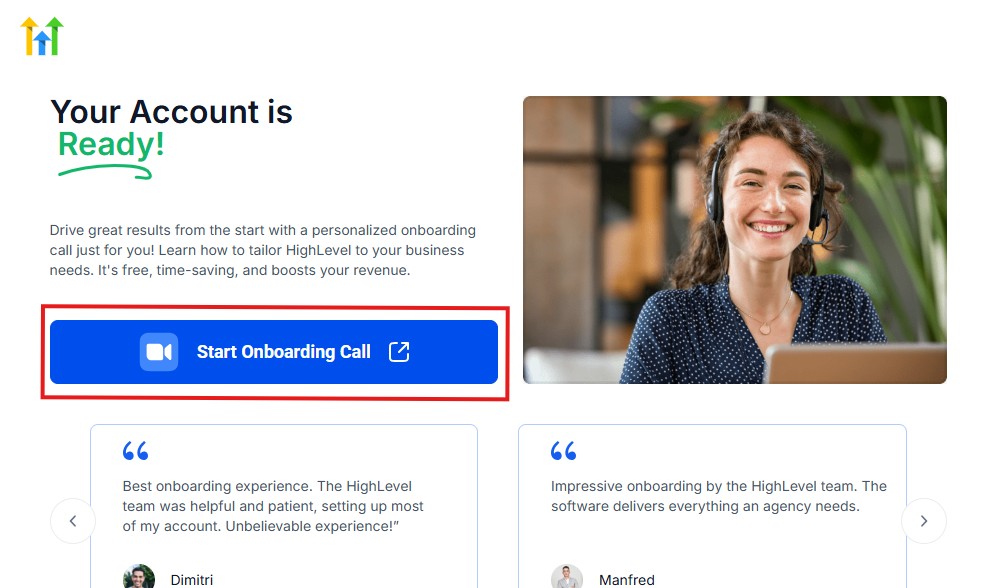
The GoHighLevel onboarding call is a 1-hour call that will connect you with a GoHighLevel expert and discuss how you can get started right away and have your account set up as well.
If you are not interested in the call, just stroll down and click “Not now, take me to my account.“
Now, you have your dashboard.
📊 Step 3: Build Your CRM & Pipeline
- Create pipelines (e.g., New Lead → Contacted → Closed)
- Add your contacts or import leads
👉 This helps you track your entire sales process.
⚡ Step 4: Create Automation Workflows
- Set up email and SMS follow-ups
- Automate responses for new leads
- Build nurturing sequences
👉 This is where you save time and increase conversions.
🌐 Step 5: Build Your Funnel or Website
- Create landing pages or funnels
- Add forms to capture leads
👉 This is how you start generating leads.
📅 Step 6: Set Up Booking & Calendars
- Create appointment slots
- Enable online booking
- Set reminders
👉 Makes it easy for prospects to schedule with you.
🚀 Step 7: Launch and Optimize
- Start running campaigns
- Monitor performance
- Adjust based on results
👉 Continuous improvement is key to getting results.
🧠 Pro Tip
Don’t try to use everything at once.
Start with:
- Lead capture
- CRM
- Basic automation
Then expand as you get comfortable.
Get GoHighLevel for 30-Day Free Now➡
How to Cancel Your GoHighLevel Account
If you decide that GoHighLevel isn’t the right fit, you can cancel your account easily by following these steps:
🧭 Step 1: Log Into Your Account
- Go to your GoHighLevel dashboard
- Enter your login details
👉 Make sure you’re logged in as the account owner/admin
⚙️ Step 2: Go to Settings
- Look for the “Settings” option (usually at the bottom left)
- Click on it to open your account settings
💳 Step 3: Open Billing Section
- Inside Settings, find “Billing” or “Company Billing”
- Click to view your subscription details
❌ Step 4: Cancel Your Subscription
- Look for the “Cancel Subscription” button
- Click it and follow the prompts
👉 You may be asked to confirm your reason for canceling
📩 Step 5: Confirm Cancellation
- Complete the cancellation process
- Check your email for a confirmation message
👉 Keep this email as proof of cancellation
⚠️ Important Things to Know
- Your account may remain active until the end of your billing cycle
- You may lose access to your data after cancellation
- Make sure to export important data before canceling
🧠 Quick Tip
Before canceling, consider:
- Downgrading your plan instead
- Removing unused features
- Pausing your usage temporarily
👉 This can help you avoid losing your setup if you plan to return later.
Frequently Asked Questions
Common FAQs about GoHighLevel Pricing.
How much does GoHighLevel cost per month?
The base pricing for GoHighLevel starts at:
- $97/month (Starter Plan)
- $297/month (Unlimited Plan)
- $497/month (SaaS Pro Plan)
👉 Your total cost may increase depending on usage (emails, SMS, calls, and AI features).
Are there any hidden fees in GoHighLevel?
GoHighLevel doesn’t have hidden fees – but it does have usage-based costs.
You may pay extra for:
- Email sending
- SMS messages
- Phone calls
- AI features
👉 You only pay for what you use, which gives you flexibility.
How much do emails and SMS cost in GoHighLevel?
- Emails → Typically a few cents per 1,000 emails
- SMS → Charged per message segment (around fractions of a cent per message)
👉 Costs depend on your volume, so higher usage means higher charges.
Is GoHighLevel expensive?
It may seem expensive at first, but when you consider that GoHighLevel replaces multiple tools, it can actually save you money.
👉 Most users find it cost-effective when they use multiple features.
Can I upgrade or downgrade my plan at any time?
Yes, you can upgrade or downgrade your plan at any time.
👉 This allows you to:
- Start small
- Scale as your business grows
- Adjust based on your needs
Does GoHighLevel offer a free trial?
Yes, GoHighLevel offers a 14-day free trial.
👉 You can test the platform before committing to a paid plan.
Is there a discount for a yearly payment?
Yes – if you choose annual billing, you typically get a discount equivalent to 2 months free.
👉 This means you pay for about 10 months instead of 12.
What is the cheapest way to use GoHighLevel?
The most affordable way is to:
- Start with the Starter plan ($97/month)
- Keep your email and SMS usage low
- Upgrade only when needed
👉 This helps you control costs while still benefiting from the platform.
Which GoHighLevel plan is best for beginners?
The Starter Plan is the best option for beginners.
👉 It gives you access to core features without the complexity of managing multiple clients.
Do I need to pay for integrations separately?
Some integrations are included, but others (like advanced tools or third-party apps) may have their own costs.
👉 If you use tools like Zapier, you may pay separately for those services.
🧠 Final Tip
If you’re unsure about pricing, start with the free trial and test how much you actually use.
👉 This gives you a clear idea of your real monthly cost before committing.
Final Thoughts
At this point, you’ve seen exactly how GoHighLevel pricing works – from base plans to real usage costs.
So, is it worth it?
💡 The Simple Answer
👉 Yes – GoHighLevel is worth the price if you actually use what it offers.
You’re not just paying for a tool.
You’re investing in a system that can:
- Replace multiple software subscriptions
- Automate your marketing and follow-ups
- Help you capture and convert more leads
- Scale your business more efficiently
⚖️ When It Makes Sense
GoHighLevel pricing makes the most sense if you:
- Run an agency or service-based business
- Need automation to handle leads
- Want to simplify your tech stack
- Plan to grow and scale your operations
👉 In these cases, the platform can easily pay for itself.
❌ When It May Not Be Worth It
You may not get full value if you:
- Only need a basic CRM
- Don’t plan to use automation or funnels
- Prefer simple, lightweight tools
👉 In that case, you might be paying for features you won’t use.
🧠 The Real Insight
With GoHighLevel, your cost grows as your usage grows.
👉 That’s not a downside – it means:
- You only pay for what you use
- Your expenses scale with your business
🚀 Final Recommendation
If you’re serious about building a system that can handle your marketing, sales, and client management in one place, GoHighLevel is a strong investment.
👉 What You Should Do Next
Start with the plan that fits your current needs.
👉 Test it during the free trial, explore the features, and see how it works for your business before committing long-term.
