
If you’re running a healthcare practice, you already know how chaotic things can get:
- missed appointments
- delayed follow-ups
- patient no-shows
- and scattered communication across calls, SMS, and emails.
That’s exactly where GoHighLevel for Healthcare Professionals comes in.
Instead of juggling multiple tools, you can manage your patients, appointments, communication, marketing, and follow-ups – all in one place.
Whether you’re a:
- Doctor
- Dentist
- Therapist
- Chiropractor
- Clinic owner
GoHighLevel helps you simplify operations, improve patient experience, and increase revenue – without adding more workload.
TL;DR
- You can capture and manage patient leads in one centralized CRM
- You can automate appointment reminders to reduce no-shows
- You can send follow-ups via SMS, email, or WhatsApp automatically
- You can build landing pages and funnels to attract new patients
- You can collect reviews and improve your clinic’s reputation
- You can track performance (appointments, revenue, patient flow)
👉 In simple terms:
GoHighLevel helps you run your healthcare practice like a system – not chaos.
Why Healthcare Professionals Need GoHighLevel
Running a healthcare practice isn’t just about treating patients – it’s about managing appointments, communication, follow-ups, and patient experience at scale.
The problem?
Most clinics still rely on manual processes or disconnected tools, which leads to missed opportunities and lost revenue.
This is where GoHighLevel becomes a game-changer.
The Real Problems You’re Facing (And How to Fix Them)
Let’s break this down practically.
1. Patients Miss Appointments (No-Shows)
This is one of the biggest revenue killers.
- Patients forget
- No reminders are sent
- Staff are too busy to follow up
👉 How You Fix It With GoHighLevel
You can automate reminders like this:
- 24 hours before → SMS reminder
- 2 hours before → final reminder
- If missed → automatic reschedule message
👉 Result:
You drastically reduce no-shows without chasing patients manually.
2. You Lose New Patient Leads
Here’s what usually happens:
- A patient fills a form or calls
- No quick response
- They move to another clinic
👉 How You Fix It With GoHighLevel
You set up instant response automation:
- Patient submits a form → immediate SMS reply
- Missed call → automatic text-back
- Inquiry → booked into your calendar instantly
👉 Result:
You capture and convert leads before your competitors respond
3. Follow-Ups Are Inconsistent
After a visit, most clinics do nothing.
That’s a problem.
- No check-in messages
- No reminders for next visits
- No long-term relationship
👉 How You Fix It With GoHighLevel
You automate follow-ups like:
- Post-visit check-in message
- Medication or care reminders
- “Time for your next appointment” reminders
👉 Result:
You improve patient retention and lifetime value.
4. Communication Is Scattered
You’re probably using:
- Phone calls
- Maybe even paper notes
Everything is disconnected.
👉 How You Fix It With GoHighLevel
You centralize everything:
- All messages (SMS, email, WhatsApp) in one inbox
- Full patient conversation history
- Easy team collaboration
👉 Result:
You never lose track of patient communication again.
5. You’re Not Getting Enough Reviews
Patients may be happy – but they don’t leave reviews.
That hurts your growth.
👉 How You Fix It With GoHighLevel
You automate review requests:
- After appointment → send review request
- Include direct Google review link
- Follow-up if they don’t respond
👉 Result:
You build a strong online reputation consistently.
What This Looks Like in Real Life
Let’s make it simple.
Example Workflow (Dental Clinic)
Here’s what your system can look like:
A patient visits your website
Books an appointment
Gets:
- Instant confirmation SMS
- Email details
Receives reminders before the visit
Shows up on time
After treatment:
- Gets a thank-you message
- Receives a review request
- Gets a follow-up reminder later
👉 You didn’t manually do anything.
Why This Matters for Your Practice
When you implement this system:
- You reduce missed appointments
- You increase patient bookings
- You save staff time
- You improve patient experience
- You grow your clinic consistently
Bottom Line
If you’re still doing things manually or using multiple tools…
You’re losing time, money, and patients.
With GoHighLevel, you turn your practice into a fully automated system that works for you 24/7.
Setting Up GoHighLevel for Your Healthcare Practice
Now let’s get practical.
This is where you turn GoHighLevel into a working system for your clinic – not just another tool you signed up for.
The goal here is simple:
👉 Set up a system that captures patients, books appointments, and follows up automatically.
Step 1: GoHighLevel Account Creation
In order to start your journey with GoHighLevel, head over to gohighlevel.com/30-day-trial, and you will be redirected to the page below.

The next thing you want to do is click “30 DAY FREE TRIAL” at the left corner of your screen, and the page below will pop up.
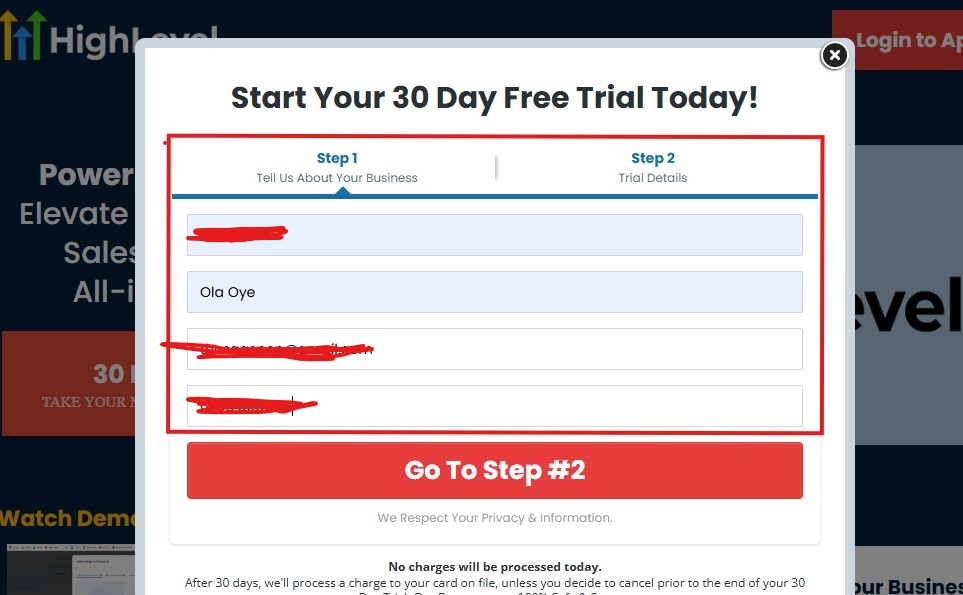
As you can see above, you need to supply your:
- Business name
- Your name
- Email address
- Phone number
Supply everything accordingly and click on “Go To Step #2” and the page below will pop up.
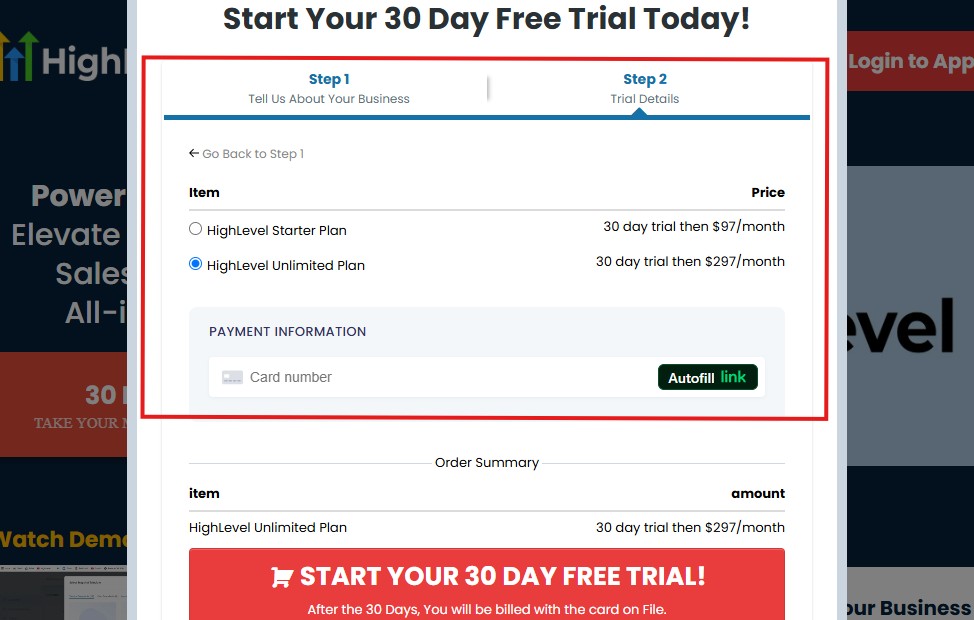
As you can see above, you need to:
- Select a plan
- Enter your credit card details
You can select the “Unlimited Plan that goes for $297/month“. You can upgrade or downgrade later.
Then click on “START YOUR 30 DAY FREE TRIAL” and you will have the page below next!
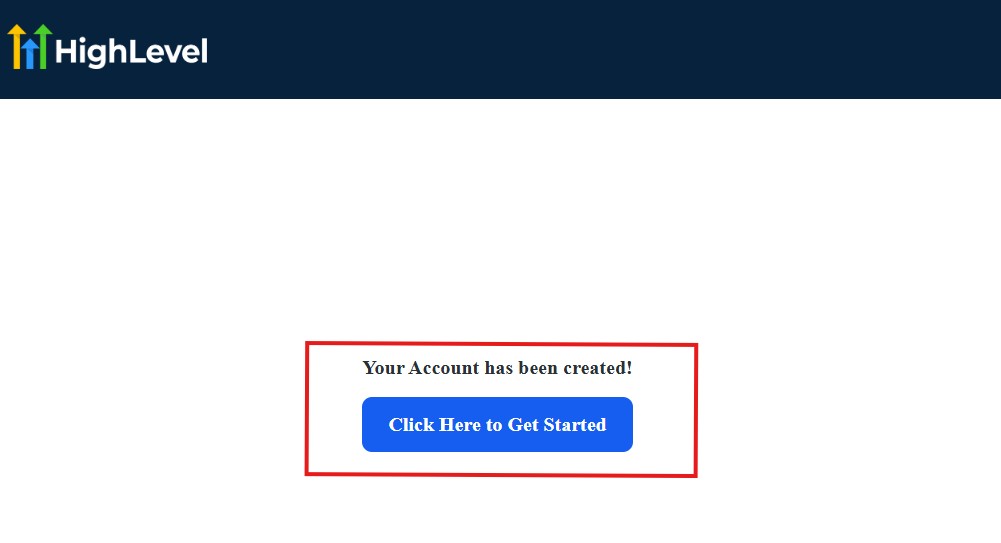
Then, click on “Click Here to Get Started“
And then, you need to start answering the onboarding questions.
Step 2: GoHighLevel Onboarding Questions
The onboarding questions help GoHighLevel understand why you have signed up for GHL and help personalize your experience accordingly.
After you have clicked on “Click Here to Get Started.” above, you will see the page below.
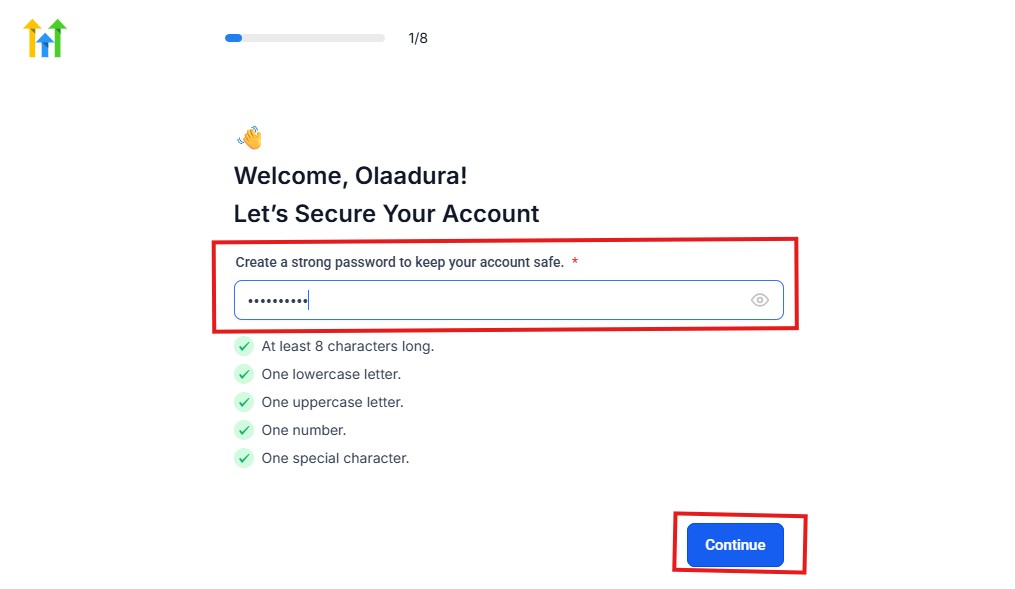
As you can see above, you need to choose a password and it must match these characters:
- At least 8 characters long
- One lowercase letter
- One uppercase letter
- One number
- One special character
If your password matches everything above, then everything should be green and hit the continue blue button.
Next, you have the page below.
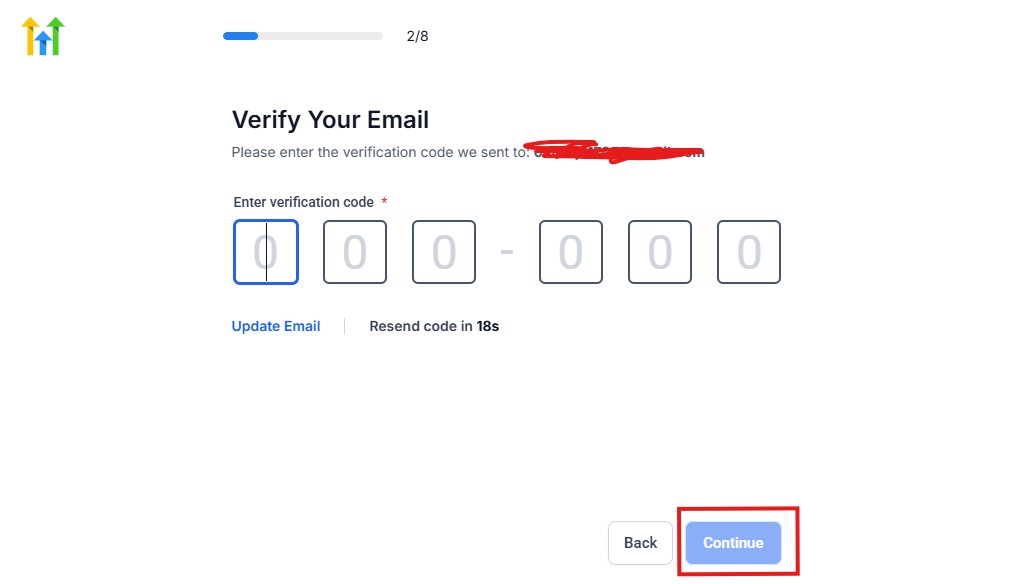
From the image above, you need to confirm your email address and do the same thing with your phone number, too.
The next page will ask you for your billing address.
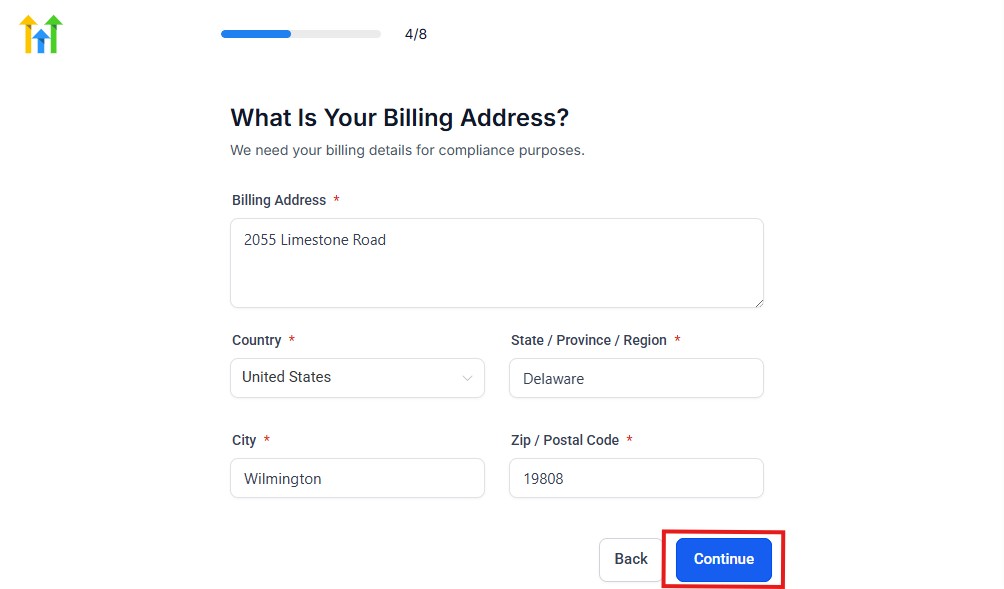
Supply everything accordingly and click on the continue blue button, and you will have the page below.
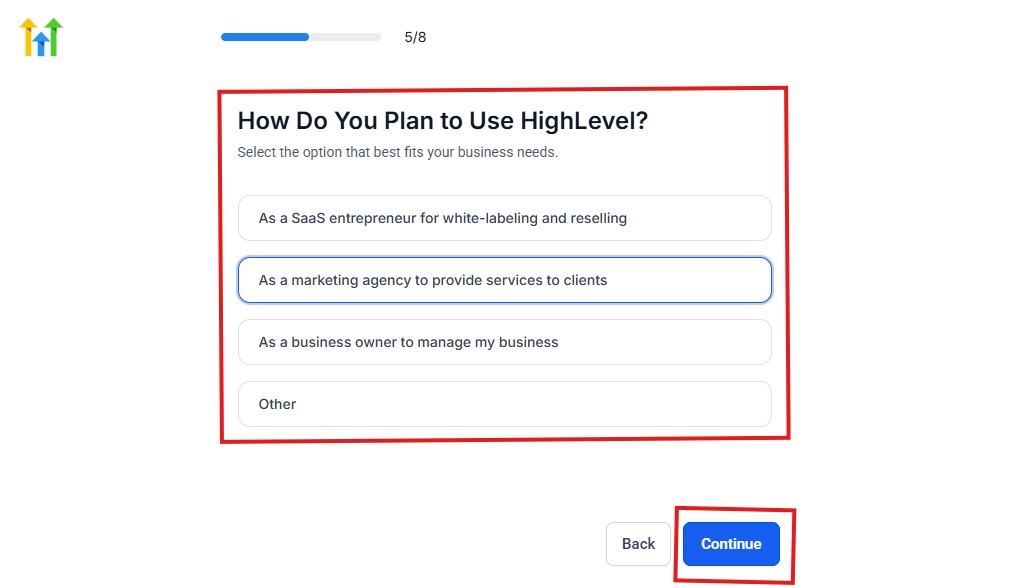
As you can see above, you need to select how you plan to use GoHighLevel.
Select what best matches why you signed up and click on continue.
The next page will ask you if you plan to resell GoHighLevel.
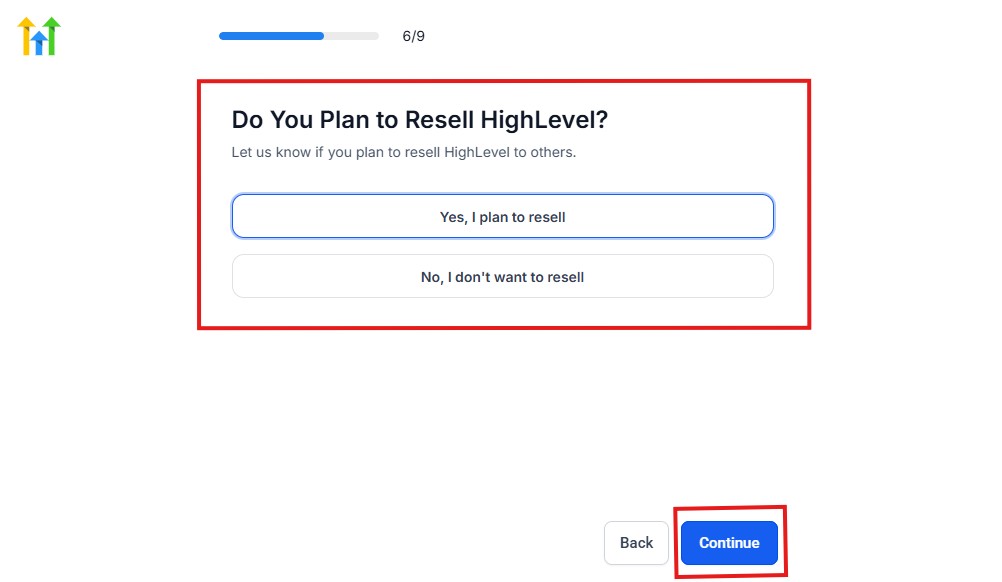
Select Yes if you plan to resell Go High Level and No if you don't have interest.
Click continue, and you will have the page below.
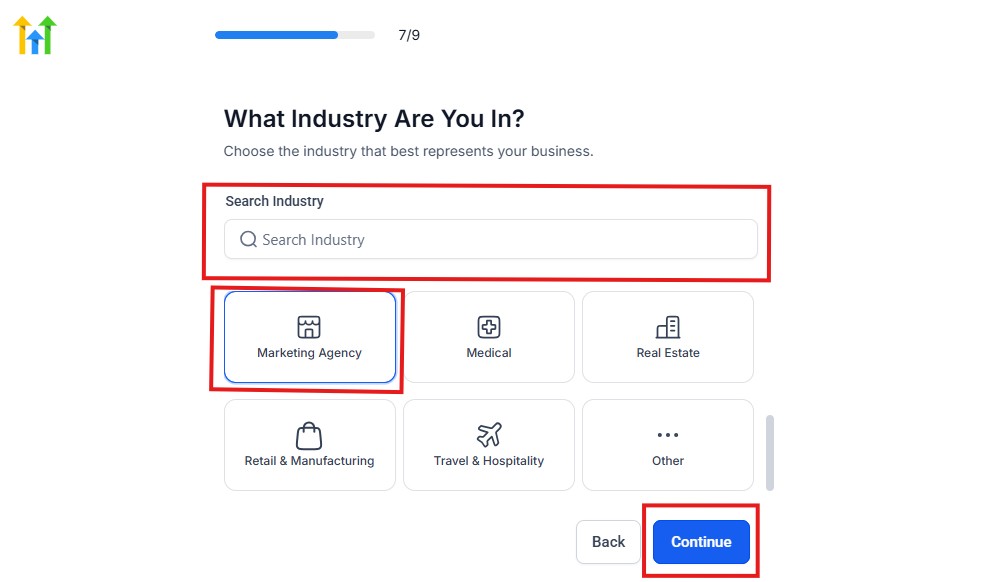
If you take a closer look at the image above, you need to select the industry that you operate.
You can also use the search button if you can't find it right away. Once you see it, click on it and click on the continue button.
And you will have the page below.
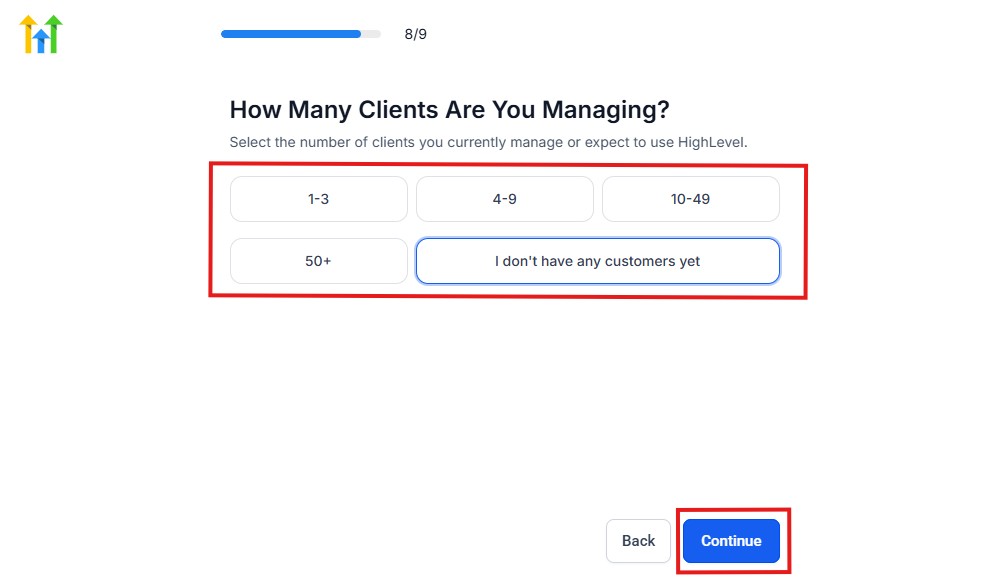
You need to indicate the number of customers that you currently have. Select “I don't have any customers yet” if you currently don't have any.
Hit the continue button, and you will have the page below.
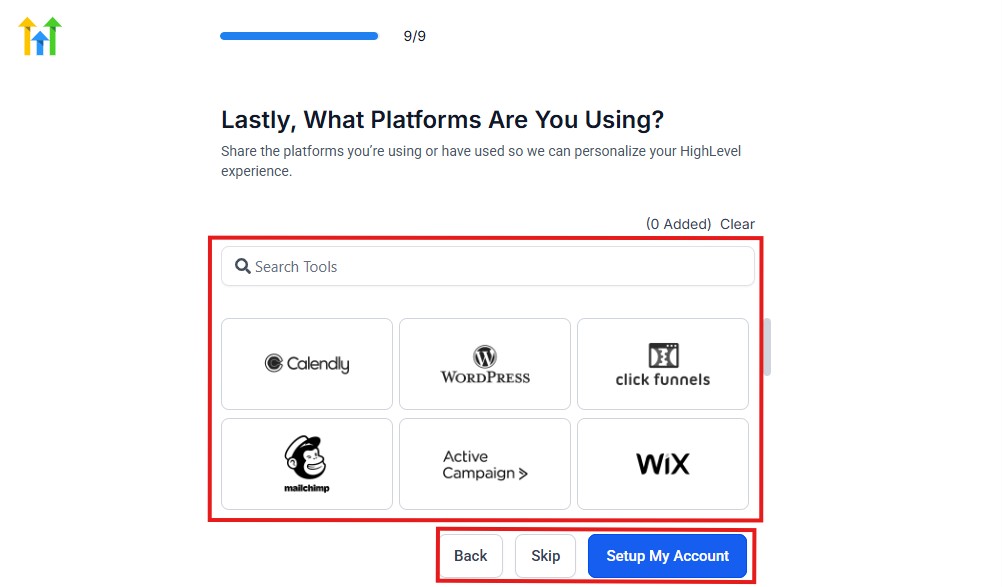
If you currently use any other software, this is where you connect it to GoHighLevel, and you can also skip it if you don't have any.
Then, you have the page below, which is an onboarding call.
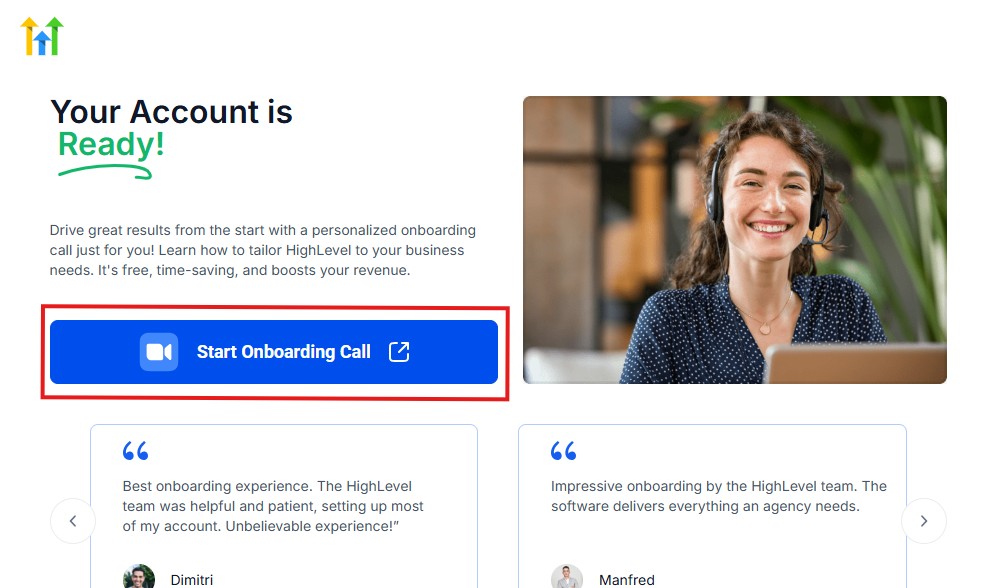
The GoHighLevel onboarding call is a 1-hour call that will connect you with a GoHighLevel expert and discuss how you can get started right away and have your account set up as well.
If you are not interested in the call, just stroll down and click “Not now, take me to my account.“
Now, you have your dashboard.
Step 3: Set Up Your Clinic Account Properly
Once you sign up, don’t rush.
Set your foundation right.
What you should configure first:
- Business name (your clinic name)
- Time zone (very important for bookings)
- Email (for notifications and campaigns)
- Phone number (for SMS and calls)
👉 This ensures everything you build later works correctly.
Step 4: Build Your Patient CRM Pipeline
This is where you track every patient – from inquiry to treatment.
Create a simple pipeline like this:
- New Patient Inquiry
- Appointment Booked
- Checked In
- Treated
- Follow-Up / Returning Patient
👉 Now every patient has a clear journey inside your system
Real Example
A patient fills your form:
- They automatically appear in “New Patient Inquiry”
- Once they book → move to “Appointment Booked”
- After visit → move to “Treated”
👉 You can track everything at a glance.
Step 5: Set Up Your Appointment Calendar
This is one of the most important parts.
What to configure:
- Your availability (days and hours)
- Appointment types:
- Consultation
- Check-up
- Emergency visit
- Buffer time between appointments
Pro Tip
Set limits like:
- Max bookings per day
- Break times
- Different schedules for different services
👉 This prevents overbooking and chaos.
Step 6: Create a Simple Patient Booking Funnel
You don’t need anything complicated.
Your funnel should have:
- A landing page (with your service info)
- A booking form
- A calendar for scheduling
Example Flow
- Patient clicks your ad or link
- Lands on your page
- Sees your offer (e.g., free consultation)
- Books instantly
👉 No back-and-forth messages needed.
Step 7: Set Up Automated Patient Responses
Speed is everything in healthcare.
If you don’t reply fast, you lose patience.
Create these automations:
Instant Response (Very Important)
- Trigger: Form submitted
- Action:
- Send SMS: “Hi, we received your request. You can book here: [link]”
Missed Call Text Back
- Trigger: Missed call
- Action:
- Send SMS automatically
👉 This alone can recover lost leads.
Step 8: Automate Appointment Reminders
This is how you reduce no-shows.
Set up reminders like this:
- 24 hours before → SMS reminder
- 2 hours before → final reminder
- After missed appointment → reschedule message
Example Reminder Message
“Hi John, this is a reminder of your appointment tomorrow at 10 AM. Reply YES to confirm.”
👉 Simple, effective, and automated.
Step 9: Set Up Post-Visit Follow-Ups
Most clinics ignore this – but it’s where retention happens.
Automate:
- Thank-you message after visit
- Care instructions (if needed)
- Next appointment reminder (after weeks/months)
Example
“Hi Sarah, hope you're feeling better after your visit. Let us know if you need anything.”
👉 This builds trust and keeps patients coming back.
Step 10: Set Up Review Requests
Your online reputation matters.
Automate this:
- After treatment → send review request
- Include direct link to your Google reviews
Simple Message
“We’d love your feedback. Please leave us a quick review here: [link]”
👉 This consistently grows your reviews.
Step 11: Organize Your Communication Inbox
You don’t want messages scattered everywhere.
With GoHighLevel, you can:
- See all SMS, email, and chats in one place
- Track full patient conversations
- Reply faster and stay organized
👉 This improves both staff efficiency and patient experience.
Step 12: Keep It Simple (Important)
Don’t overcomplicate your setup.
Start with:
- CRM pipeline
- Calendar
- Basic automations
Then expand later.
What Your System Should Look Like (Final Overview)
Once everything is set up, your workflow becomes:
- Patient enters → captured in CRM
- Gets instant response
- Books appointment
- Receives reminders
- Shows up
- Gets follow-up + review request
👉 Everything runs automatically.
Bottom Line
Setting up GoHighLevel properly means:
- Less manual work
- Fewer missed appointments
- Faster patient response
- Better patient experience
Is GoHighLevel Safe for Healthcare? (HIPAA Explained Simply)
Before you start using GoHighLevel in your healthcare practice, you need to understand one important thing:
👉 Patient data is sensitive – and you must handle it properly.
The Truth You Need to Know
Let’s keep it simple and clear:
- GoHighLevel is NOT HIPAA compliant by default
- You must enable the HIPAA add-on
- You must configure it correctly before using patient data
👉 This is not optional if you’re handling protected health information (PHI).
What Happens If You Ignore This?
If you use GoHighLevel without proper setup:
- Patient data may not be fully protected
- You risk compliance issues
- You expose your practice to legal and ethical problems
👉 In short: Don’t use it carelessly. Set it up properly.
What the HIPAA Add-On Does
When you enable the HIPAA add-on, you get:
- Secure handling of patient data
- Encryption and protection measures
- Compliance-ready environment (when configured correctly)
👉 This allows you to safely use GoHighLevel for:
- Patient communication
- Appointment management
- Follow-ups
- CRM tracking
How You Should Use GoHighLevel Safely
Here’s the practical approach:
1. Enable HIPAA Mode First
Before adding any patient data:
- Activate the HIPAA add-on inside your account
2. Limit What You Store
Only store necessary information:
- Name
- Contact details
- Appointment info
👉 Avoid storing highly sensitive medical records unless required.
3. Be Careful With Messaging
When sending SMS or emails:
- Keep messages simple
- Avoid detailed medical information
- Focus on reminders and general communication
Example of Safe Message
“Hi Sarah, this is a reminder of your appointment tomorrow at 2 PM.”
Avoid This
“Reminder for your diabetes treatment consultation…”
👉 Keep it general and professional.
4. Control Access for Your Team
- Give access only to authorized staff
- Restrict sensitive data visibility
- Use role-based permissions
5. Always Use Secure Integrations
If you connect other tools:
- Make sure they are also compliant
- Avoid exposing patient data through unsafe apps
What This Means for You
You can absolutely use GoHighLevel in healthcare…
👉 But only if you treat it as a system that needs proper configuration – not a plug-and-play tool
Simple Rule to Follow
- Before setup → Enable HIPAA
- During use → Keep data minimal and secure
- For communication → Keep messages general
Bottom Line
GoHighLevel can be a powerful system for your healthcare practice…
👉 But compliance is your responsibility.
Set it up properly, use it correctly, and you’ll have:
Peace of mind
A secure system
Better patient management
Managing Patients, Appointments & Records With the CRM
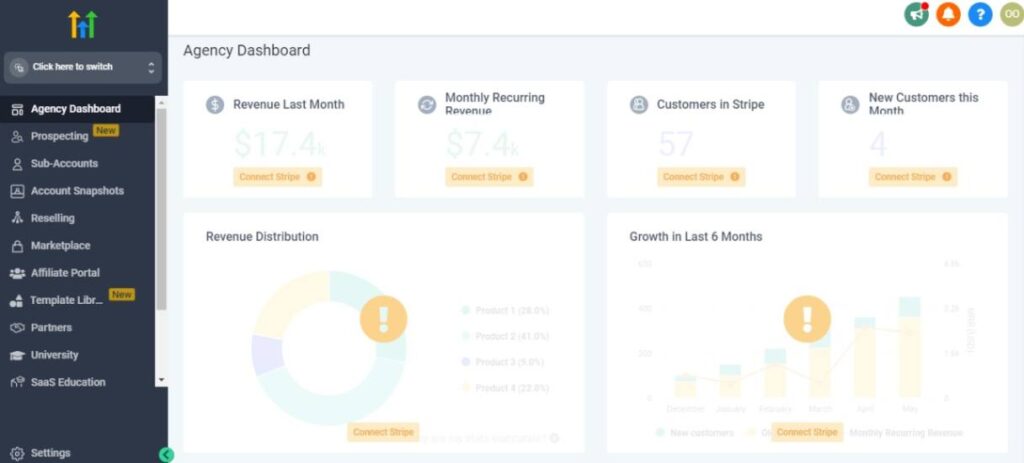
Now that your system is set up, this is where everything comes together.
Inside GoHighLevel, your CRM becomes the central hub for your entire practice – patients, appointments, communication, and records.
👉 The goal here is simple:
You should be able to see everything about a patient in one place – without switching tools.
1. How to Manage Patients Inside the CRM
Every patient who contacts your clinic is automatically stored as a contact.
But don’t just leave them there – organize them properly.
What you should track for each patient:
- Full name and contact details
- Appointment history
- Treatment type (e.g., dental, therapy, consultation)
- Notes (symptoms, preferences, special cases)
- Communication history (SMS, email, calls)
Practical Setup
Use custom fields and tags like:
- New Patient
- Returning Patient
- Follow-Up Needed
- High Priority
- Missed Appointment
👉 This helps you filter and take action fast.
2. Track Patient Journey With Pipelines
Your pipeline is your visual workflow.
You already created stages earlier – now you actually use them daily.
Example Pipeline:
- New Inquiry
- Appointment Booked
- Checked In
- Treated
- Follow-Up
Real Example
- A patient fills a form → appears in New Inquiry
- Books appointment → moves to Appointment Booked
- Shows up → move to Checked In
- After treatment → move to Treated
👉 You always know where every patient stands
3. Managing Appointments Without Chaos
Instead of spreadsheets or manual tracking…
You manage everything inside the CRM.
What you can do:
- View all appointments in one calendar
- See patient details linked to each booking
- Reschedule appointments easily
- Track missed appointments
Pro Tip
When a patient misses an appointment:
- Move them to a “Missed Appointment” stage
- Trigger a follow-up automation to rebook
👉 You recover lost revenue automatically.
4. Keep Patient Records Organized (Simple But Powerful)
You don’t need a complicated system.
Just keep it structured.
Inside each patient profile, you should:
- Add notes after every visit
- Track past treatments
- Store important details (allergies, preferences, etc.)
Example
After a visit, you add a note:
“Patient complained about tooth sensitivity. Recommended follow-up in 2 weeks.”
👉 Next time they come, you already know their history.
5. Use Communication History to Improve Care
Every message is logged inside the CRM.
That means you can:
- See past conversations instantly
- Avoid asking patients the same questions again
- Respond faster and more personally
Real Example
Instead of:
“Can you remind me what you came in for?”
You say:
“Hi John, how is your tooth feeling after your last visit?”
👉 That’s a better patient experience.
6. Segment Patients for Better Follow-Ups
Not all patients are the same.
You should group them.
Example segments:
- New patients
- Returning patients
- Patients due for follow-up
- Patients who haven’t visited in 3–6 months
Why this matters
You can now send targeted messages like:
- “Time for your next check-up”
- “We haven’t seen you in a while”
- “Follow-up appointment reminder”
👉 This increases retention and repeat visits.
7. Automate CRM Actions to Save Time
You don’t need to move everything manually.
You can automate:
- Moving patients between pipeline stages
- Tagging patients based on actions
- Assigning staff to specific patients
Example Automation
- Patient books appointment → automatically moved to “Booked”
- Appointment completed → moved to “Treated”
- After 30 days → tagged “Follow-Up Needed”
👉 Your CRM updates itself.
8. Keep Your Team Organized
If you have staff, this becomes even more powerful.
You can:
- Assign patients to team members
- Add internal notes
- Track who handled what
Example
- Receptionist handles bookings
- Doctor handles treatment
- Assistant manages follow-ups
👉 Everyone stays aligned.
What This Looks Like in Real Life
Here’s your day-to-day workflow:
- New patient comes in → added to CRM
- Books appointment → tracked in pipeline
- Shows up → updated status
- Gets treated → notes added
- Follow-up scheduled → automated
👉 Everything is tracked, organized, and easy to manage.
Bottom Line
When you use the CRM properly:
- You never lose patient information
- You always know what’s happening
- You improve patient experience
- You save time and reduce errors
Automating Patient Follow-Ups & Communication
This is where GoHighLevel becomes extremely powerful for your healthcare practice.
Because let’s be honest…
👉 Most clinics lose patients not because of bad treatment, but because of poor follow-up and slow communication
Automation fixes that completely.
What You’re Solving With Automation
Without automation:
- You forget to follow up
- Patients don’t come back
- Leads go cold
- Staff get overwhelmed
With automation:
👉 Every patient gets the right message at the right time – automatically
1. Instant Response to New Patient Inquiries
Speed is everything.
If someone contacts your clinic and you reply hours later…
👉 You’ve probably lost them.
What You Should Set Up
Trigger: Patient fills a form or contacts you
Automation:
- Send instant SMS
- Send confirmation email
- Share booking link
Example
“Hi John, thanks for reaching out. You can book your appointment here: [link]”
👉 This happens immediately – even at midnight.
2. Missed Call Text-Back (High Impact)
This is one of the most underrated automations.
What Happens Normally
- Patient calls
- You miss the call
- They don’t call again
👉 Lost patient.
With Automation
Trigger: Missed call
Action:
- Automatic SMS sent instantly
Example
“Sorry we missed your call. How can we help? You can also book here: [link]”
👉 You recover leads automatically.
3. Appointment Reminder System (Reduce No-Shows)
This is critical for your revenue.
Set Up This Flow
- 24 hours before → SMS reminder
- 2 hours before → final reminder
- Optional → confirmation reply (YES to confirm)
Example
“Reminder: Your appointment is tomorrow at 10 AM. Reply YES to confirm.”
👉 Simple reminders = fewer missed appointments.
4. Post-Visit Follow-Ups (Retention Booster)
Most clinics stop communication after the visit.
That’s a mistake.
What You Should Automate
- Thank-you message
- Care instructions
- Follow-up check-in
- Next appointment reminder
Example Flow
- Immediately after visit: “Thanks for visiting us today. Let us know if you need anything.”
- 2 days later: “Hope you’re feeling better. Any concerns?”
👉 This builds trust and keeps patients coming back.
5. Review Request Automation (Reputation Growth)
Happy patients rarely leave reviews unless asked.
Automate This
- Trigger: Appointment marked as completed
- Action:
- Send review request
- Include direct Google review link
Example
“We’d love your feedback. Please leave us a quick review here: [link]”
👉 Over time, this builds strong social proof.
6. Re-Engagement Campaigns (Bring Back Old Patients)
This is where you make extra revenue.
Target:
- Patients who haven’t visited in 3–6 months
Automation:
- Send reminder message
- Offer check-up or consultation
Example
“Hi Sarah, it’s been a while since your last visit. Would you like to book a quick check-up?”
👉 You bring inactive patients back.
7. Smart Patient Segmentation
Not all patients should receive the same message.
Segment Your Patients:
- New patients
- Returning patients
- Follow-up needed
- Missed appointments
👉 Then send targeted communication to each group.
8. Multi-Channel Communication (Stay Connected Everywhere)
You’re not limited to one channel.
You can automate across:
- SMS (most effective)
- WhatsApp (if connected)
👉 This ensures patients always see your message.
9. Keep Messages Simple (Very Important)
Don’t overcomplicate communication.
Good Message
“Reminder: Appointment tomorrow at 2 PM.”
Bad Message
Long, complicated, medical-heavy text
👉 Keep it clear, short, and human.
What Your Automation System Should Look Like
Once everything is set up:
- Patient contacts you → instant reply
- Books appointment → confirmation sent
- Before visit → reminders sent
- After visit → follow-up + review request
- After months → re-engagement message
👉 Everything runs automatically.
Bottom Line
When you automate follow-ups and communication:
- You reduce missed appointments
- You respond faster
- You improve patient experience
- You increase repeat visits
Funnels & Lead Generation for Healthcare Professionals
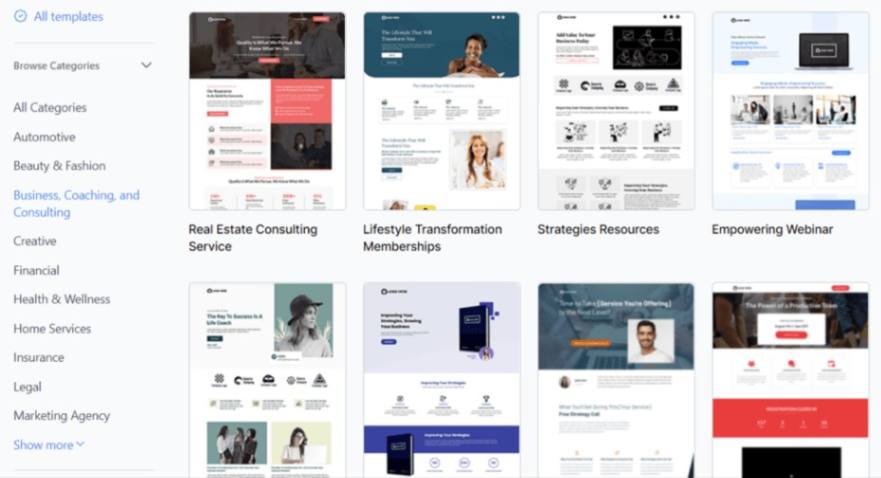
Now let’s focus on what actually grows your practice:
👉 Getting a steady flow of new patients – consistently
With GoHighLevel, you don’t just “hope” for patients…
You build a predictable system that brings them in every week
What Most Healthcare Practices Do Wrong
Let’s be real.
Most clinics:
- Rely only on word-of-mouth
- Have a basic website with no conversion strategy
- Don’t follow up with interested patients
- Lose leads due to slow response
👉 Result: Unpredictable patient flow
What You Should Be Doing Instead
You need a simple system:
👉 Traffic → Landing Page → Booking → Follow-Up
That’s your funnel.
1. Build a Simple Patient Funnel (Don’t Overcomplicate It)
You don’t need a complex website.
Start with one focused funnel.
Your Funnel Should Include:
- A landing page (clear offer)
- A short form (name, phone, email)
- A booking calendar
- Instant follow-up automation
Example Funnel (Dental Clinic)
- Ad: “Free Dental Consultation”
- Landing page → explains offer
- Patient fills form
- Books appointment instantly
👉 That’s it. Simple and effective.
2. Create an Irresistible Offer
This is what gets patients to take action.
Examples You Can Use:
- Free consultation
- Discounted first visit
- Free check-up
- Pain relief consultation (for urgent cases)
👉 The easier you make it to say “yes,” the more patients you attract.
3. Optimize Your Landing Page for Conversions
Your landing page should answer one question:
👉 “Why should I choose you?”
What to Include:
- Clear headline (what you offer)
- Short explanation (benefits, not features)
- Testimonials or reviews
- Strong call-to-action (Book Now)
Example Headline
“Book Your Free Consultation Today—Fast, Professional Care You Can Trust”
👉 Keep it simple. No distractions.
4. Capture Every Lead Automatically
Every visitor should be tracked.
With GoHighLevel:
- Form submissions go directly into your CRM
- Contacts are tagged automatically
- Instant follow-up is triggered
👉 You never lose a potential patient again.
5. Respond Instantly (This Changes Everything)
Speed wins.
What You Should Do:
As soon as someone fills your form:
- Send SMS immediately
- Provide booking link
- Confirm interest
Example
“Hi John, thanks for your interest. You can book your appointment here: [link]”
👉 Fast response = higher conversion rate.
6. Use Ads to Drive Traffic (Simple Strategy)
You don’t need complicated marketing.
Start with:
- Facebook ads
- Google ads (for local searches)
Example
Someone searches:
“Dentist near me”
They click your ad → go to your funnel → book appointment
👉 That’s how you generate patients daily.
7. Retarget People Who Didn’t Book
Not everyone books immediately.
Don’t lose them.
Retargeting Strategy:
- Show ads again
- Send follow-up messages
- Offer reminders
Example Message
“Still thinking about your consultation? Book your spot today.”
👉 This brings back interested patients.
8. Track What’s Working
You don’t want to guess.
Track:
- Number of leads
- Number of bookings
- Conversion rate
- Cost per patient
👉 This helps you improve and scale.
What This Looks Like in Real Life
Here’s your system working:
- Someone sees your ad
- Visits your page
- Fills form
- Gets instant SMS
- Books appointment
- Shows up
👉 You just acquired a new patient automatically.
Bottom Line
Funnels and lead generation give you:
- Consistent patient flow
- Less reliance on referrals
- More control over your growth
Email & SMS Campaigns for Healthcare Practices
Now that you’re generating leads and bookings, the next step is staying connected with your patients consistently.
This is where GoHighLevel helps you turn one-time visits into long-term patient relationships.
👉 The goal here is simple:
Send the right message to the right patient at the right time – automatically
Why Email & SMS Campaigns Matter
If you don’t communicate regularly:
- Patients forget about you
- They skip follow-ups
- They go to another clinic
With proper campaigns:
👉 You stay top-of-mind and increase repeat visits.
SMS vs Email (What You Should Use More)
Let’s be practical.
- SMS → High open rate, instant attention (best for reminders)
- Email → More detailed communication (best for education & updates)
👉 In healthcare, SMS should be your primary channel
1. Appointment Reminder Campaigns (Must Have)
You already set automation, but campaigns allow you to manage reminders at scale.
What to Send
- Appointment confirmations
- Reminders (24h + same day)
- Reschedule links
Example SMS
“Reminder: Your appointment is tomorrow at 2 PM. Reply YES to confirm.”
👉 This alone reduces no-shows significantly.
2. Follow-Up Campaigns After Visits
This is where most clinics lose patients.
What You Should Send
- Thank-you messages
- Recovery check-ins
- Care instructions
- Next appointment reminders
Example SMS
“Hi Sarah, hope you're feeling better after your visit. Let us know if you need anything.”
Example Email
Subject: How are you feeling after your visit?
We just wanted to check in and make sure you're doing well…
👉 This builds trust and keeps patients engaged.
3. Recall Campaigns (Bring Patients Back)
This is one of the highest ROI campaigns.
Target Patients Who:
- Haven’t visited in 3–6 months
- Missed their last appointment
- Are due for routine check-ups
Example SMS
“Hi John, it’s been a while since your last visit. Ready for your next check-up? Book here: [link]”
👉 This turns inactive patients into active ones again.
4. Promotional Campaigns (Use Carefully)
Healthcare is sensitive – you don’t want to sound “salesy.”
Good Promotions
- Free consultation
- Discounted first visit
- Seasonal health check-ups
Example
“This month only: Free consultation for new patients. Book your spot today.”
👉 Keep it professional and patient-focused.
5. Educational Campaigns (Build Authority)
Not everything should be about booking.
What to Send
- Health tips
- Preventive care advice
- FAQs
- Awareness messages
Example Email
Subject: 3 Simple Ways to Prevent Tooth Decay
👉 This positions you as an expert and builds trust.
6. Segment Your Campaigns (Very Important)
Don’t send the same message to everyone.
Segment Patients Into:
- New patients
- Returning patients
- Follow-up needed
- Inactive patients
👉 Then send relevant messages to each group
7. Timing Matters (Don’t Overdo It)
You don’t want to annoy patients.
Best Practice:
- SMS → Only when necessary (reminders, urgent updates)
- Email → Weekly or occasional
👉 Keep it consistent but not excessive.
8. Keep Messages Simple and Clear
This is very important in healthcare.
Good Message
“Reminder: Appointment tomorrow at 10 AM.”
Bad Message
- Too long
- Too technical
- Too promotional
👉 Always keep it short and human.
9. Automate + Broadcast (Best Combo)
You should use both:
- Automation → triggered messages (based on actions)
- Campaigns → bulk messages (for groups of patients)
👉 This gives you full control.
What This Looks Like in Real Life
Here’s your system working:
- Patient books → gets confirmation
- Before visit → reminders sent
- After visit → follow-up sent
- Months later → recall message sent
- Occasionally → educational email
👉 You stay connected without manual effort.
Bottom Line
When you use email & SMS campaigns properly:
- You reduce no-shows
- You improve patient experience
- You increase repeat visits
- You build long-term relationships
Reputation Management & Reviews for Healthcare Practices
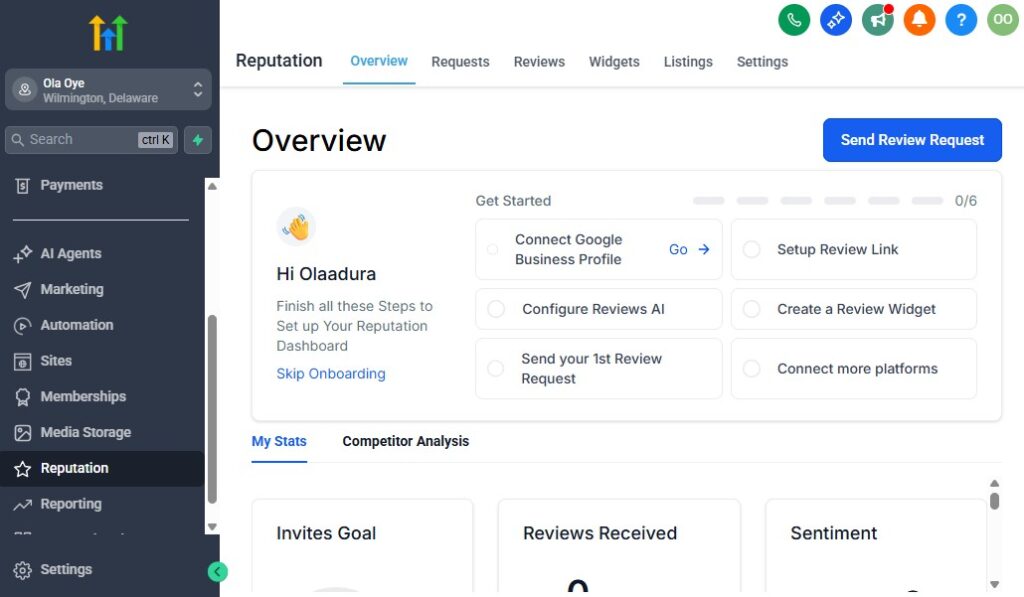
In healthcare, trust is everything.
Before a patient books an appointment, they check one thing first:
👉 Your reviews
With GoHighLevel, you can turn happy patients into consistent, high-quality reviews – automatically
Why Reviews Matter More Than You Think
Let’s be practical.
When someone searches:
“Doctor near me”
“Dentist in my area”
They compare:
- Ratings (4.8 vs 3.9 ⭐)
- Number of reviews
- Recent feedback
👉 And they choose the one they trust most.
The Real Problem Most Clinics Have
- Patients are happy… but don’t leave reviews
- Staff forget to ask
- No system to follow up
- Negative reviews go unanswered
👉 Result: weak online reputation
1. Automate Review Requests (The Game Changer)
This is the easiest win.
What You Should Set Up
Trigger: Appointment marked as completed
Automation:
- Send SMS with review link
- Send follow-up if no response
Example SMS
“Hi John, thanks for visiting us today. We’d love your feedback: [Google Review Link]”
👉 You consistently collect reviews without asking manually.
2. Ask at the Right Time
Timing is everything.
Best Moment to Ask
- Immediately after a successful visit
- When the patient is satisfied
👉 That’s when they’re most likely to leave a positive review.
3. Filter Feedback Before Going Public (Smart Strategy)
You don’t want negative reviews going straight online.
What You Can Do
- First ask: “How was your experience?”
- If positive → send review link
- If negative → ask for private feedback
👉 This protects your reputation.
4. Respond to Every Review (Very Important)
Most clinics ignore this.
Don’t.
Why It Matters
- Shows professionalism
- Builds trust
- Improves your online presence
Example Response
“Thank you for your kind words, John. We’re glad you had a great experience.”
👉 Simple responses go a long way.
5. Use Reviews as Marketing Assets
Don’t just collect reviews – use them.
Where to Display Them
- Landing pages
- Booking pages
- Ads
- Website
👉 Social proof increases conversions.
6. Build a Consistent Review System
Don’t rely on random reviews.
Your System Should Be:
- Automated
- Consistent
- Ongoing
👉 This helps you:
- Grow reviews every week
- Stay ahead of competitors
- Build long-term trust
7. Handle Negative Reviews Properly
They will happen.
What matters is how you respond.
What You Should Do
- Stay calm and professional
- Acknowledge the issue
- Offer to resolve offline
Example
“We’re sorry to hear about your experience. Please contact us so we can make it right.”
👉 This shows you care.
8. Track Your Reputation Performance
You need to measure growth.
Track:
- Number of reviews
- Average rating
- Review frequency
👉 This helps you improve over time.
What This Looks Like in Real Life
Here’s your system working:
- Patient completes visit
- Gets review request automatically
- Leaves review
- You respond
- Review appears on your profile
- New patients see it and trust you
👉 This cycle repeats continuously.
Bottom Line
When you manage your reputation properly:
- You attract more patients
- You build trust instantly
- You stand out from competitors
- You grow your practice faster
Reporting & Analytics for Healthcare Practices
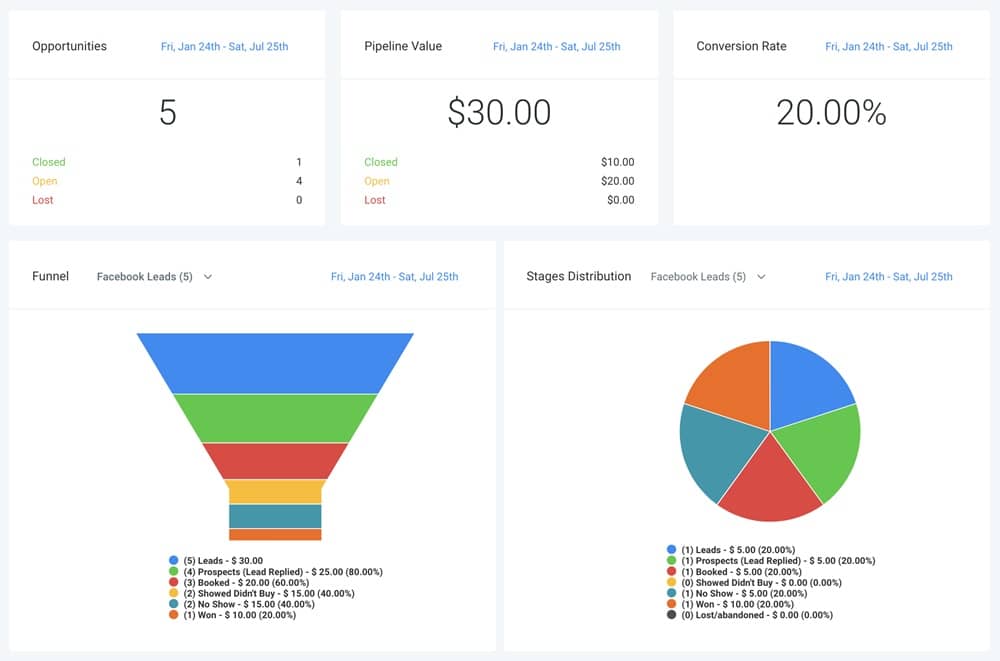
At this point, you’ve built a system that captures leads, books appointments, follows up, and collects reviews.
Now comes the part most clinics ignore…
👉 Tracking what’s actually working
With GoHighLevel, you don’t have to guess.
You can see exactly where your patients are coming from, how they convert, and how much revenue you’re generating
Why Reporting Matters in Your Practice
If you’re not tracking data:
- You don’t know which marketing is working
- You don’t know why appointments are dropping
- You can’t improve your system
👉 You’re operating blindly.
With proper analytics:
👉 You make decisions based on real numbers – not assumptions
1. Track Your Patient Acquisition (Where Patients Come From)
This is the first thing you should monitor.
What to Track:
- Website leads
- Facebook ads
- Google ads
- Referrals
Example
You discover:
- Facebook ads → 20 bookings/month
- Website → 5 bookings/month
👉 You now know where to focus your budget.
2. Monitor Your Conversion Rates
Getting leads is not enough.
👉 You need to know how many actually book.
Track This:
- Number of leads
- Number of booked appointments
Example
- 50 leads → 20 bookings = 40% conversion
👉 If this drops, something is wrong (slow response, poor offer, etc.)
3. Track Appointment Performance
This directly affects your revenue.
What to Monitor:
- Total appointments booked
- Completed appointments
- Missed appointments (no-shows)
Example Insight
- 30 bookings
- 10 no-shows
👉 You need stronger reminders or follow-ups.
4. Measure Revenue & Patient Value
You should know how much each patient is worth.
Track:
- Revenue per patient
- Total monthly revenue
- Repeat visits
Example
- One patient = $50,000 over time
👉 Now you understand the value of each lead.
5. Track Campaign Performance (SMS & Email)
Not all messages perform the same.
Monitor:
- Open rates (especially SMS)
- Response rates
- Click rates
Example
- Reminder SMS → high response
- Promotional email → low engagement
👉 Focus more on what works.
6. Monitor Your Funnel Performance
Your funnel should convert visitors into patients.
Track:
- Page visits
- Form submissions
- Booking rate
Example
- 100 visitors → 10 bookings
👉 Improve your landing page to increase conversions.
7. Track Reputation Growth
Your reviews are part of your growth.
Monitor:
- Number of new reviews
- Average rating
- Review frequency
👉 This helps you stay competitive.
8. Use Dashboards for Quick Insights
Instead of checking everything manually…
👉 Use GoHighLevel dashboards.
You can see:
- Leads generated
- Appointments booked
- Revenue trends
- Campaign performance
👉 Everything in one place.
9. Make Data-Driven Decisions
This is where everything pays off.
Instead of guessing:
- You scale what works
- You fix what’s broken
- You optimize your system
Example
- Ads working → increase budget
- High no-shows → improve reminders
- Low conversion → improve landing page
👉 This is how you grow consistently.
What This Looks Like in Real Life
Here’s your system in action:
- You run ads
- Leads come in
- Some book, some don’t
- You track everything
- You improve weak areas
- You increase bookings
👉 Growth becomes predictable.
Bottom Line
When you use reporting and analytics properly:
- You understand your business clearly
- You make smarter decisions
- You increase efficiency
- You grow your practice faster
Integrating GoHighLevel With Healthcare Tools & Platforms
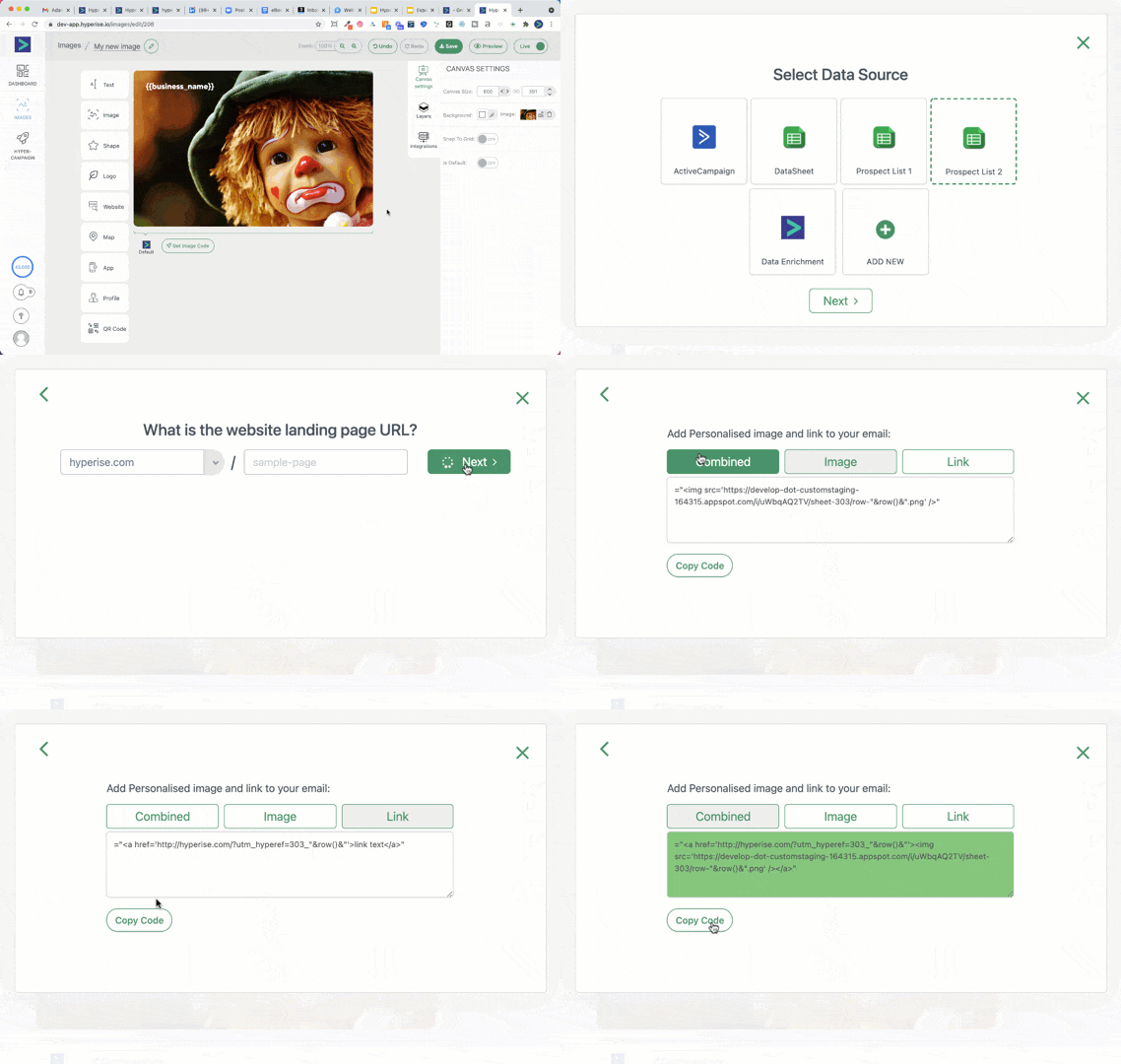
By now, you’ve built a solid system.
But here’s the reality:
👉 You probably already use other tools in your practice.
- EHR/EMR systems
- Billing or insurance software
- E-signature tools
- Accounting platforms
The goal is not to replace everything.
👉 The goal is to connect everything into one smooth workflow
That’s exactly what you can do with GoHighLevel
Why Integration Matters for Your Practice
Without integration:
- You enter the same patient data multiple times
- Systems don’t communicate
- Staff waste time switching tools
- Errors increase
With integration:
👉 Everything flows automatically between systems
1. Connect Your Forms & Patient Intake System
When a patient fills a form, that data should go everywhere it’s needed.
What You Should Do
- Use GoHighLevel forms or connect external forms
- Automatically send data into your CRM
- Trigger workflows instantly
Example
- Patient fills intake form
- Data goes into CRM
- Appointment booking link sent
- Staff notified
👉 No manual data entry.
2. Integrate With EHR/EMR Systems
Most healthcare practices already use an Electronic Health Record system.
How to Approach This
GoHighLevel is not a full medical record system.
👉 So you use it alongside your EHR.
What You Can Sync
- Patient contact details
- Appointment data
- Basic notes (non-sensitive if needed)
Important Note
Keep detailed medical records inside your EHR system.
👉 Use GoHighLevel for:
- Communication
- Automation
- Marketing
3. Connect Payment & Billing Systems
You want a smooth payment experience.
Integrations You Can Use
- Payment gateways (for consultations, deposits)
- Invoicing systems
- Subscription or package billing
Example Workflow
- Patient books appointment
- Pays deposit online
- Confirmation sent automatically
👉 Faster payments, fewer cancellations.
4. Integrate E-Signature Tools
Healthcare often requires forms:
- Consent forms
- Agreements
- Treatment approvals
What You Can Do
- Send documents automatically
- Collect signatures before appointments
- Store signed files in patient records
👉 This saves time at the front desk.
5. Connect Communication Channels
Your patients communicate in different ways.
You can integrate:
- SMS
- WhatsApp (if configured)
👉 All conversations appear in one inbox.
6. Use Automation Tools for Advanced Workflows
If you want deeper integrations:
Use tools like:
- Zap-based connectors
- API integrations
Example Automation
- New patient in GoHighLevel
→ Create record in your EHR
→ Notify staff
→ Send welcome message
👉 Everything happens automatically.
7. Keep Your Data Clean and Organized
Integration is powerful – but only if managed properly.
Best Practices
- Avoid duplicate data
- Use consistent naming
- Sync only necessary information
👉 This keeps your system efficient.
8. Focus on Workflow, Not Tools
Don’t integrate everything just because you can.
Ask Yourself:
- Does this save time?
- Does this improve patient experience?
- Does this reduce manual work?
👉 If yes, integrate it. If not, skip it.
What This Looks Like in Real Life
Here’s a connected system:
- Patient fills form → enters CRM
- Books appointment → synced with calendar
- Pays online → recorded instantly
- Receives reminders → automated
- Data shared with EHR → ready for consultation
👉 Everything works together smoothly.
Bottom Line
When you integrate GoHighLevel with your healthcare tools:
- You eliminate manual work
- You reduce errors
- You improve efficiency
- You deliver a better patient experience
Learn More:
- GoHighLevel Review: (My Experience After 4 Years)
- What is GoHighLevel? [A User Experience]
- GoHighLevel Features: Complete List
- GoHighLevel Integrations
- GoHighLevel Pricing: (Costs Breakdown)
- Is GoHighLevel a CRM?: (Find Out Here💡)
- Is GoHighLevel Legit?: (Find Out Here 💡)
- Is GoHighLevel Worth It? (Find Out Here 💡)
- 15+ GoHighLevel Benefits: (Why You Need It)
Frequently Asked Questions
FAQs about GoHighLevel for Healthcare Professionals.
Is GoHighLevel suitable for healthcare practices?
Yes – GoHighLevel works very well for healthcare professionals.
You can use it to:
- Manage patient inquiries and contacts
- Automate appointment booking and reminders
- Send follow-ups via SMS and email
- Collect reviews and improve your reputation
👉 It’s especially useful for clinics, dentists, therapists, and private practices.
Is GoHighLevel HIPAA compliant?
Not by default.
- You must enable the HIPAA add-on
- You must configure it properly
👉 Once set up correctly, you can safely use it for patient communication and CRM management.
Can I manage appointments and scheduling with GoHighLevel?
Yes.
You can:
- Create booking calendars
- Allow patients to schedule online
- Send automated reminders
- Reschedule easily
👉 This helps reduce no-shows and keeps your schedule organized.
Can GoHighLevel replace my EHR or medical record system?
No.
GoHighLevel is not a full EHR/EMR system.
👉 You should use it alongside your existing system.
Use GoHighLevel for:
- Communication
- Automation
- Marketing
- Patient follow-ups
Keep medical records inside your EHR.
How does GoHighLevel help me get more patients?
It helps you build a system like this:
- Run ads or share your link
- Capture patient details with a form
- Send instant responses
- Allow online booking
👉 This increases your chances of converting leads into patients.
Can I send SMS and email reminders automatically?
Yes – and this is one of the most powerful features.
You can automate:
- Appointment reminders
- Follow-ups
- Review requests
- Re-engagement messages
👉 This saves time and improves patient experience.
Is GoHighLevel difficult to set up?
Not really.
If you follow a simple structure:
- Set up your CRM pipeline
- Create your calendar
- Add basic automations
👉 You can get a working system in a few hours.
Can I use GoHighLevel for multiple healthcare locations?
Yes.
You can:
- Manage multiple clinics
- Separate patient data by location
- Track performance individually
👉 This is ideal if you run more than one practice.
Does GoHighLevel help with patient retention?
Yes.
You can automate:
- Follow-up messages
- Recall campaigns
- Check-in reminders
👉 This keeps patients coming back consistently.
Is GoHighLevel worth it for healthcare professionals?
If you want to:
- Reduce missed appointments
- Automate communication
- Get more patients
- Save time
👉 Then yes – it’s absolutely worth it.
Bottom Line
GoHighLevel gives you a complete system to manage, communicate, and grow your healthcare practice
Final Thoughts
If you step back and look at everything you’ve built…
You’re no longer just running a healthcare practice.
👉 You’re running a system
With GoHighLevel, you’ve turned:
- Patient inquiries → into booked appointments
- Appointments → into completed visits
- Visits → into repeat patients
- Happy patients → into reviews and referrals
And the best part?
👉 Most of it runs automatically
What This Means for You
When you implement everything in this guide:
- You reduce missed appointments
- You respond faster to new patients
- You stay organized without stress
- You improve patient experience
- You increase revenue consistently
Keep This in Mind
You don’t need to set up everything at once.
Start simple:
- Set up your CRM pipeline
- Add your calendar
- Create basic automations (reminders + follow-ups)
Then gradually expand into:
- Funnels
- Campaigns
- Advanced automation
👉 This is how you build a system that actually works.
Your Competitive Advantage
Most healthcare practices are still:
- Doing manual follow-ups
- Missing leads
- Using disconnected tools
When you use GoHighLevel properly:
👉 You operate faster, smarter, and more efficiently than your competitors.
Final Recommendation
If you’re serious about:
- Growing your practice
- Saving time
- Delivering a better patient experience
Then GoHighLevel is not just another tool…
👉 It’s the system that powers your entire operation
Ready to Get Started?
You can start setting this up today and begin seeing results quickly.
👉 Capture more patients
👉 Automate your workflow
👉 Grow your healthcare practice consistently
Bottom Line
If you implement what you’ve learned here…
👉 You won’t just manage your practice better
👉 You’ll scale it with confidence
